# 3D volume from Tomo Set
**URL:** https://discourse.slicer.org/t/3d-volume-from-tomo-set/45070
**Category:** Support
**Created:** [November 13, 2025, 7:45pm UTC](https://discourse.slicer.org/t/3d-volume-from-tomo-set/45070 "2025-11-13T19:45:26Z")
**Posts on this page:** 14
**Page:** 1
### Author:  [@jmac](https://discourse.slicer.org/u/jmac)
#### Post date: [November 13, 2025, 7:45pm UTC](https://discourse.slicer.org/t/3d-volume-from-tomo-set/45070/1 "2025-11-13T19:45:26Z")
New to slicer via recommendation from colleague. Very nice tool.
Trying to see a 3D volume of mouse from a tomosynthesis dataset (height stack of 24 slices). I know its not going to be a perfect 3D dataset but just want to see it anyway.
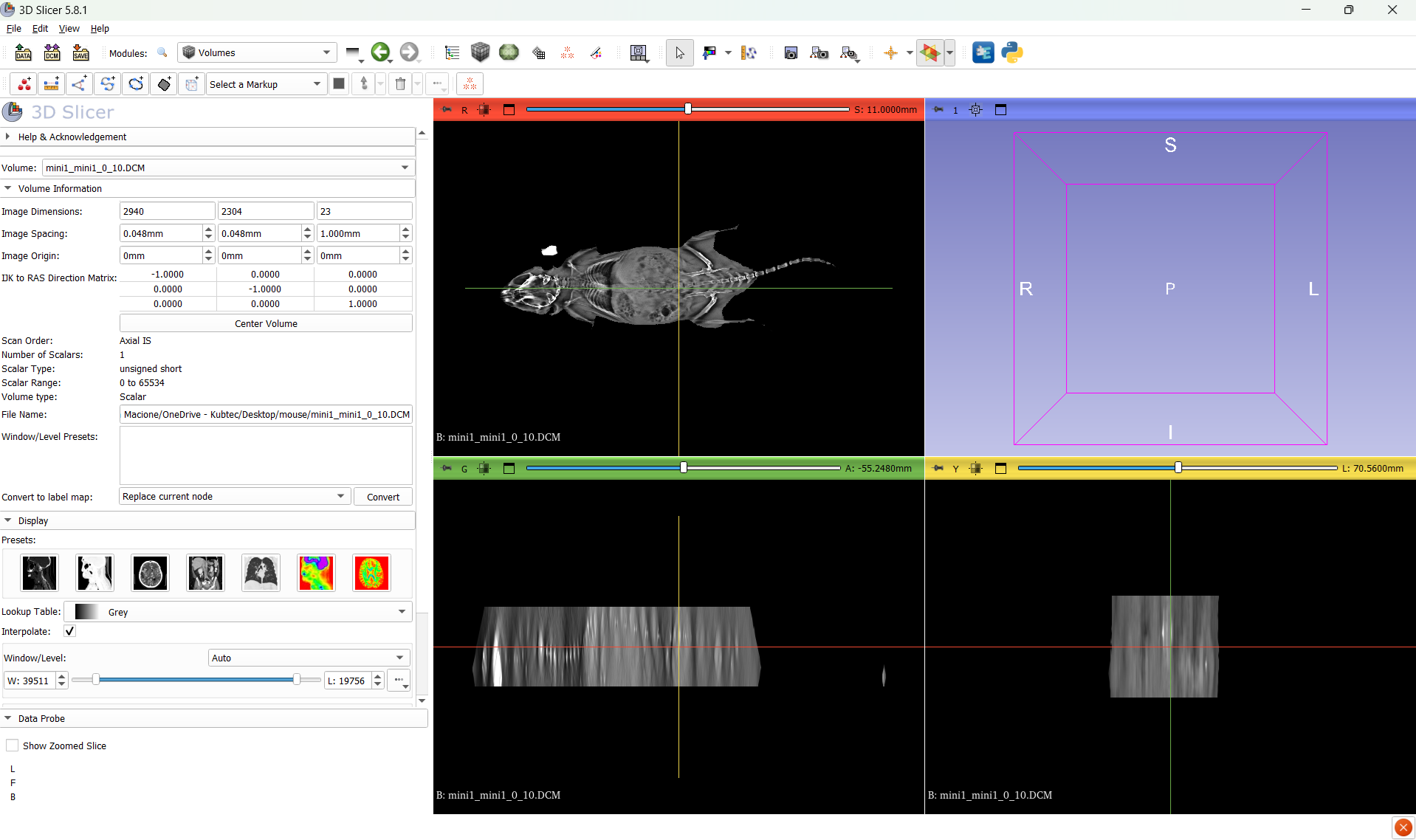
I can see the 3 independant views but not the 3D volume view.
Can someone help figure out why it is not loading.
I uploaded dataset here
> **[Download mouse.zip | LimeWire](https://limewire.com/d/Bd3N4?lmwr-ftv=1)**
>
> Download mouse.zip on LimeWire
here is a screen shot. I would assume the volume would show up on the box in the top right corner.
---
### Author:  [@pieper](https://discourse.slicer.org/u/pieper)
#### Post date: [November 13, 2025, 7:47pm UTC](https://discourse.slicer.org/t/3d-volume-from-tomo-set/45070/2 "2025-11-13T19:47:21Z")
You can try RTK: [https://www.openrtk.org/](https://www.openrtk.org/)
---
### Author:  [@lassoan](https://discourse.slicer.org/u/lassoan)
#### Post date: [November 13, 2025, 7:53pm UTC](https://discourse.slicer.org/t/3d-volume-from-tomo-set/45070/3 "2025-11-13T19:53:10Z")
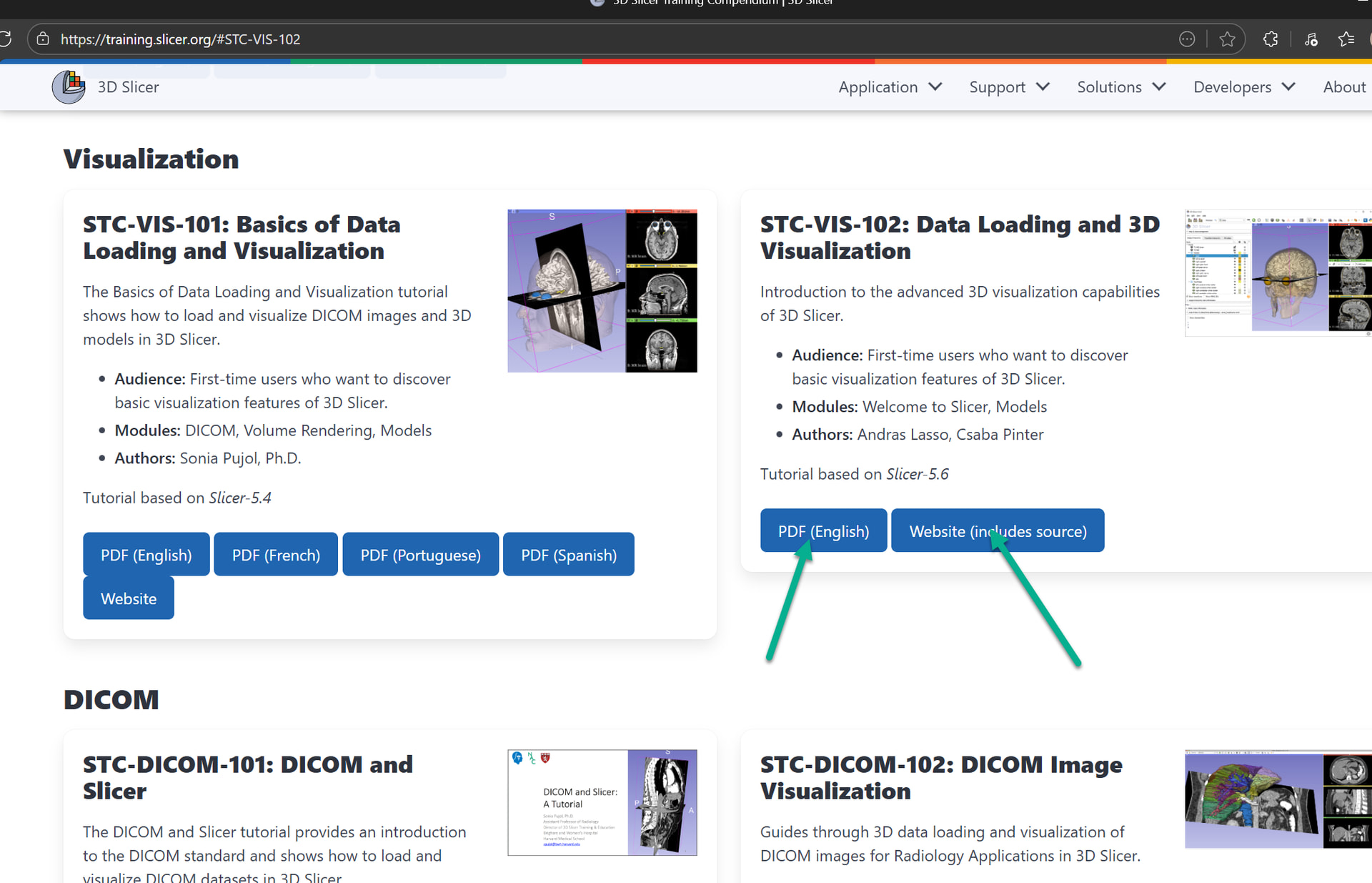
If it is a “height stack” then you can display it in 3D using volume rendering (go to Data module and drag-and-drop the image to the 3D view). You can find more information on basic visualization options in the [STC-VIS-102 visualization tutorial](https://training.slicer.org/#STC-VIS-102).
If you have a sinogram (projection from different directions) then you need to reconstruct it first into a Cartesian image as @pieper described above. I could not check what kind of images you have because the link did not work for me (limewire reported “Incomplete or wrong Download URL.”).
---
### Author:  [@muratmaga](https://discourse.slicer.org/u/muratmaga)
#### Post date: [November 14, 2025, 2:53am UTC](https://discourse.slicer.org/t/3d-volume-from-tomo-set/45070/4 "2025-11-14T02:53:47Z")
> [@jmac](#):
>
> I can see the 3 independant views but not the 3D volume view.
Go to data module, and than drag the `mini_mini` object onto the 3D viewer. It will render but it will be pretty bad. You have two orders of magnitude difference in the resolution between your XY and Z planes.
---
### Author:  [@jmac](https://discourse.slicer.org/u/jmac)
#### Post date: [December 10, 2025, 8:35pm UTC](https://discourse.slicer.org/t/3d-volume-from-tomo-set/45070/5 "2025-12-10T20:35:42Z")
hi Andras. I am trying to reference the link STC-VIS 102 but keep getting error messages
---
### Author:  [@jmac](https://discourse.slicer.org/u/jmac)
#### Post date: [December 10, 2025, 8:55pm UTC](https://discourse.slicer.org/t/3d-volume-from-tomo-set/45070/6 "2025-12-10T20:55:32Z")
sometimes good enough is all the application needs and that is the goal here
bigger challenge is limited angular range too but just need to get some detail but not going for perfect.
I believe we just have to scale it in slicer → volume→ volume information tab: 0.048,0.048,1
Question.. I cant seem to figure out how to drag “minimini” object into the 3D volume
is this correct ?

this in in matlab, its all i need but the 3D is crashing unless i upgrade matlab again and really hoping for someting more powerful anyway

---
### Author:  [@muratmaga](https://discourse.slicer.org/u/muratmaga)
#### Post date: [December 10, 2025, 9:08pm UTC](https://discourse.slicer.org/t/3d-volume-from-tomo-set/45070/7 "2025-12-10T21:08:28Z")
> [@jmac](#):
>
> is this correct ?
Yes, but you need to center the field of view (+ sign in the top bar) in the 3d view and probably zoom in a bit. See this for explanation of things in the 3D view:
> **[Ctrl - User Interface — 3D Slicer documentation](https://slicer.readthedocs.io/en/latest/user_guide/user_interface.html#d-view)**
---
### Author:  [@lassoan](https://discourse.slicer.org/u/lassoan)
#### Post date: [December 10, 2025, 9:29pm UTC](https://discourse.slicer.org/t/3d-volume-from-tomo-set/45070/8 "2025-12-10T21:29:44Z")
> [@jmac](#):
>
> I am trying to reference the link STC-VIS 102 but keep getting error messages
What error messages are you getting? Where?
The link to download the slides or access the website work well for me.
---
### Author:  [@jmac](https://discourse.slicer.org/u/jmac)
#### Post date: [December 11, 2025, 5:45pm UTC](https://discourse.slicer.org/t/3d-volume-from-tomo-set/45070/9 "2025-12-11T17:45:36Z")
Sorry, Im not sure what i clicked, it might have been the STC-VIS-101 or otherwise 102
The 102 is working when i just clinked on it, but if i click on 101 (PDF English) I get the error shown below (atleats now). Maybe that was the one I clicked?
note i figured it was a better place to start out
I do appreciate the literature you have made and am thankful to use it it

---
### Author:  [@jmac](https://discourse.slicer.org/u/jmac)
#### Post date: [December 11, 2025, 6:21pm UTC](https://discourse.slicer.org/t/3d-volume-from-tomo-set/45070/10 "2025-12-11T18:21:20Z")
does anyone have a CT dataset I can use to try to learn to use slicer with? I think doing something with tomo is not ideal and really need to see normal behavior with a CT dataset first.
for the tomo, we are trying to just get data that is good enough to decide basic properties such as delineation of boundaries of the skin in the height axis, not trying to complete with MRI or CT
---
### Author:  [@pieper](https://discourse.slicer.org/u/pieper)
#### Post date: [December 11, 2025, 6:31pm UTC](https://discourse.slicer.org/t/3d-volume-from-tomo-set/45070/11 "2025-12-11T18:31:57Z")
There are several CT datasets in the SampleData module.
From the pictures you shared it looks like you may not have reconstructed the volume on your scanner. Slicer doesn’t work with the raw projection images. As I mentioned above you may be able to use rtk, but using the scanner itself is usually easiest and best.
---
### Author:  [@jmac](https://discourse.slicer.org/u/jmac)
#### Post date: [December 11, 2025, 6:38pm UTC](https://discourse.slicer.org/t/3d-volume-from-tomo-set/45070/12 "2025-12-11T18:38:48Z")
thank you I will look at RTK
However, this is the reconstructed dataset and you can sort through the height stack to see it is properly made. Otherwise you would see angular effects from each projection.
---
### Author:  [@jmac](https://discourse.slicer.org/u/jmac)
#### Post date: [December 11, 2025, 6:41pm UTC](https://discourse.slicer.org/t/3d-volume-from-tomo-set/45070/13 "2025-12-11T18:41:04Z")
this is the dataset, reuploaded
> **[Download mouse | LimeWire](https://limewire.com/d/HAxId?lmwr-ftv=1)**
>
> Download mouse on LimeWire
---
### Author:  [@pieper](https://discourse.slicer.org/u/pieper)
#### Post date: [December 11, 2025, 8:30pm UTC](https://discourse.slicer.org/t/3d-volume-from-tomo-set/45070/14 "2025-12-11T20:30:07Z")
Okay, I see, it’s just a little slab. These aren’t valid dicom, so I loaded them as an image stack and changed the spacing to be isotropic (made the slice spacing 0.048. You just don’t have the full specimen in the scan.
