# BoneReconstructionPlanner not generating bone models/cutting guides
**URL:** https://discourse.slicer.org/t/bonereconstructionplanner-not-generating-bone-models-cutting-guides/27188
**Category:** Support
**Tags:** 3d-printing, surgical-planning, extensions
**Created:** [January 11, 2023, 1:12pm UTC](https://discourse.slicer.org/t/bonereconstructionplanner-not-generating-bone-models-cutting-guides/27188 "2023-01-11T13:12:10Z")
**Posts on this page:** 19
**Page:** 1
### Author:  [@R\_Nara](https://discourse.slicer.org/u/R_Nara)
#### Post date: [January 11, 2023, 1:12pm UTC](https://discourse.slicer.org/t/bonereconstructionplanner-not-generating-bone-models-cutting-guides/27188/1 "2023-01-11T13:12:10Z")
Dear Sir,
I’m trying to plan a case of mandibular reconstruction using BoneReconstructionPlanner, but i’m stuck at one step, “create bone models from segmentations” doesn’t do anything and returns empty bone models, hence i’m not able to perform any steps beyond this point.(like centering fibula line, automatic mandibular cutting plane positioning, fibula surgical guide generation etc.)
Please guide me and help me in resolving this issue
Regards
---
### Author:  [@mau\_igna\_06](https://discourse.slicer.org/u/mau_igna_06)
#### Post date: [January 11, 2023, 2:20pm UTC](https://discourse.slicer.org/t/bonereconstructionplanner-not-generating-bone-models-cutting-guides/27188/2 "2023-01-11T14:20:16Z")
Hi. I just installed BoneReconstructionPlanner and executed its automatic tests and they worked successfully on both [the stable and preview release](https://download.slicer.org/) of Slicer.
It should look like this video:
[ ](https://www.youtube.com/watch?v=HRciwWEOAKk)
Although it may take around 10 minutes for you because Slicer will be downloading the test data (around 500MB) for the first time (after that it is cached).
To be able to execute the tests you need to enable developer mode on Slicer:
```auto
Edit -> Application Settings -> Developer -> Enable developer mode
```
Then restart Slicer. After that you should be able to execute the BoneReconstructionPlanner automatic tests. You should see the same GUI that appears on the video.
Please let me know if you have more questions
---
### Author:  [@R\_Nara](https://discourse.slicer.org/u/R_Nara)
#### Post date: [January 12, 2023, 9:08am UTC](https://discourse.slicer.org/t/bonereconstructionplanner-not-generating-bone-models-cutting-guides/27188/3 "2023-01-12T09:08:42Z")
thanks for the prompt response
i’m getting error on running the test, here are the details
Traceback (most recent call last):
File “C:\Users\Admin\AppData\Local\NA-MIC\Slicer 5.2.1\bin\Python\slicer\util.py”, line 2961, in tryWithErrorDisplay
yield
File “C:\Users\Admin\AppData\Local\NA-MIC\Slicer 5.2.1\bin\Python\slicer\ScriptedLoadableModule.py”, line 224, in onReloadAndTest
test(msec=int(slicer.app.userSettings().value(“Developer/SelfTestDisplayMessageDelay”)), \*\*kwargs)
File “C:\Users\Admin\AppData\Local\NA-MIC\Slicer 5.2.1\bin\Python\slicer\ScriptedLoadableModule.py”, line 86, in runTest
testCase.runTest(\*\*kwargs)
File “C:/Users/Admin/AppData/Local/NA-MIC/Slicer 5.2.1/NA-MIC/Extensions-31317/BoneReconstructionPlanner/lib/Slicer-5.2/qt-scripted-modules/BoneReconstructionPlanner.py”, line 3656, in runTest
self.section\_MakeModels()
File “C:/Users/Admin/AppData/Local/NA-MIC/Slicer 5.2.1/NA-MIC/Extensions-31317/BoneReconstructionPlanner/lib/Slicer-5.2/qt-scripted-modules/BoneReconstructionPlanner.py”, line 3803, in section\_MakeModels
self.assertEqual(decimatedFibulaModelNode.GetMesh().GetNumberOfPoints(), 9872)
File “C:\Users\Admin\AppData\Local\NA-MIC\Slicer 5.2.1\lib\Python\Lib\unittest\case.py”, line 837, in assertEqual
assertion\_func(first, second, msg=msg)
File “C:\Users\Admin\AppData\Local\NA-MIC\Slicer 5.2.1\lib\Python\Lib\unittest\case.py”, line 830, in \_baseAssertEqual
raise self.failureException(msg)
AssertionError: 9871 != 9872
how should I proceed?
---
### Author:  [@mau\_igna\_06](https://discourse.slicer.org/u/mau_igna_06)
#### Post date: [January 12, 2023, 9:04pm UTC](https://discourse.slicer.org/t/bonereconstructionplanner-not-generating-bone-models-cutting-guides/27188/4 "2023-01-12T21:04:41Z")
Hi
Ok, so the test is not so robust as it’s needed and fails:
```auto
self.assertEqual(decimatedFibulaModelNode.GetMesh().GetNumberOfPoints(), 9872)
```
returns:
```auto
AssertionError: 9871 != 9872
```
The difference is 1.
This maybe due to vtk implementation differences on Windows (where you executed the tests) and Ubuntu (where I coded the tests and they were successful)
@lassoan do you have any quick fix suggestion?
---
### Author:  [@lassoan](https://discourse.slicer.org/u/lassoan)
#### Post date: [January 12, 2023, 9:36pm UTC](https://discourse.slicer.org/t/bonereconstructionplanner-not-generating-bone-models-cutting-guides/27188/5 "2023-01-12T21:36:10Z")
Result of floating-point operations depend on many things - compiler options, hardware, operating systems, etc. Therefore results of any image or mesh processing operations is often slightly different on each system.
There are special compilation options that could be used to get consistent computation results, but the generated code is very slow, therefore these are rarely used in practice.
A simple solution is to specify tolerances for your tests to allow some small numerical differences.
---
### Author:  [@R\_Nara](https://discourse.slicer.org/u/R_Nara)
#### Post date: [January 13, 2023, 1:32am UTC](https://discourse.slicer.org/t/bonereconstructionplanner-not-generating-bone-models-cutting-guides/27188/6 "2023-01-13T01:32:07Z")
This is the place where I’m stuck as well… nothing works after “generate bone models step”
---
### Author:  [@mau\_igna\_06](https://discourse.slicer.org/u/mau_igna_06)
#### Post date: [January 13, 2023, 1:20pm UTC](https://discourse.slicer.org/t/bonereconstructionplanner-not-generating-bone-models-cutting-guides/27188/7 "2023-01-13T13:20:52Z")
@R_Nara I’ll solve this during the weekend
Thank you for your patience
---
### Author:  [@R\_Nara](https://discourse.slicer.org/u/R_Nara)
#### Post date: [January 13, 2023, 3:36pm UTC](https://discourse.slicer.org/t/bonereconstructionplanner-not-generating-bone-models-cutting-guides/27188/8 "2023-01-13T15:36:00Z")
Thanks @mau_igna_06
i found a workaround for now… i’ve installed Ubuntu VM and running slicer on it now… i’m able to run the test successfully…
I started from scratch on this VM. But I still can’t go past “create models from segmentations” using my data… models turn out to be empty
will it be possible for you to have a look at this project file please
> **[2023-01-13-Scene.mrb](https://drive.google.com/file/d/1cFKuPOnmNZhxsKXPJE3DIRjbV6kW7vrZ/view?usp=sharing)**
>
> Google Drive file.
Regards
---
### Author:  [@R\_Nara](https://discourse.slicer.org/u/R_Nara)
#### Post date: [January 13, 2023, 3:44pm UTC](https://discourse.slicer.org/t/bonereconstructionplanner-not-generating-bone-models-cutting-guides/27188/9 "2023-01-13T15:44:54Z")
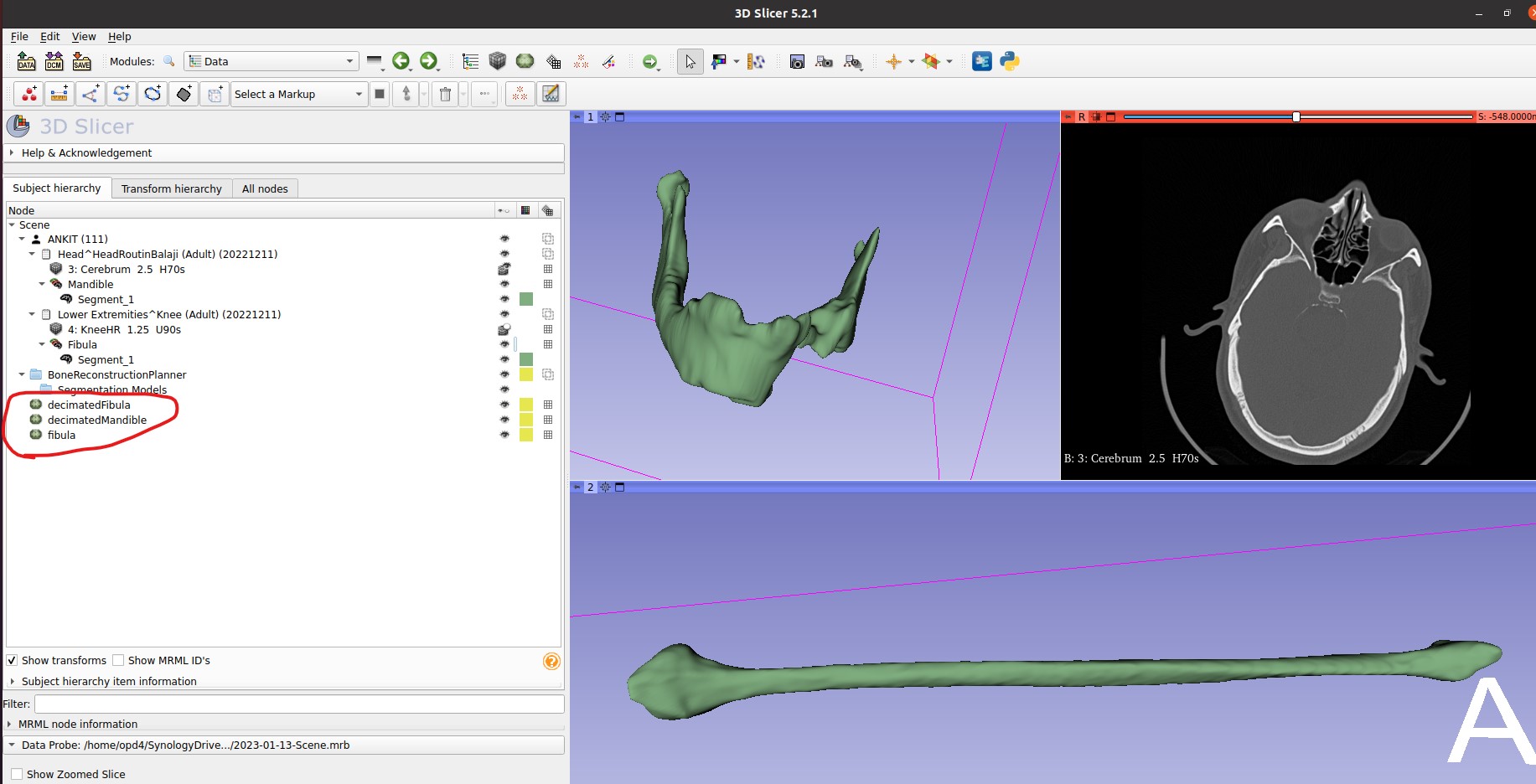
i get decimated fibula, decimated mandible, and then it stops at fibula… all models are blank, if i hide segments, the 3D view is blank

---
### Author:  [@mau\_igna\_06](https://discourse.slicer.org/u/mau_igna_06)
#### Post date: [January 13, 2023, 4:03pm UTC](https://discourse.slicer.org/t/bonereconstructionplanner-not-generating-bone-models-cutting-guides/27188/10 "2023-01-13T16:03:42Z")
Probably there was an error. Please open the python interactor and copy the error message and paste it here. I’ll help then.
Here is a [keyboard-shortcut](https://slicer.readthedocs.io/en/latest/user_guide/user_interface.html#mouse-keyboard-shortcuts) on how to open the python console
---
### Author:  [@R\_Nara](https://discourse.slicer.org/u/R_Nara)
#### Post date: [January 13, 2023, 4:30pm UTC](https://discourse.slicer.org/t/bonereconstructionplanner-not-generating-bone-models-cutting-guides/27188/11 "2023-01-13T16:30:57Z")
here it is
Python 3.9.10 (main, Nov 24 2022, 08:11:57)
[GCC 7.3.1 20180303 (Red Hat 7.3.1-5)] on linux2
> > >
[Qt] QLayout::addChildLayout: layout “” already has a parent
[Qt] ctkSliderWidget::setSingleStep() 0 is out of bounds. 0 100 1
[Qt] QString qSlicerSegmentEditorAbstractEffect::parameter(QString) : Parameter named “regionSegmentID” cannot be found for effect “Wrap Solidify”
[Qt] ctkSliderWidget::setSingleStep() 0 is out of bounds. 0 100 1
Traceback (most recent call last):
File “/home/opd4/Downloads/Slicer-5.2.1-linux-amd64/NA-MIC/Extensions-31317/BoneReconstructionPlanner/lib/Slicer-5.2/qt-scripted-modules/BoneReconstructionPlanner.py”, line 261, in setup
self.initializeParameterNode()
File “/home/opd4/Downloads/Slicer-5.2.1-linux-amd64/NA-MIC/Extensions-31317/BoneReconstructionPlanner/lib/Slicer-5.2/qt-scripted-modules/BoneReconstructionPlanner.py”, line 379, in initializeParameterNode
self.setParameterNode(self.logic.getParameterNode())
File “/home/opd4/Downloads/Slicer-5.2.1-linux-amd64/NA-MIC/Extensions-31317/BoneReconstructionPlanner/lib/Slicer-5.2/qt-scripted-modules/BoneReconstructionPlanner.py”, line 400, in setParameterNode
self.updateGUIFromParameterNode()
File “/home/opd4/Downloads/Slicer-5.2.1-linux-amd64/NA-MIC/Extensions-31317/BoneReconstructionPlanner/lib/Slicer-5.2/qt-scripted-modules/BoneReconstructionPlanner.py”, line 426, in updateGUIFromParameterNode
scalarVolumeID = self.\_parameterNode.GetNodeReference(“currentScalarVolume”).GetID()
AttributeError: ‘NoneType’ object has no attribute ‘GetID’
[VTK] Warning: In /work/Stable/Slicer-0/Libs/MRML/Core/vtkMRMLSubjectHierarchyNode.cxx, line 2839
[VTK] vtkMRMLSubjectHierarchyNode (0x433cb20): GetItemChildren: Invalid item ID given
[VTK] Warning: In /work/Stable/Slicer-0/Libs/MRML/Core/vtkMRMLSubjectHierarchyNode.cxx, line 2839
[VTK] vtkMRMLSubjectHierarchyNode (0x433cb20): GetItemChildren: Invalid item ID given
Traceback (most recent call last):
File “/home/opd4/Downloads/Slicer-5.2.1-linux-amd64/NA-MIC/Extensions-31317/BoneReconstructionPlanner/lib/Slicer-5.2/qt-scripted-modules/BoneReconstructionPlanner.py”, line 620, in onMakeModelsButton
self.logic.makeModels()
File “/home/opd4/Downloads/Slicer-5.2.1-linux-amd64/NA-MIC/Extensions-31317/BoneReconstructionPlanner/lib/Slicer-5.2/qt-scripted-modules/BoneReconstructionPlanner.py”, line 2299, in makeModels
seg.GetSegmentation().CreateRepresentation(slicer.vtkSegmentationConverter.GetSegmentationClosedSurfaceRepresentationName())
AttributeError: ‘NoneType’ object has no attribute ‘GetSegmentation’
---
### Author:  [@mau\_igna\_06](https://discourse.slicer.org/u/mau_igna_06)
#### Post date: [January 13, 2023, 5:41pm UTC](https://discourse.slicer.org/t/bonereconstructionplanner-not-generating-bone-models-cutting-guides/27188/12 "2023-01-13T17:41:22Z")
> [@R\_Nara](#):
>
> here it is
Thank you. There was a bug and [I fixed it](https://github.com/SlicerIGT/SlicerBoneReconstructionPlanner/commit/b4c167c723360dcd0dc32ed8cabae836053474da)
I loaded to Slicer only the CT volumes and the two segmentations from your scene and I could do Virtual Surgical Planning in both Slicer Preview and Stable release with the updated code. Also the automatic tests executed successfully.
The new BRP code will be available tomorrow as an extension update on Stable release or as an extension install on the Preview version of tomorrow. You can also download the code by yourself and add the module path to Slicer settings to start using it today but you first need to uninstall BRP from the extensions manager to avoid conflicts
---
### Author:  [@R\_Nara](https://discourse.slicer.org/u/R_Nara)
#### Post date: [January 13, 2023, 6:10pm UTC](https://discourse.slicer.org/t/bonereconstructionplanner-not-generating-bone-models-cutting-guides/27188/13 "2023-01-13T18:10:19Z")
Perfect. I’m totally new to 3D slicer and Linux, i don’t know how to download and use the code manually… I’ll wait for the update tomorrow and get back to you with a feedback.
Regards
---
### Author:  [@R\_Nara](https://discourse.slicer.org/u/R_Nara)
#### Post date: [January 14, 2023, 4:55pm UTC](https://discourse.slicer.org/t/bonereconstructionplanner-not-generating-bone-models-cutting-guides/27188/14 "2023-01-14T16:55:17Z")
Looks like it’s working, I’m able to get past the error… thanks a lot for the prompt response and solution. Will update once i complete the process or if I come across any error.
It’s still not working on windows, but working on ubuntu
Regards
---
### Author:  [@mau\_igna\_06](https://discourse.slicer.org/u/mau_igna_06)
#### Post date: [January 14, 2023, 11:23pm UTC](https://discourse.slicer.org/t/bonereconstructionplanner-not-generating-bone-models-cutting-guides/27188/15 "2023-01-14T23:23:19Z")
Hi
Some tests were failing and got fixed… Please use Slicer Preview release of tomorrow (or update BRP extension on Stable release tomorrow). Both Ubuntu and Windows should work.
Please try executing the automatic tests as I pointed in the video above, they should be a very graphic learning tool for new users
---
### Author:  [@R\_Nara](https://discourse.slicer.org/u/R_Nara)
#### Post date: [January 15, 2023, 1:57pm UTC](https://discourse.slicer.org/t/bonereconstructionplanner-not-generating-bone-models-cutting-guides/27188/16 "2023-01-15T13:57:33Z")
Hi
I’m getting a new error in windows app now. here are the details
Traceback (most recent call last):
File “C:\Users\abc\AppData\Local\NA-MIC\Slicer 5.2.1\bin\Python\slicer\util.py”, line 2961, in tryWithErrorDisplay
yield
File “C:\Users\abc\AppData\Local\NA-MIC\Slicer 5.2.1\bin\Python\slicer\ScriptedLoadableModule.py”, line 224, in onReloadAndTest
test(msec=int(slicer.app.userSettings().value(“Developer/SelfTestDisplayMessageDelay”)), \*\*kwargs)
File “C:\Users\abc\AppData\Local\NA-MIC\Slicer 5.2.1\bin\Python\slicer\ScriptedLoadableModule.py”, line 86, in runTest
testCase.runTest(\*\*kwargs)
File “C:/Users/abc/AppData/Local/NA-MIC/Slicer 5.2.1/NA-MIC/Extensions-31317/BoneReconstructionPlanner/lib/Slicer-5.2/qt-scripted-modules/BoneReconstructionPlanner.py”, line 3654, in runTest
self.section\_SimulateAndImproveMandibleReconstruction()
File “C:/Users/abc/AppData/Local/NA-MIC/Slicer 5.2.1/NA-MIC/Extensions-31317/BoneReconstructionPlanner/lib/Slicer-5.2/qt-scripted-modules/BoneReconstructionPlanner.py”, line 4123, in section\_SimulateAndImproveMandibleReconstruction
layoutManager.addMaximizedViewNode(mandibleViewNode)
AttributeError: qSlicerLayoutManager has no attribute named ‘addMaximizedViewNode’

---
### Author:  [@jamesobutler](https://discourse.slicer.org/u/jamesobutler)
#### Post date: [January 15, 2023, 2:20pm UTC](https://discourse.slicer.org/t/bonereconstructionplanner-not-generating-bone-models-cutting-guides/27188/17 "2023-01-15T14:20:53Z")
@mau_igna_06 Your latest code changes are compatible with the latest Slicer Preview but not the latest Slicer stable (5.2.1). You’ll need to add some compatibility statements like below
```python
if (slicer.app.majorVersion, slicer.app.minorVersion) < (5, 3):
layoutManager.setMaximizedViewNode(fibulaViewNode)
else:
layoutManager.addMaximizedViewNode(fibulaViewNode)
```
---
### Author:  [@mau\_igna\_06](https://discourse.slicer.org/u/mau_igna_06)
#### Post date: [January 15, 2023, 7:12pm UTC](https://discourse.slicer.org/t/bonereconstructionplanner-not-generating-bone-models-cutting-guides/27188/18 "2023-01-15T19:12:18Z")
Thank you @jamesobutler. You are right.
Dear @R_Nara
Thank you for bearing with me. Your testing is very important since we are still developing auto-tests that would send us an email to developers when things are not working.
Stable release should work after updating the BoneReconstructionPlanner extension tomorrow
---
### Author:  [@R\_Nara](https://discourse.slicer.org/u/R_Nara)
#### Post date: [January 22, 2023, 10:53am UTC](https://discourse.slicer.org/t/bonereconstructionplanner-not-generating-bone-models-cutting-guides/27188/19 "2023-01-22T10:53:42Z")
thanks for resolving the issues, i was able to generate the cutting guides and complete the surgical plan without further issues…