# Can't load dicom images generated by dcmtk
**URL:** https://discourse.slicer.org/t/cant-load-dicom-images-generated-by-dcmtk/7338
**Category:** Support
**Tags:** dicom
**Created:** [June 27, 2019, 12:00pm UTC](https://discourse.slicer.org/t/cant-load-dicom-images-generated-by-dcmtk/7338 "2019-06-27T12:00:19Z")
**Posts on this page:** 20
**Page:** 1
### Author:  [@pdeman](https://discourse.slicer.org/u/pdeman)
#### Post date: [June 27, 2019, 12:00pm UTC](https://discourse.slicer.org/t/cant-load-dicom-images-generated-by-dcmtk/7338/1 "2019-06-27T12:00:19Z")
Hi,
I have generated few dicom using dcmtk. I can open them using some software (imagej, xnview etc …).
dcm2pnm test0004.dcm test.bmp works perfectly, as well as dcmdump G:\Contracts\Novartis\test0004.dcm
so the dicom file must not be far from something “good”.
output of dcmdump:
> **DICOM tags**
>
> ```
> # Dicom-File-Format
>
> # Dicom-Meta-Information-Header
> # Used TransferSyntax: Little Endian Explicit
> (0002,0000) UL 198 # 4, 1 FileMetaInformationGroupLength
> (0002,0001) OB 00\01 # 2, 1 FileMetaInformationVersion
> (0002,0002) UI [1.2.276.0.7230010.3.1.0.1] # 26, 1 MediaStorageSOPClassUID
> (0002,0003) UI [1.2.276.0.7230010.3.1.4.613533732.15860.1561626548.497] # 54, 1 MediaStorageSOPInstanceUID
> (0002,0010) UI =LittleEndianExplicit # 20, 1 TransferSyntaxUID
> (0002,0012) UI [1.2.276.0.7230010.3.0.3.6.4] # 28, 1 ImplementationClassUID
> (0002,0013) SH [OFFIS_DCMTK_364] # 16, 1 ImplementationVersionName
>
> # Dicom-Data-Set
> # Used TransferSyntax: Little Endian Explicit
> (0008,0005) CS [ISO_IR 100] # 10, 1 SpecificCharacterSet
> (0008,0020) DA [20190627] # 8, 1 StudyDate
> (0008,0021) DA [20190627] # 8, 1 SeriesDate
> (0008,0022) DA [20190627] # 8, 1 AcquisitionDate
> (0008,0023) DA [20190627] # 8, 1 ContentDate
> (0008,0030) TM [110908.000] # 10, 1 StudyTime
> (0008,0031) TM [110908.000] # 10, 1 SeriesTime
> (0008,0032) TM [110908.000] # 10, 1 AcquisitionTime
> (0008,0033) TM [110908.000] # 10, 1 ContentTime
> (0008,0060) CS [OCT] # 4, 1 Modality
> (0008,0070) LO [Heidelberg Engineering] # 22, 1 Manufacturer
> (0008,0090) PN (no value available) # 0, 0 ReferringPhysicianName
> (0008,0221) CS [OCT] # 4, 1 EquipmentModality
> (0008,103e) LO [OCT] # 4, 1 SeriesDescription
> (0008,1070) PN [GYS] # 4, 1 OperatorsName
> (0008,1090) LO [Spectralis] # 10, 1 ManufacturerModelName
> (0010,0020) LO [1.4.444.0.1.4.613533732.15860.1561626542.494] # 44, 1 PatientID
> (0010,0040) CS [F] # 2, 1 PatientSex
> (0018,0050) DS [0.0598645833333333] # 18, 1 SliceThickness
> (0020,000d) UI [1.4.444.0.1.2.613533732.15860.1561626542.495] # 44, 1 StudyInstanceUID
> (0020,000e) UI [1.4.444.0.1.3.613533732.15860.1561626542.496] # 44, 1 SeriesInstanceUID
> (0020,0010) SH [test] # 4, 1 StudyID
> (0020,0011) IS [0] # 2, 1 SeriesNumber
> (0020,0060) CS [OS] # 2, 1 Laterality
> (0020,1041) DS [0.0598645833333333] # 18, 1 SliceLocation
> (0028,0002) US 1 # 2, 1 SamplesPerPixel
> (0028,0004) CS [MONOCHROME2] # 12, 1 PhotometricInterpretation
> (0028,0010) US 496 # 2, 1 Rows
> (0028,0011) US 1024 # 2, 1 Columns
> (0028,0030) DS [0.0057\0.0039] # 14, 2 PixelSpacing
> (0028,0100) US 8 # 2, 1 BitsAllocated
> (0028,0101) US 8 # 2, 1 BitsStored
> (0028,0102) US 7 # 2, 1 HighBit
> (0028,0103) US 0 # 2, 1 PixelRepresentation
> (7fe0,0010) OB 00\00\00\00\00\00\00\00\00\00\00\00\00\00\00\00\00\00\00\00\00\00... # 507904, 1 PixelData
>
> ```
but I can not open them using Slicer. I give me this error:
“Exception thrown in event: Calling methods on uninitialized ctkDICOMItem”
---
### Author:  [@Chris\_Rorden](https://discourse.slicer.org/u/Chris_Rorden)
#### Post date: [June 27, 2019, 12:44pm UTC](https://discourse.slicer.org/t/cant-load-dicom-images-generated-by-dcmtk/7338/2 "2019-06-27T12:44:30Z")
Technically, this is not a valid DICOM image as it is missing Type 1 fields. Specifically, type 1 tags Image Orientation Patient (0020,0037), Image Position Patient (0020,0032). I suspect viewers that treat this as a simple bitmap may find this acceptable, but tools that want are interested in spatial position will find this underspecified.
---
### Author:  [@pdeman](https://discourse.slicer.org/u/pdeman)
#### Post date: [June 27, 2019, 1:02pm UTC](https://discourse.slicer.org/t/cant-load-dicom-images-generated-by-dcmtk/7338/3 "2019-06-27T13:02:31Z")
thanks for the answer, I was suspecting something like that, even if in eye oct ( Ophthalmic Optical Coherence Tomography B-scan Volume Analysis CIOD : [https://dicom.innolitics.com/ciods/ophthalmic-optical-coherence-tomography-b-scan-volume-analysis](https://dicom.innolitics.com/ciods/ophthalmic-optical-coherence-tomography-b-scan-volume-analysis)) it does not make much sens, they are not even in the list of fields for this type of images on this website. I will try to add these fields with “random values”
---
### Author:  [@pdeman](https://discourse.slicer.org/u/pdeman)
#### Post date: [June 27, 2019, 1:57pm UTC](https://discourse.slicer.org/t/cant-load-dicom-images-generated-by-dcmtk/7338/4 "2019-06-27T13:57:43Z")
I see that the frame of reference is “requested” as well but don’t get what it refers to. I have some ct scan, for which there is an uid in this field 0020,0052 but the uid in it doesn’t match with any uid in the studies.
---
### Author:  [@lassoan](https://discourse.slicer.org/u/lassoan)
#### Post date: [June 27, 2019, 2:14pm UTC](https://discourse.slicer.org/t/cant-load-dicom-images-generated-by-dcmtk/7338/5 "2019-06-27T14:14:21Z")
If OCT images do not require these fields then the proper solution would be to add a DICOM plugin to handle these volumes. You can write a DICOM import plugin by cloning an existing plugin and customizing it. See for example scalar volume importer plugin [here](https://github.com/Slicer/Slicer/blob/master/Modules/Scripted/DICOMPlugins/DICOMScalarVolumePlugin.py) and some ultrasound importer plugins [here](https://github.com/SlicerHeart/SlicerHeart/blob/master/DicomUltrasoundPlugin/DicomUltrasoundPlugin.py).
You may also use DICOM Patcher module to add image plane fields (image position patient, image orientation patient, etc.).
---
### Author:  [@fedorov](https://discourse.slicer.org/u/fedorov)
#### Post date: [June 27, 2019, 5:50pm UTC](https://discourse.slicer.org/t/cant-load-dicom-images-generated-by-dcmtk/7338/6 "2019-06-27T17:50:23Z")
> [@pdeman](#):
>
> I see that the frame of reference is “requested” as well but don’t get what it refers to. I have some ct scan, for which there is an uid in this field 0020,0052 but the uid in it doesn’t match with any uid in the studies.
Frame of reference UID is usually the same across series in a study. But I am sure there can be exceptions, and in any case Slicer is not using it, so if you don’t have it, it’s not a problem for loading images into Slicer.
---
### Author:  [@pdeman](https://discourse.slicer.org/u/pdeman)
#### Post date: [June 28, 2019, 7:28am UTC](https://discourse.slicer.org/t/cant-load-dicom-images-generated-by-dcmtk/7338/7 "2019-06-28T07:28:59Z")
thanks. I have added an empty value just in case
---
### Author:  [@pdeman](https://discourse.slicer.org/u/pdeman)
#### Post date: [June 28, 2019, 7:38am UTC](https://discourse.slicer.org/t/cant-load-dicom-images-generated-by-dcmtk/7338/8 "2019-06-28T07:38:09Z")
thanks to you, I have added the missing field an now it loads the dicom but not correctly.

it sees there is 97 dicom files and load all of them.

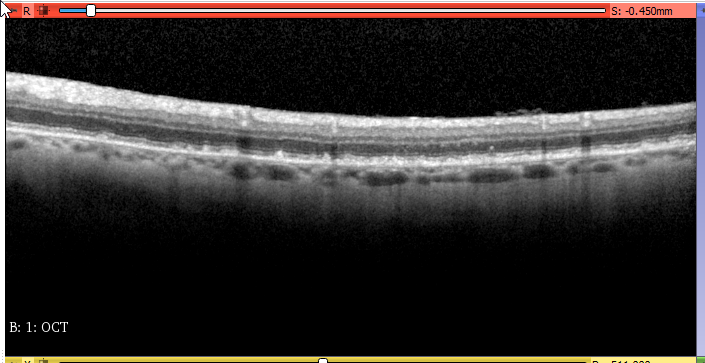
all slices have the same image.
and normally on the “view metadata interface”, there is the possibility to navigate between instance of the same series with a slider, which I don’t have.
(I have checked using dcm2pnm the image is different each time, the problem doesn’t come from there).
here are 3 dcmdump as example.
the image position and instance number change for each “slice”. so I don’t get why it displays always the same slice.
> **test0030.dcm**
>
> ```
> # Dicom-File-Format
>
> # Dicom-Meta-Information-Header
> # Used TransferSyntax: Little Endian Explicit
> (0002,0000) UL 186 # 4, 1 FileMetaInformationGroupLength
> (0002,0001) OB 00\01 # 2, 1 FileMetaInformationVersion
> (0002,0002) UI =SecondaryCaptureImageStorage # 26, 1 MediaStorageSOPClassUID
> (0002,0003) UI [1.4.444.0.1.4.613533732.156.1561706684.739] # 42, 1 MediaStorageSOPInstanceUID
> (0002,0010) UI =LittleEndianExplicit # 20, 1 TransferSyntaxUID
> (0002,0012) UI [1.2.276.0.7230010.3.0.3.6.4] # 28, 1 ImplementationClassUID
> (0002,0013) SH [OFFIS_DCMTK_364] # 16, 1 ImplementationVersionName
>
> # Dicom-Data-Set
> # Used TransferSyntax: Little Endian Explicit
> (0008,0005) CS [ISO_IR 100] # 10, 1 SpecificCharacterSet
> (0008,0016) UI =SecondaryCaptureImageStorage # 26, 1 SOPClassUID
> (0008,0018) UI [1.4.444.0.1.4.613533732.156.1561706684.739] # 42, 1 SOPInstanceUID
> (0008,0020) DA [20190628] # 8, 1 StudyDate
> (0008,0021) DA [20190628] # 8, 1 SeriesDate
> (0008,0022) DA [20190628] # 8, 1 AcquisitionDate
> (0008,0023) DA [20190628] # 8, 1 ContentDate
> (0008,0030) TM [092450.000] # 10, 1 StudyTime
> (0008,0031) TM [092450.000] # 10, 1 SeriesTime
> (0008,0032) TM [092450.000] # 10, 1 AcquisitionTime
> (0008,0033) TM [092450.000] # 10, 1 ContentTime
> (0008,0050) SH (no value available) # 0, 0 AccessionNumber
> (0008,0060) CS [OCT] # 4, 1 Modality
> (0008,0070) LO [Heidelberg Engineering] # 22, 1 Manufacturer
> (0008,0090) PN (no value available) # 0, 0 ReferringPhysicianName
> (0008,0221) CS [OCT] # 4, 1 EquipmentModality
> (0008,103e) LO [OCT] # 4, 1 SeriesDescription
> (0008,1070) PN [GYS] # 4, 1 OperatorsName
> (0008,1090) LO [Spectralis] # 10, 1 ManufacturerModelName
> (0010,0010) PN (no value available) # 0, 0 PatientName
> (0010,0020) LO [1.4.444.0.1.4.613533732.156.1561706684.738] # 42, 1 PatientID
> (0010,0040) CS [F] # 2, 1 PatientSex
> (0010,1010) AS (no value available) # 0, 0 PatientAge
> (0018,0050) DS [0.0598645833333333] # 18, 1 SliceThickness
> (0018,5100) CS [HFP] # 4, 1 PatientPosition
> (0020,000d) UI [1.4.444.0.1.2.613533732.156.1561706684.740] # 42, 1 StudyInstanceUID
> (0020,000e) UI [1.4.444.0.1.3.613533732.156.1561706684.741] # 42, 1 SeriesInstanceUID
> (0020,0010) SH [test] # 4, 1 StudyID
> (0020,0011) IS [1] # 2, 1 SeriesNumber
> (0020,0013) IS [31] # 2, 1 InstanceNumber
> (0020,0032) DS [0\0\1.85580208333333] # 20, 3 ImagePositionPatient
> (0020,0037) DS [1\0\0\0\1\0] # 12, 6 ImageOrientationPatient
> (0020,0060) CS [L] # 2, 1 Laterality
> (0020,1041) DS [1.85580208333333] # 16, 1 SliceLocation
> (0028,0002) US 1 # 2, 1 SamplesPerPixel
> (0028,0004) CS [MONOCHROME2] # 12, 1 PhotometricInterpretation
> (0028,0010) US 496 # 2, 1 Rows
> (0028,0011) US 1024 # 2, 1 Columns
> (0028,0030) DS [0.0057\0.0039] # 14, 2 PixelSpacing
> (0028,0100) US 8 # 2, 1 BitsAllocated
> (0028,0101) US 8 # 2, 1 BitsStored
> (0028,0102) US 7 # 2, 1 HighBit
> (0028,0103) US 0 # 2, 1 PixelRepresentation
> (7fe0,0010) OB 00\00\00\00\00\00\00\00\00\00\00\00\00\00\00\00\00\00\00\00\00\00... # 507904, 1 PixelData
>
> ```
> **test0010.dcm**
>
> ```
> # Dicom-File-Format
>
> # Dicom-Meta-Information-Header
> # Used TransferSyntax: Little Endian Explicit
> (0002,0000) UL 186 # 4, 1 FileMetaInformationGroupLength
> (0002,0001) OB 00\01 # 2, 1 FileMetaInformationVersion
> (0002,0002) UI =SecondaryCaptureImageStorage # 26, 1 MediaStorageSOPClassUID
> (0002,0003) UI [1.4.444.0.1.4.613533732.156.1561706684.739] # 42, 1 MediaStorageSOPInstanceUID
> (0002,0010) UI =LittleEndianExplicit # 20, 1 TransferSyntaxUID
> (0002,0012) UI [1.2.276.0.7230010.3.0.3.6.4] # 28, 1 ImplementationClassUID
> (0002,0013) SH [OFFIS_DCMTK_364] # 16, 1 ImplementationVersionName
>
> # Dicom-Data-Set
> # Used TransferSyntax: Little Endian Explicit
> (0008,0005) CS [ISO_IR 100] # 10, 1 SpecificCharacterSet
> (0008,0016) UI =SecondaryCaptureImageStorage # 26, 1 SOPClassUID
> (0008,0018) UI [1.4.444.0.1.4.613533732.156.1561706684.739] # 42, 1 SOPInstanceUID
> (0008,0020) DA [20190628] # 8, 1 StudyDate
> (0008,0021) DA [20190628] # 8, 1 SeriesDate
> (0008,0022) DA [20190628] # 8, 1 AcquisitionDate
> (0008,0023) DA [20190628] # 8, 1 ContentDate
> (0008,0030) TM [092450.000] # 10, 1 StudyTime
> (0008,0031) TM [092450.000] # 10, 1 SeriesTime
> (0008,0032) TM [092450.000] # 10, 1 AcquisitionTime
> (0008,0033) TM [092450.000] # 10, 1 ContentTime
> (0008,0050) SH (no value available) # 0, 0 AccessionNumber
> (0008,0060) CS [OCT] # 4, 1 Modality
> (0008,0070) LO [Heidelberg Engineering] # 22, 1 Manufacturer
> (0008,0090) PN (no value available) # 0, 0 ReferringPhysicianName
> (0008,0221) CS [OCT] # 4, 1 EquipmentModality
> (0008,103e) LO [OCT] # 4, 1 SeriesDescription
> (0008,1070) PN [GYS] # 4, 1 OperatorsName
> (0008,1090) LO [Spectralis] # 10, 1 ManufacturerModelName
> (0010,0010) PN (no value available) # 0, 0 PatientName
> (0010,0020) LO [1.4.444.0.1.4.613533732.156.1561706684.738] # 42, 1 PatientID
> (0010,0040) CS [F] # 2, 1 PatientSex
> (0010,1010) AS (no value available) # 0, 0 PatientAge
> (0018,0050) DS [0.0598645833333333] # 18, 1 SliceThickness
> (0018,5100) CS [HFP] # 4, 1 PatientPosition
> (0020,000d) UI [1.4.444.0.1.2.613533732.156.1561706684.740] # 42, 1 StudyInstanceUID
> (0020,000e) UI [1.4.444.0.1.3.613533732.156.1561706684.741] # 42, 1 SeriesInstanceUID
> (0020,0010) SH [test] # 4, 1 StudyID
> (0020,0011) IS [1] # 2, 1 SeriesNumber
> (0020,0013) IS [11] # 2, 1 InstanceNumber
> (0020,0032) DS [0\0\0.658510416666667] # 22, 3 ImagePositionPatient
> (0020,0037) DS [1\0\0\0\1\0] # 12, 6 ImageOrientationPatient
> (0020,0060) CS [L] # 2, 1 Laterality
> (0020,1041) DS [0.658510416666667] # 18, 1 SliceLocation
> (0028,0002) US 1 # 2, 1 SamplesPerPixel
> (0028,0004) CS [MONOCHROME2] # 12, 1 PhotometricInterpretation
> (0028,0010) US 496 # 2, 1 Rows
> (0028,0011) US 1024 # 2, 1 Columns
> (0028,0030) DS [0.0057\0.0039] # 14, 2 PixelSpacing
> (0028,0100) US 8 # 2, 1 BitsAllocated
> (0028,0101) US 8 # 2, 1 BitsStored
> (0028,0102) US 7 # 2, 1 HighBit
> (0028,0103) US 0 # 2, 1 PixelRepresentation
> (7fe0,0010) OB 00\00\00\00\00\00\00\00\00\00\00\00\00\00\00\00\00\00\00\00\00\00... # 507904, 1 PixelData
>
> ```
> **test0020.dcm**
>
> ```
> # Dicom-File-Format
>
> # Dicom-Meta-Information-Header
> # Used TransferSyntax: Little Endian Explicit
> (0002,0000) UL 186 # 4, 1 FileMetaInformationGroupLength
> (0002,0001) OB 00\01 # 2, 1 FileMetaInformationVersion
> (0002,0002) UI =SecondaryCaptureImageStorage # 26, 1 MediaStorageSOPClassUID
> (0002,0003) UI [1.4.444.0.1.4.613533732.156.1561706684.739] # 42, 1 MediaStorageSOPInstanceUID
> (0002,0010) UI =LittleEndianExplicit # 20, 1 TransferSyntaxUID
> (0002,0012) UI [1.2.276.0.7230010.3.0.3.6.4] # 28, 1 ImplementationClassUID
> (0002,0013) SH [OFFIS_DCMTK_364] # 16, 1 ImplementationVersionName
>
> # Dicom-Data-Set
> # Used TransferSyntax: Little Endian Explicit
> (0008,0005) CS [ISO_IR 100] # 10, 1 SpecificCharacterSet
> (0008,0016) UI =SecondaryCaptureImageStorage # 26, 1 SOPClassUID
> (0008,0018) UI [1.4.444.0.1.4.613533732.156.1561706684.739] # 42, 1 SOPInstanceUID
> (0008,0020) DA [20190628] # 8, 1 StudyDate
> (0008,0021) DA [20190628] # 8, 1 SeriesDate
> (0008,0022) DA [20190628] # 8, 1 AcquisitionDate
> (0008,0023) DA [20190628] # 8, 1 ContentDate
> (0008,0030) TM [092450.000] # 10, 1 StudyTime
> (0008,0031) TM [092450.000] # 10, 1 SeriesTime
> (0008,0032) TM [092450.000] # 10, 1 AcquisitionTime
> (0008,0033) TM [092450.000] # 10, 1 ContentTime
> (0008,0050) SH (no value available) # 0, 0 AccessionNumber
> (0008,0060) CS [OCT] # 4, 1 Modality
> (0008,0070) LO [Heidelberg Engineering] # 22, 1 Manufacturer
> (0008,0090) PN (no value available) # 0, 0 ReferringPhysicianName
> (0008,0221) CS [OCT] # 4, 1 EquipmentModality
> (0008,103e) LO [OCT] # 4, 1 SeriesDescription
> (0008,1070) PN [GYS] # 4, 1 OperatorsName
> (0008,1090) LO [Spectralis] # 10, 1 ManufacturerModelName
> (0010,0010) PN (no value available) # 0, 0 PatientName
> (0010,0020) LO [1.4.444.0.1.4.613533732.156.1561706684.738] # 42, 1 PatientID
> (0010,0040) CS [F] # 2, 1 PatientSex
> (0010,1010) AS (no value available) # 0, 0 PatientAge
> (0018,0050) DS [0.0598645833333333] # 18, 1 SliceThickness
> (0018,5100) CS [HFP] # 4, 1 PatientPosition
> (0020,000d) UI [1.4.444.0.1.2.613533732.156.1561706684.740] # 42, 1 StudyInstanceUID
> (0020,000e) UI [1.4.444.0.1.3.613533732.156.1561706684.741] # 42, 1 SeriesInstanceUID
> (0020,0010) SH [test] # 4, 1 StudyID
> (0020,0011) IS [1] # 2, 1 SeriesNumber
> **(0020,0013) IS [21] # 2, 1 InstanceNumber**
> **(0020,0032) DS [0\0\1.25715625] # 14, 3 ImagePositionPatient**
> **(0020,0037) DS [1\0\0\0\1\0] # 12, 6 ImageOrientationPatient**
> (0020,0060) CS [L] # 2, 1 Laterality
> (0020,1041) DS [1.25715625] # 10, 1 SliceLocation
> (0028,0002) US 1 # 2, 1 SamplesPerPixel
> (0028,0004) CS [MONOCHROME2] # 12, 1 PhotometricInterpretation
> (0028,0010) US 496 # 2, 1 Rows
> (0028,0011) US 1024 # 2, 1 Columns
> (0028,0030) DS [0.0057\0.0039] # 14, 2 PixelSpacing
> (0028,0100) US 8 # 2, 1 BitsAllocated
> (0028,0101) US 8 # 2, 1 BitsStored
> (0028,0102) US 7 # 2, 1 HighBit
> (0028,0103) US 0 # 2, 1 PixelRepresentation
> (7fe0,0010) OB 00\00\00\00\00\00\00\00\00\00\00\00\00\00\00\00\00\00\00\00\00\00... # 507904, 1 PixelData
>
> ```
on the python console it shows this:
```
Irregular volume geometry detected (maximum error of 1020.01 mm is above tolerance threshold of 0.001 mm). Regularization transform is not added, as the option is disabled.
```
and apparently it uses the dicomscalarvolumplugin to open it.
but I don’t know how to put breakpoint in it to see what happens.
---
### Author:  [@pdeman](https://discourse.slicer.org/u/pdeman)
#### Post date: [June 28, 2019, 11:04am UTC](https://discourse.slicer.org/t/cant-load-dicom-images-generated-by-dcmtk/7338/9 "2019-06-28T11:04:27Z")
I just tried with adding a different acquisition time and content time for each slices, but I have got the same result. it shows only one slice, in the display and in the metadata viewer.
---
### Author:  [@pieper](https://discourse.slicer.org/u/pieper)
#### Post date: [June 28, 2019, 11:21am UTC](https://discourse.slicer.org/t/cant-load-dicom-images-generated-by-dcmtk/7338/10 "2019-06-28T11:21:44Z")
@pdeman - it seems like a converter to make 3D volumes from your data could be a useful bit of code - would you be able to make it an open source tool along with some examples? If so it would be a lot easier for us to help you debug.
---
### Author:  [@lassoan](https://discourse.slicer.org/u/lassoan)
#### Post date: [June 28, 2019, 2:54pm UTC](https://discourse.slicer.org/t/cant-load-dicom-images-generated-by-dcmtk/7338/11 "2019-06-28T14:54:25Z")
The metadata is still invalid, as the same SOP instance UID is reused in multiple files. This UID must be unique in each file.
You do not need to use different acquisition or content time. If you do, then you have the option of loading only group of frames that have the same acquisition or content time (if you enable “Allow loading subseries by time” in Application settings / DICOM).
---
### Author:  [@pdeman](https://discourse.slicer.org/u/pdeman)
#### Post date: [July 1, 2019, 6:35am UTC](https://discourse.slicer.org/t/cant-load-dicom-images-generated-by-dcmtk/7338/12 "2019-07-01T06:35:04Z")
> [@lassoan](#):
>
> ent time. If you do, then you have the option of loading only group of fram
ok thanks, I did the correction and it works now. except that when I change slices, it says they are 1 mm spaced, instead of 0.059 mm
---
### Author:  [@lassoan](https://discourse.slicer.org/u/lassoan)
#### Post date: [July 1, 2019, 12:41pm UTC](https://discourse.slicer.org/t/cant-load-dicom-images-generated-by-dcmtk/7338/13 "2019-07-01T12:41:58Z")
> [@pdeman](#):
>
> it works now. except that when I change slices, it says they are 1 mm spaced, instead of 0.059 mm
Slice thickness field is not intended for defining geometry (such as distance between slices). Instead, slice spacing is defined by “image position patient” tag (position of next slice is obtained by incrementing previous slice position by slice spacing).
---
### Author:  [@pdeman](https://discourse.slicer.org/u/pdeman)
#### Post date: [September 11, 2019, 1:31pm UTC](https://discourse.slicer.org/t/cant-load-dicom-images-generated-by-dcmtk/7338/14 "2019-09-11T13:31:20Z")
I still have a problem with the geometry that I don’t get.
the problem seems to come from:
sliceCornersFromIJKToRAS in DICOMScalarVolumePlugin.py
> ```
> volumeNode.GetIJKToRASMatrix(ijkToRAS)
> print(ijkToRAS)
>
> ```
return:
> Loading with imageIOName: GDCM
> vtkMatrix4x4 (000001FC74D84AD0)
> Debug: Off
> Modified Time: 323439
> Reference Count: 1
> Registered Events: (none)
> Elements:
> -1 0 0 0
> 0 -1 0 0
> 0 0 1 0
> 0 0 0 1
so the self.originalCorners are matrix in “pixel”
while self.targetCorners
read from the dicom header in this python script are correct.
how the matrix GetIJKToRASMatrix is initialized ? why in my case it is incorrect ?
---
### Author:  [@lassoan](https://discourse.slicer.org/u/lassoan)
#### Post date: [September 11, 2019, 1:44pm UTC](https://discourse.slicer.org/t/cant-load-dicom-images-generated-by-dcmtk/7338/15 "2019-09-11T13:44:04Z")
> [@pdeman](#):
>
> I still have a problem with the geometry that I don’t get.
What is your problem? Image loaded but spacing is 1.0?
Are any error messages logged?
Could you send a sample data set?
---
### Author:  [@pdeman](https://discourse.slicer.org/u/pdeman)
#### Post date: [September 11, 2019, 1:50pm UTC](https://discourse.slicer.org/t/cant-load-dicom-images-generated-by-dcmtk/7338/16 "2019-09-11T13:50:30Z")
yes all spacing (in the 3 directions) is 1.0.
I get a warning 🙂
> if maxError \> self.cornerEpsilon:
> warningText = “Irregular volume geometry detected (maximum error of %g mm is above tolerance threshold of %g mm).” % (maxError, self.cornerEpsilon)
and maxError is high due to the fact that self.originalCorners does’nt take into account the spacing.
here is a dcmdump:
# Dicom-File-Format
# Dicom-Meta-Information-Header
# Used TransferSyntax: Little Endian Explicit
(0002,0000) UL 188 # 4, 1 FileMetaInformationGroupLength
(0002,0001) OB 00\01 # 2, 1 FileMetaInformationVersion
(0002,0002) UI =SecondaryCaptureImageStorage # 26, 1 MediaStorageSOPClassUID
(0002,0003) UI [1.4.444.0.1.4.560454010.10948.1568207717.271] # 44, 1 MediaStorageSOPInstanceUID
(0002,0010) UI =LittleEndianExplicit # 20, 1 TransferSyntaxUID
(0002,0012) UI [1.2.276.0.7230010.3.0.3.6.4] # 28, 1 ImplementationClassUID
(0002,0013) SH [OFFIS\_DCMTK\_364] # 16, 1 ImplementationVersionName
# Dicom-Data-Set
# Used TransferSyntax: Little Endian Explicit
(0008,0005) CS [ISO\_IR 100] # 10, 1 SpecificCharacterSet
(0008,0016) UI =SecondaryCaptureImageStorage # 26, 1 SOPClassUID
(0008,0018) UI [1.4.444.0.1.4.560454010.10948.1568207717.271] # 44, 1 SOPInstanceUID
(0008,0020) DA [20151214] # 8, 1 StudyDate
(0008,0021) DA [20151214] # 8, 1 SeriesDate
(0008,0022) DA [20151214] # 8, 1 AcquisitionDate
(0008,0023) DA [20151214] # 8, 1 ContentDate
(0008,0030) TM [000000.0000] # 12, 1 StudyTime
(0008,0031) TM [000000.0000] # 12, 1 SeriesTime
(0008,0032) TM [180136.136] # 10, 1 AcquisitionTime
(0008,0033) TM [180136.136] # 10, 1 ContentTime
(0008,0050) SH (no value available) # 0, 0 AccessionNumber
(0008,0060) CS [OPT] # 4, 1 Modality
(0008,0070) LO [xxx] # 22, 1 Manufacturer
(0008,0090) PN (no value available) # 0, 0 ReferringPhysicianName
(0008,0221) CS [OCT] # 4, 1 EquipmentModality
(0008,103e) LO [SlicesOPT] # 10, 1 SeriesDescription
(0008,1070) PN [GYS] # 4, 1 OperatorsName
(0008,1090) LO [Spectralis] # 10, 1 ManufacturerModelName
(0010,0010) PN [visit x] # 30, 1 PatientName
(0010,0020) LO [LOC6053359.1.3.6.1.4.1.33437.10.7.2548426.13094654189.13010.7] # 62, 1 PatientID
(0010,0030) DA [19000101] # 8, 1 PatientBirthDate
(0010,0040) CS [F] # 2, 1 PatientSex
(0010,1010) AS (no value available) # 0, 0 PatientAge
(0018,0050) DS [0.0598645833333333] # 18, 1 SliceThickness
(0018,5100) CS [HFP] # 4, 1 PatientPosition
(0020,000d) UI [LOC13309808.1.3.6.1.4.1.33437.10.8.2673601.13094590126.7801.8] # 62, 1 StudyInstanceUID
(0020,000e) UI [LOC13309808.1.3.6.1.4.1.33437.10.9.2673601.13094590127.7801.9] # 62, 1 SeriesInstanceUID
(0020,0010) SH # 12, 1 StudyID
(0020,0011) IS [1] # 2, 1 SeriesNumber
(0020,0013) IS [15] # 2, 1 InstanceNumber
(0020,0032) DS [0\0\0.89796875] # 14, 3 ImagePositionPatient
(0020,0037) DS [1\0\0\0\1\0] # 12, 6 ImageOrientationPatient
(0020,0052) UI [1.4.444.0.1.3.560454010.10948.1568207717.256] # 44, 1 FrameOfReferenceUID
(0020,0060) CS [L] # 2, 1 Laterality
(0020,1041) DS [0.89796875] # 10, 1 SliceLocation
(0028,0002) US 1 # 2, 1 SamplesPerPixel
(0028,0004) CS [MONOCHROME2] # 12, 1 PhotometricInterpretation
(0028,0008) IS [1] # 2, 1 NumberOfFrames
(0028,0010) US 496 # 2, 1 Rows
(0028,0011) US 1024 # 2, 1 Columns
(0028,0030) DS [0.0057\0.0039] # 14, 2 PixelSpacing
(0028,0100) US 8 # 2, 1 BitsAllocated
(0028,0101) US 8 # 2, 1 BitsStored
(0028,0102) US 7 # 2, 1 HighBit
(0028,0103) US 0 # 2, 1 PixelRepresentation
(7fe0,0010) OB 00\00\00\00\00\00\00\00\00\00\00\00\00\00\00\00\00\00\00\00\00\00… # 507904, 1 PixelData
I’ll upload some data soon.
---
### Author:  [@pdeman](https://discourse.slicer.org/u/pdeman)
#### Post date: [September 11, 2019, 2:56pm UTC](https://discourse.slicer.org/t/cant-load-dicom-images-generated-by-dcmtk/7338/17 "2019-09-11T14:56:55Z")
I can’t upload .dcm on the forum
---
### Author:  [@pieper](https://discourse.slicer.org/u/pieper)
#### Post date: [September 11, 2019, 3:11pm UTC](https://discourse.slicer.org/t/cant-load-dicom-images-generated-by-dcmtk/7338/18 "2019-09-11T15:11:49Z")
> [@pdeman](#):
>
> (0008,0016) UI =SecondaryCaptureImageStorage # 26, 1 SOPClassUID
When the data is a secondary capture it basically means screenshot, which isn’t really a volumetric format.
> [@pdeman](#):
>
> I can’t upload .dcm on the forum
You can use dropbox, google drive, one drive, etc to share the data.
---
### Author:  [@pdeman](https://discourse.slicer.org/u/pdeman)
#### Post date: [September 12, 2019, 7:26am UTC](https://discourse.slicer.org/t/cant-load-dicom-images-generated-by-dcmtk/7338/19 "2019-09-12T07:26:13Z")
yes but it doesn’t work with opthalmic tomographic uid neither, even if they are volumetric format.
so indeed if I specify for example a CTImageStorage sop class uid, it works.
but it’s not a CTImageStorage …
how can I know which sop class uid are managed by slicer ?
---
### Author:  [@lassoan](https://discourse.slicer.org/u/lassoan)
#### Post date: [September 12, 2019, 1:54pm UTC](https://discourse.slicer.org/t/cant-load-dicom-images-generated-by-dcmtk/7338/20 "2019-09-12T13:54:26Z")
There is no restriction in term of SOP Class UID, but Slicer’s Scalar volume DICOM reader plugin requires image geometry information defined by slice position and orientation tags.
If ophtalmic tomographic image IOD does not require these fields then you need to create your own DICOM plugin for reading this type of image. A plugin would probably be just a few ten lines of Python code that computes image origin, spacing, and axis directions from DICOM tags - see my [post above](https://discourse.slicer.org/t/cant-load-dicom-images-generated-by-dcmtk/7338/5) for details.
[Next page](https://discourse.slicer.org/t/cant-load-dicom-images-generated-by-dcmtk/7338.md?page=2)