# How to change the background with a picture in 3d window?
**URL:** https://discourse.slicer.org/t/how-to-change-the-background-with-a-picture-in-3d-window/1628
**Category:** Support
**Created:** [December 10, 2017, 2:19pm UTC](https://discourse.slicer.org/t/how-to-change-the-background-with-a-picture-in-3d-window/1628 "2017-12-10T14:19:47Z")
**Posts on this page:** 9
**Page:** 1
### Author:  [@timeanddoctor](https://discourse.slicer.org/u/timeanddoctor)
#### Post date: [December 10, 2017, 2:19pm UTC](https://discourse.slicer.org/t/how-to-change-the-background-with-a-picture-in-3d-window/1628/1 "2017-12-10T14:19:47Z")
Operating system:win 7
Slicer version:4.8
Expected behavior:
Actual behavior:

---
### Author:  [@lassoan](https://discourse.slicer.org/u/lassoan)
#### Post date: [December 10, 2017, 2:59pm UTC](https://discourse.slicer.org/t/how-to-change-the-background-with-a-picture-in-3d-window/1628/2 "2017-12-10T14:59:05Z")
You can load an image and show it in a slice plane. For easy positioning of the image, install SlicerIGT extension and use Volume Reslicile Driver module (apply a transform to the image and use the image as driver for a slice view in transverse mode).
---
### Author:  [@doc-xie](https://discourse.slicer.org/u/doc-xie)
#### Post date: [December 11, 2017, 8:54am UTC](https://discourse.slicer.org/t/how-to-change-the-background-with-a-picture-in-3d-window/1628/3 "2017-12-11T08:54:18Z")
About the background of the 3D view,how to change the color or replace the background with a picture?
---
### Author:  [@lassoan](https://discourse.slicer.org/u/lassoan)
#### Post date: [December 11, 2017, 4:46pm UTC](https://discourse.slicer.org/t/how-to-change-the-background-with-a-picture-in-3d-window/1628/4 "2017-12-11T16:46:06Z")
> [@doc-xie](#):
>
> About the background of the 3D view,how to change the color or replace the background with a picture?
See my answers above.
If you are thinking about changing the background color so that you can remove that color and replace it with an image, then there is a much simpler way: you can save the view content with transparent background. See “Capture 3D view into PNG file with transparent background” example in the [script repository](https://www.slicer.org/wiki/Documentation/Nightly/ScriptRepository#Capture).
---
### Author:  [@doc-xie](https://discourse.slicer.org/u/doc-xie)
#### Post date: [December 12, 2017, 1:40pm UTC](https://discourse.slicer.org/t/how-to-change-the-background-with-a-picture-in-3d-window/1628/5 "2017-12-12T13:40:33Z")
Thanks a lot!
Maybe I have not show my thought definitely. The color of the background in the 3D view include light blue,white and black,if I want to change the color to red or repalce it with another picture arbitriraly,what can i do without any familiarity with Python .
Best wishes!
doc-xie
---
### Author:  [@lassoan](https://discourse.slicer.org/u/lassoan)
#### Post date: [December 12, 2017, 3:28pm UTC](https://discourse.slicer.org/t/how-to-change-the-background-with-a-picture-in-3d-window/1628/6 "2017-12-12T15:28:59Z")
You can change the background to red using this code snippet:
[https://www.slicer.org/wiki/Documentation/Nightly/ScriptRepository#Change\_3D\_view\_background\_color](https://www.slicer.org/wiki/Documentation/Nightly/ScriptRepository#Change_3D_view_background_color)
---
### Author:  [@doc-xie](https://discourse.slicer.org/u/doc-xie)
#### Post date: [December 14, 2017, 7:44am UTC](https://discourse.slicer.org/t/how-to-change-the-background-with-a-picture-in-3d-window/1628/7 "2017-12-14T07:44:15Z")
Thanks,I got it like this!

---
### Author:  [@timeanddoctor](https://discourse.slicer.org/u/timeanddoctor)
#### Post date: [February 6, 2020, 10:47am UTC](https://discourse.slicer.org/t/how-to-change-the-background-with-a-picture-in-3d-window/1628/8 "2020-02-06T10:47:10Z")
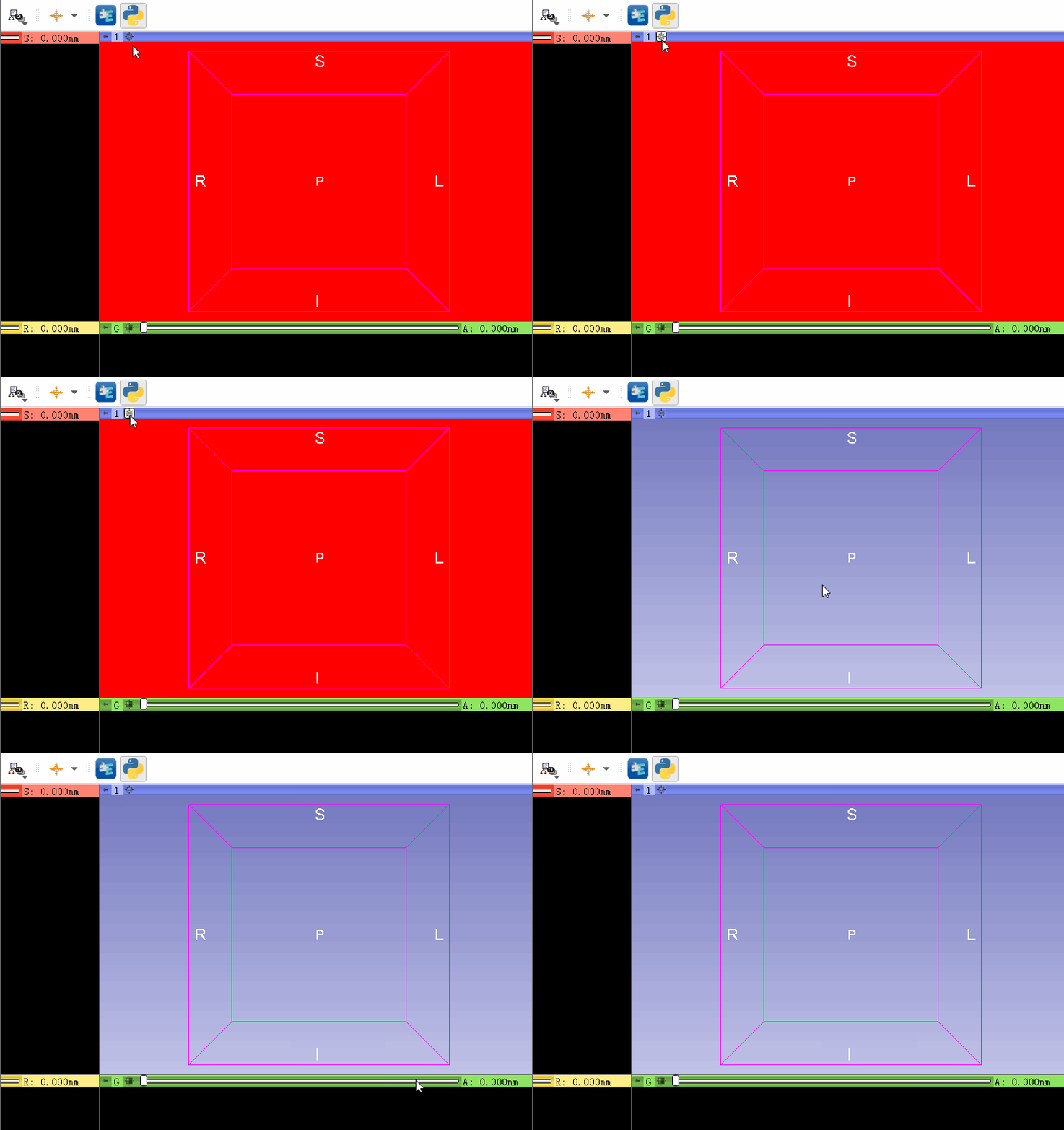
I changed the background to Red, however,it return when click the 3d tool . Can I keep the changing?
---
### Author:  [@lassoan](https://discourse.slicer.org/u/lassoan)
#### Post date: [February 6, 2020, 4:54pm UTC](https://discourse.slicer.org/t/how-to-change-the-background-with-a-picture-in-3d-window/1628/9 "2020-02-06T16:54:51Z")
The example in the script repository was only intended for temporary change of the background color. For changing it persistently, use SetBackgroundColor methods of the view node - see the [updated example in script repository](https://www.slicer.org/wiki/Documentation/Nightly/ScriptRepository#Change_3D_view_background_color).