Hi Murat,
Thank you so much.
The vertices ended up being 3969 and 4693.
Increasing the iterations seemed to make the biggest difference.
Just to confirm, increasing both alpha and beta will enable more transformation, or did I get this wrong? I read the Alpaca documentation but still not entirely sure what these values are - it sounded like a lower alpha enables more deformation but I wasn’t sure if this means between deformed target and source or more deformations allowed in the transformation of the target.
When I compare alpha and beta set at 2 vs 4, 4 is generally more aligned except at the coracoid.
Here is the output with 1000 CPD iterations and alpha and beta set at 4, in the testing mode:

What is odd to me is that the transformed source mesh is smaller than the target although the source itself is larger than the target. But maybe this is due to not using landmarks to align the
If I decrease alpha to 2 and keep beta at 4 then the size marches better but the spine is less aligned
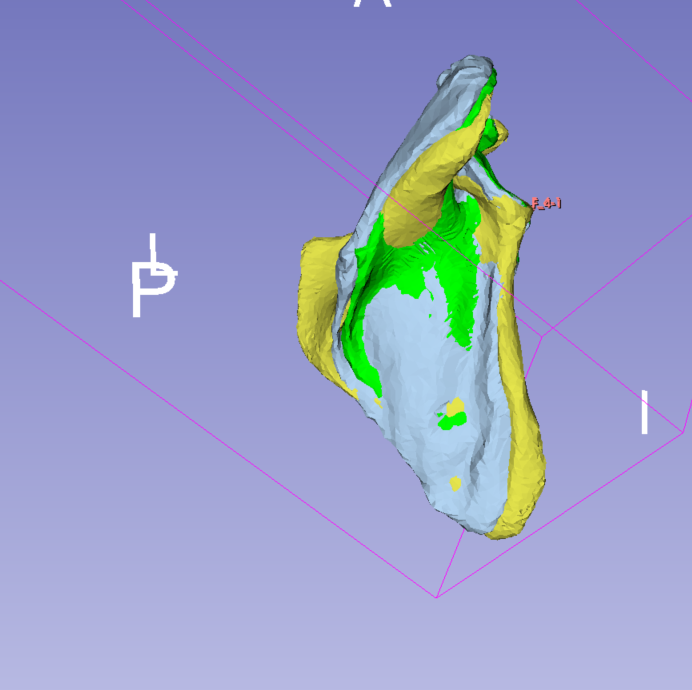
I also tried changing the CPD tolerance but it made only a slight difference and wasn’t clear if better or worse (some parts better aligned, some worse).
Is there any way I can make deform even more to match the target better? Or do I need higher resolution meshes?
Thank you so much,
Eva