# Load OpenInventor (.iv) VRML 1.0 bone files in 3D Slicer
**URL:** https://discourse.slicer.org/t/load-openinventor-iv-vrml-1-0-bone-files-in-3d-slicer/26942
**Category:** Support
**Created:** [December 27, 2022, 3:08pm UTC](https://discourse.slicer.org/t/load-openinventor-iv-vrml-1-0-bone-files-in-3d-slicer/26942 "2022-12-27T15:08:22Z")
**Posts on this page:** 10
**Page:** 1
### Author:  [@roshans17](https://discourse.slicer.org/u/roshans17)
#### Post date: [December 27, 2022, 3:08pm UTC](https://discourse.slicer.org/t/load-openinventor-iv-vrml-1-0-bone-files-in-3d-slicer/26942/1 "2022-12-27T15:08:22Z")
Hi all,
I am very new to Slicer so please excuse me for my ignorance. I am currently trying to understand how I can take an .iv file that represents a bone and output this onto slicer. Would love any help I can get. thank you in advance
---
### Author:  [@lassoan](https://discourse.slicer.org/u/lassoan)
#### Post date: [December 27, 2022, 3:10pm UTC](https://discourse.slicer.org/t/load-openinventor-iv-vrml-1-0-bone-files-in-3d-slicer/26942/2 "2022-12-27T15:10:36Z")
What software did you use to create these .iv file?
Can you share an example?
(upload to dropbox/OneDrive and post the link here; make sure it does not contain patient information)
---
### Author:  [@roshans17](https://discourse.slicer.org/u/roshans17)
#### Post date: [December 27, 2022, 4:38pm UTC](https://discourse.slicer.org/t/load-openinventor-iv-vrml-1-0-bone-files-in-3d-slicer/26942/3 "2022-12-27T16:38:38Z")
Thank you for your quick response. To be honest, I don’t know what software was used to create these .iv files as I am new to the lab and was just instructed to accomplish this. Attached below is a Google Drive link to an example of one of these files. Essentially just a bunch of 3D coordinate points that represent triangles and then points to distinguish how they are connected. I am able to run this in Matlab by simply calling on a built-in function after parsing through the data and was wondering if there is some slicer equivalent.
Link: [14819\_cap\_R.iv - Google Drive](https://drive.google.com/file/d/17Gl-MOvm8AGz5OAIQu9aOJ9f7RN0ZueN/view?usp=sharing)
---
### Author:  [@roshans17](https://discourse.slicer.org/u/roshans17)
#### Post date: [December 28, 2022, 9:03pm UTC](https://discourse.slicer.org/t/load-openinventor-iv-vrml-1-0-bone-files-in-3d-slicer/26942/4 "2022-12-28T21:03:42Z")
Sorry to be a bother, but any thoughts? I can’t seem to find any prior discussion post about this subject matter nor any documentation. Closest I have gotten is finding scripts that output PLY or STL files.
---
### Author:  [@pieper](https://discourse.slicer.org/u/pieper)
#### Post date: [December 28, 2022, 9:46pm UTC](https://discourse.slicer.org/t/load-openinventor-iv-vrml-1-0-bone-files-in-3d-slicer/26942/5 "2022-12-28T21:46:31Z")
I haven’t worked with OpenInventor in a long time. As I recall the format is very free-form so probably no universal reader. You could start with [OpenInventor](https://www.openinventor.com/) code and maybe you can load using a demo program and save the parts you want in another format. Or you could try [Mevislab](https://www.mevislab.de/), which is based on OpenInventor and has a free trial version with many options.
---
### Author:  [@lassoan](https://discourse.slicer.org/u/lassoan)
#### Post date: [December 31, 2022, 3:23am UTC](https://discourse.slicer.org/t/load-openinventor-iv-vrml-1-0-bone-files-in-3d-slicer/26942/6 "2022-12-31T03:23:44Z")
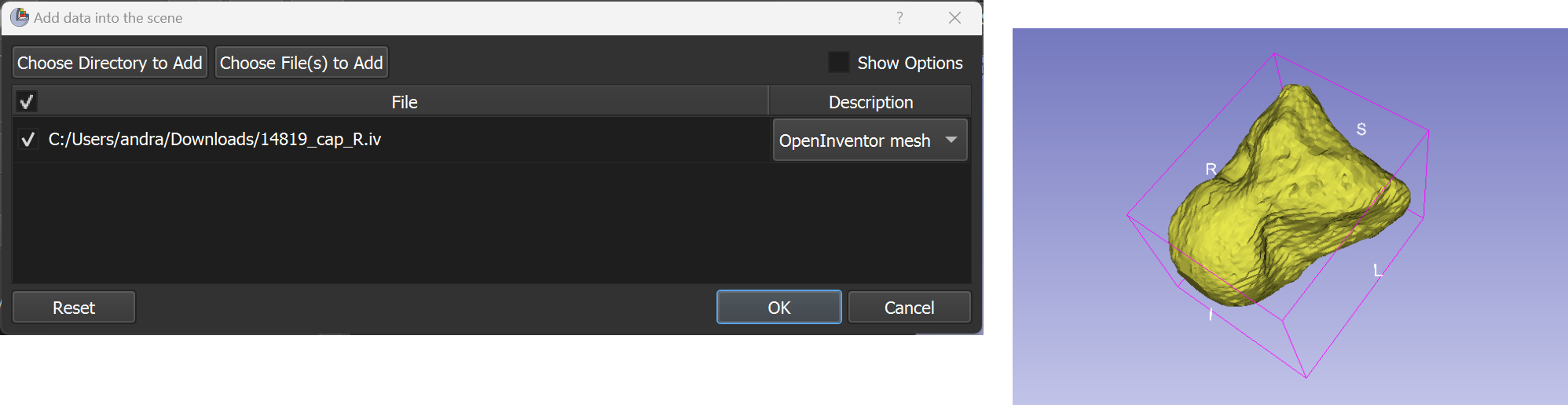
I had a look at the file and it is indeed an OpenInventor file, which stores a single triangle mesh in VRML 1.0 file format. I could not find any open-source file reader for it, so [I’ve implemented a very simple reader](https://github.com/PerkLab/SlicerSandbox/commit/14753dfb8f53e59609a5e0a46a25d02dbab2cff4) and added to the `Sandbox` extension.
All you need to do is to install the `Sandbox` extension tomorrow or later into Slicer-5.2 (or later). You can then load your .iv files as usual: drag-and-drop to the application window or use “Add data” window.
---
### Author:  [@roshans17](https://discourse.slicer.org/u/roshans17)
#### Post date: [January 3, 2023, 2:10am UTC](https://discourse.slicer.org/t/load-openinventor-iv-vrml-1-0-bone-files-in-3d-slicer/26942/7 "2023-01-03T02:10:32Z")
Wow, Andras! thank you so much for making this reader for me! I have a follow-up question and was wondering if you could give me some guidance. The main part of my question is how can I access and manipulate the polyData after it is displayed. I want to be able to create a module that has a GUI with sliders that allow the user to transform the bones based on some transformation data we have.
I believe the answer to my question requires an understanding of high-level slicer architecture. I have tried to look into the various tutorials (videos and powerpoints) that discuss slicer architecture; however, I feel lost as I am a fresh novice to slicer. Any thoughts as to how I should approach this specific problem and become more confident creating a slicer module?
Thank you in advance for all your help thus far and continued support.
---
### Author:  [@lassoan](https://discourse.slicer.org/u/lassoan)
#### Post date: [January 3, 2023, 3:03am UTC](https://discourse.slicer.org/t/load-openinventor-iv-vrml-1-0-bone-files-in-3d-slicer/26942/8 "2023-01-03T03:03:54Z")
I’m glad it all works for you now. Please post a new question about the model transformation. Describe why/how you want to transform (e.g., do you want to align models, align model with an image, …).
---
### Author:  [@sulli419](https://discourse.slicer.org/u/sulli419)
#### Post date: [March 4, 2025, 11:21pm UTC](https://discourse.slicer.org/t/load-openinventor-iv-vrml-1-0-bone-files-in-3d-slicer/26942/9 "2025-03-04T23:21:21Z")
I’m trying to import a .iv or .wrl file with the sandbox tool but defaults to volume and cannot open. Is there a newer way to do this? The files were created in Imaris software, so maybe they have some proprietary stamp that prevents it from working. Thoughts? Thanks much, Steve
---
### Author:  [@pieper](https://discourse.slicer.org/u/pieper)
#### Post date: [March 4, 2025, 11:27pm UTC](https://discourse.slicer.org/t/load-openinventor-iv-vrml-1-0-bone-files-in-3d-slicer/26942/10 "2025-03-04T23:27:10Z")
It’s probably because the format is so flexibile that it can store many types of data. What I suggested above still holds true, about using MevisLab or OpenInventor.