# Loading Robot into Slicer
**URL:** https://discourse.slicer.org/t/loading-robot-into-slicer/36798
**Category:** Support
**Tags:** robotics
**Created:** [June 15, 2024, 3:37am UTC](https://discourse.slicer.org/t/loading-robot-into-slicer/36798 "2024-06-15T03:37:33Z")
**Posts on this page:** 11
**Page:** 1
### Author:  [@Jeff\_Boker](https://discourse.slicer.org/u/Jeff_Boker)
#### Post date: [June 15, 2024, 3:37am UTC](https://discourse.slicer.org/t/loading-robot-into-slicer/36798/1 "2024-06-15T03:37:33Z")
I am trying to figure out how I load the Franka Robot into Slicer because I want to be able to send joint commands to it via OpenIGTLink and see it move in Slicer. It seems like I need to use Slicer\_ROS2, but I was wondering if there is any easier way to just upload the URDF files of the robot because I do not need ROS and it seems like I need to use a specific version of ubuntu for Slicer\_ROS2.
---
### Author:  [@lassoan](https://discourse.slicer.org/u/lassoan)
#### Post date: [June 15, 2024, 3:55am UTC](https://discourse.slicer.org/t/loading-robot-into-slicer/36798/2 "2024-06-15T03:55:16Z")
Slicer\_ROS2
> **[GitHub - rosmed/slicer\_ros2\_module: Slicer module that can interface directly...](https://github.com/rosmed/slicer_ros2_module)**
>
> Slicer module that can interface directly with ROS 2 using ROS parameters, topics, tf... - rosmed/slicer\_ros2\_module
If all you need is to visualize a robot and send joint commands then you can use the ROS OpenIGTLink bridge. You can extract surface meshes needed for rendering the robot from the urdf file and recreate them in Slicer - see an example here:
[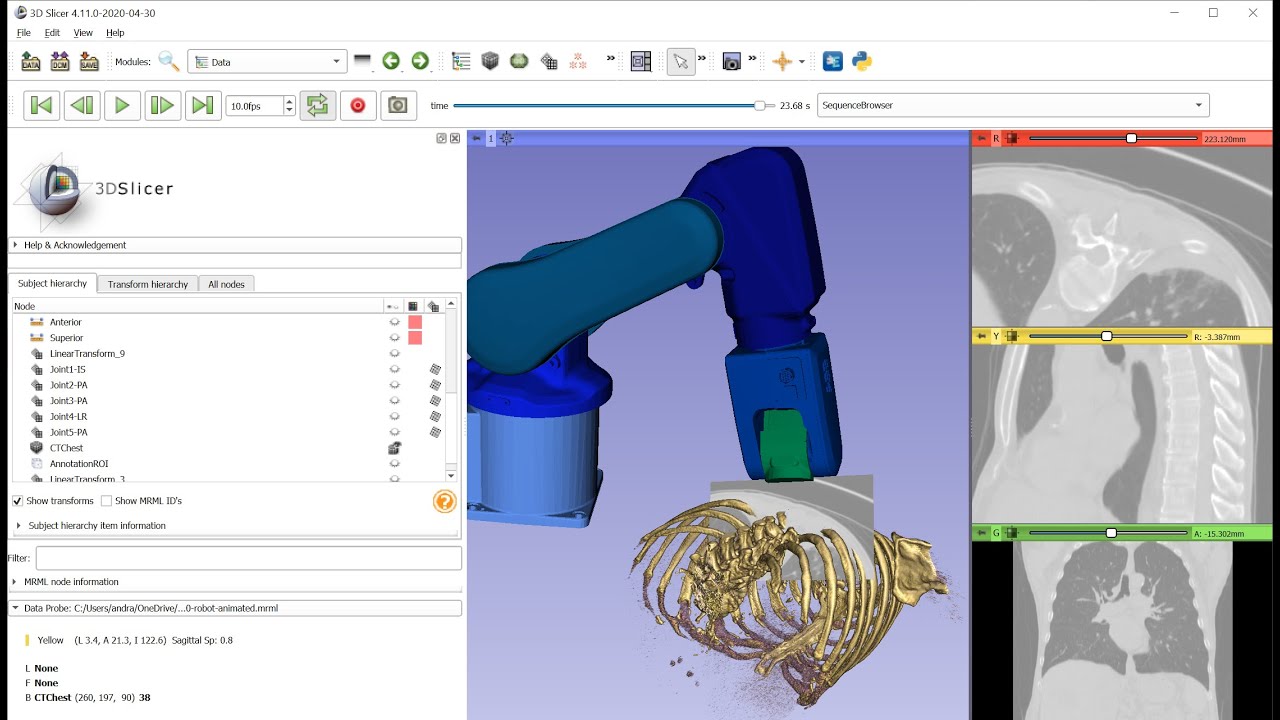 ](https://www.youtube.com/watch?v=yS3SKqNztJU)
However, roboticists generally prefer to have full access to ROS from the Slicer module, and that is where the second option is useful: having a ROS node running in Slicer. This allows you to do a lot more, but it is harder to set up the build.
---
### Author:  [@Jeff\_Boker](https://discourse.slicer.org/u/Jeff_Boker)
#### Post date: [June 21, 2024, 12:11am UTC](https://discourse.slicer.org/t/loading-robot-into-slicer/36798/3 "2024-06-21T00:11:00Z")
Wow, thanks! That is what I am looking for as you show in the youtube video. Basically I want to just drag and drop a file and instead of using the mouse and sliders to adjust the joint values, I want to do this automatically using OpenIGTLink.
But I am a little confused about converting my urdf file into the mrb file where the joint values can be controlled with the sliders as you do in the video. So I can convert the urdf into surface meshes, but how will slicer know all the joints and how to set the sliders to actuate the joints?
---
### Author:  [@lassoan](https://discourse.slicer.org/u/lassoan)
#### Post date: [June 21, 2024, 6:34pm UTC](https://discourse.slicer.org/t/loading-robot-into-slicer/36798/4 "2024-06-21T18:34:21Z")
> [@Jeff\_Boker](#):
>
> Basically I want to just drag and drop a file and instead of using the mouse and sliders to adjust the joint values, I want to do this automatically using OpenIGTLink.
Slicer can do exactly this. The file that you drag-and-drop is a Slicer scene file that contains models, transforms, and OpenIGTLink configuration.
> [@Jeff\_Boker](#):
>
> I am a little confused about converting my urdf file into the mrb file where the joint values can be controlled with the sliders as you do in the video. So I can convert the urdf into surface meshes, but how will slicer know all the joints and how to set the sliders to actuate the joints?
You can build the transform tree from information in the urdf file. To make this very easy, I’ve implemented an automatic importer script. You can download it from here:
>
The script does not support all possible features (e.g., I’ve only added “revolute” joint types), but can be easily extended as needed.
All you need is to copy-paste the script into Slicer’s Python console in a recent Slicer Preview Release (Slicer-5.7.x; Slicer Stable Release is not compatible, as it does not support selective display of transform rotation handles):
---
### Author:  [@Kyle\_Hata25](https://discourse.slicer.org/u/Kyle_Hata25)
#### Post date: [August 4, 2024, 9:46pm UTC](https://discourse.slicer.org/t/loading-robot-into-slicer/36798/5 "2024-08-04T21:46:23Z")
Hi,
Thank you so much for making this converter available for us. I had some trouble with loading my own URDF into the python console of Slicer. The module and Slicer would crash when this portion of the code was pasted into the console:
```auto
# Add all links and joints to the scene
nodes = {}
for link in robot:
name = link.get("name")
if link.tag == "link":
try:
stlFilePath = rootPath + "/" + link.find('collision').find('geometry').find('mesh').attrib["filename"]
# Use RAS coordinate system to avoid model conversion from LPS to RAS (we can transform the entire robot as a whole later if needed)
modelNode = slicer.modules.models.logic().AddModel(stlFilePath, slicer.vtkMRMLStorageNode.CoordinateSystemRAS)
except:
# No mesh found, add a sphere
sphere = vtk.vtkSphereSource()
sphere.SetRadius(0.01)
modelNode = slicer.modules.models.logic().AddModel(sphere.GetOutputPort())
modelNode.SetName(name)
nodes[name] = { "type": "link", "model": modelNode}
elif link.tag == "joint":
jointTransformNode = slicer.mrmlScene.AddNewNodeByClass("vtkMRMLTransformNode", name)
nodes[name] = { "type": "joint", "transform": jointTransformNode}
if link.get("type") == "fixed":
# do not create a display node, the transform does not have to be editable
pass
else:
# make the transform interactively editable in 3D views
jointTransformNode.CreateDefaultDisplayNodes()
displayNode = jointTransformNode.GetDisplayNode()
displayNode.SetEditorVisibility(True)
displayNode.SetEditorSliceIntersectionVisibility(False)
displayNode.SetEditorTranslationEnabled(False)
if link.get("type") == "revolute":
#
rotationAxis = [float(x) for x in link.find("axis").get("xyz").split()]
if rotationAxis == [1, 0, 0]:
displayNode.SetRotationHandleComponentVisibility3D(True, False, False, False)
elif rotationAxis == [0, 1, 0]:
displayNode.SetRotationHandleComponentVisibility3D(False, True, False, False)
elif rotationAxis == [0, 0, 1]:
displayNode.SetRotationHandleComponentVisibility3D(False, False, True, False)
else:
raise ValueError(f"Unsupported rotation axis {rotationAxis}")
else:
# TODO: implement translation and other joint types
raise ValueError(f"Unsupported joint type {link.get('type')}")
```
I was wondering if I could get some help on this. Thank you
---
### Author:  [@pieper](https://discourse.slicer.org/u/pieper)
#### Post date: [August 5, 2024, 6:11pm UTC](https://discourse.slicer.org/t/loading-robot-into-slicer/36798/6 "2024-08-05T18:11:12Z")
@Kyle_Hata25 - It would be great if you could post an example robot file that isn’t working, along with a report of which specific error you are seeing.
---
### Author:  [@Kyle\_Hata25](https://discourse.slicer.org/u/Kyle_Hata25)
#### Post date: [August 5, 2024, 7:08pm UTC](https://discourse.slicer.org/t/loading-robot-into-slicer/36798/8 "2024-08-05T19:08:14Z")
Hi! So I am not receiving an error message on the Slicer python console but rather Slicer is crashing and would shut down when pasting the code into the console.
---
### Author:  [@pieper](https://discourse.slicer.org/u/pieper)
#### Post date: [August 5, 2024, 7:55pm UTC](https://discourse.slicer.org/t/loading-robot-into-slicer/36798/9 "2024-08-05T19:55:37Z")
To get help, be sure to post the data and the exact replication steps. Maybe you need to put the robot file in google drive or similar and paste the link here.
---
### Author:  [@Kyle\_Hata25](https://discourse.slicer.org/u/Kyle_Hata25)
#### Post date: [August 5, 2024, 8:26pm UTC](https://discourse.slicer.org/t/loading-robot-into-slicer/36798/10 "2024-08-05T20:26:56Z")
Hi,
Thank you so much for the help. Here is the link to the drive with the information of the problem.
[Link](https://drive.google.com/drive/folders/1mAaVVec7Cqw23gQi8qTbaYCFAJDbgrw6?usp=drive_link)
Once again, thank you so much!
---
### Author:  [@pieper](https://discourse.slicer.org/u/pieper)
#### Post date: [August 5, 2024, 10:56pm UTC](https://discourse.slicer.org/t/loading-robot-into-slicer/36798/11 "2024-08-05T22:56:28Z")
Great, thanks for sharing the udf file - I can see now why it crashes.
If you look in your .urdf file you can see that the mesh lines are formatted like this:
```auto
```
Whereas in the [example that Andras used](https://github.com/justagist/franka_panda_description/tree/master) this look like this:
```auto
```
That is, in the code that working the mesh files are in a location relative to the location of the .urdf file, while yours use a special syntax `package://`
So you’ll need to investigate where to get those stl files and construct a layout like the one the code expects. From a quick search I think this should help:
> **[Using \`package://\` in URDF with ROS2 - ROS Answers: Open Source Q&A Forum](https://answers.ros.org/question/370075/using-package-in-urdf-with-ros2/)**
>
> How is package:// in an URDF file resolved in ROS 2, i.e. what do I need to put there so that the files are found? Some context: With ROS 1 I was using package://package\_name/meshes/file.stl in the URDF file with a directory "meshes" at the root of...
---
### Author:  [@lassoan](https://discourse.slicer.org/u/lassoan)
#### Post date: [August 15, 2024, 4:32pm UTC](https://discourse.slicer.org/t/loading-robot-into-slicer/36798/12 "2024-08-15T16:32:18Z")
It may be easier to update the code to strip `package://` and search for the STL files in the current folder and make sure that the STL files are in the correct subfolder relative to the .urdf file.