# Model Generation
**URL:** https://discourse.slicer.org/t/model-generation/12399
**Category:** Support
**Created:** [July 6, 2020, 4:52pm UTC](https://discourse.slicer.org/t/model-generation/12399 "2020-07-06T16:52:35Z")
**Posts on this page:** 10
**Page:** 1
### Author:  [@IanH](https://discourse.slicer.org/u/IanH)
#### Post date: [July 6, 2020, 4:52pm UTC](https://discourse.slicer.org/t/model-generation/12399/1 "2020-07-06T16:52:35Z")
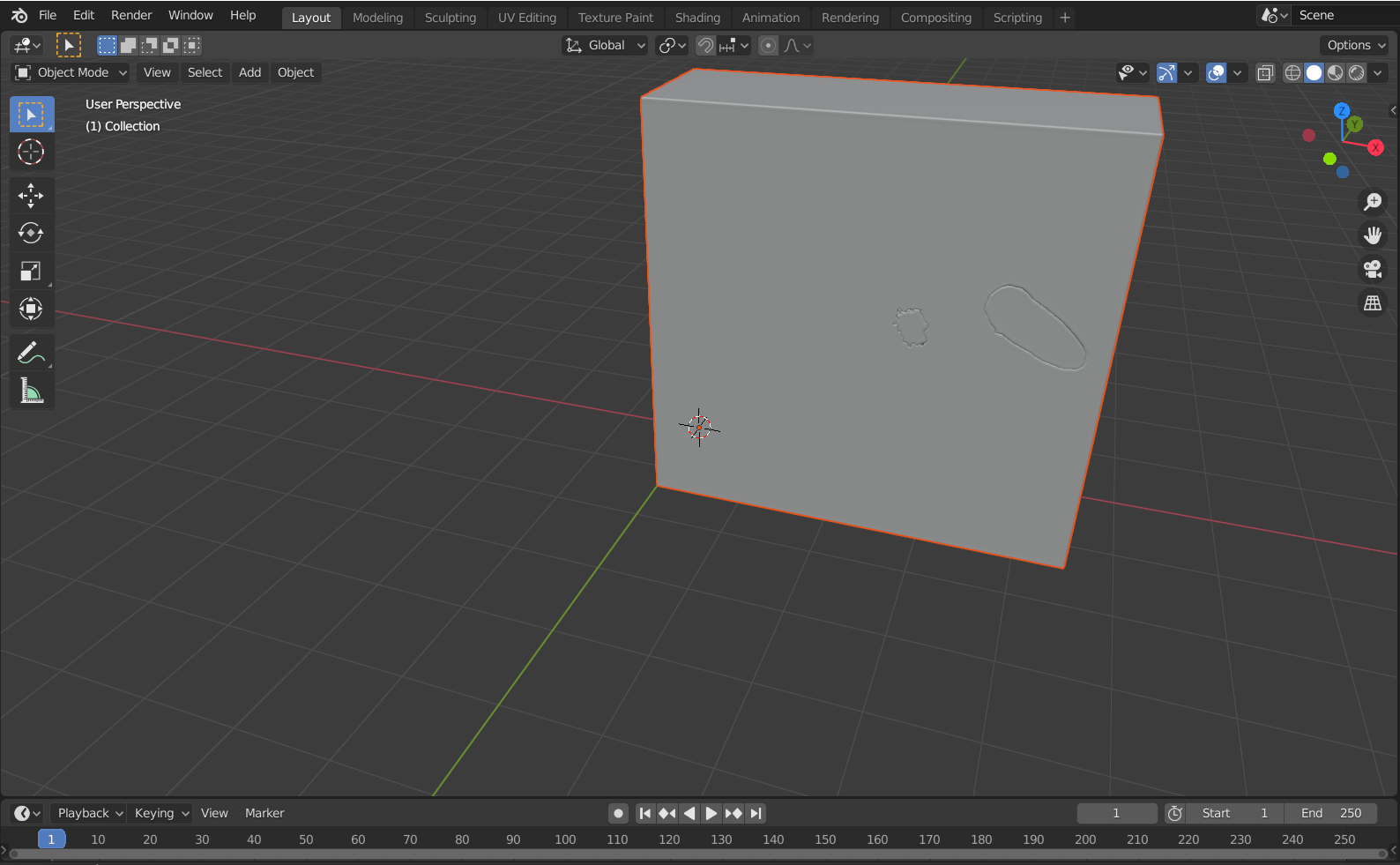
Using help given on other posts I’ve made on here I’ve been able to make a nice looking model on the 3D view panel in the software. However, when I export the file to a .obj file it comes through as just a solid block. Does anybody know how to export only certain elements of the segmentation? Or am I able to make a model that can be printed in the 3D slicer software itself? Any help would be appreciated and I have attached pictures.

---
### Author:  [@lassoan](https://discourse.slicer.org/u/lassoan)
#### Post date: [July 6, 2020, 4:55pm UTC](https://discourse.slicer.org/t/model-generation/12399/2 "2020-07-06T16:55:50Z")
It seems that you export the “Background” segment, too. You can delete this background segment before exporting. In general, if you don’t want to export some segments then hide them and check “Visible segments only” in the “Export segments to files” window.
---
### Author:  [@hherhold](https://discourse.slicer.org/u/hherhold)
#### Post date: [July 6, 2020, 5:21pm UTC](https://discourse.slicer.org/t/model-generation/12399/3 "2020-07-06T17:21:23Z")
Is there a particular reason you’re using OBJ? I’ve found PLY to be a lot smaller and easier to deal with when moving segmentations to blender. OBJ preserves surface colors, other than that, I haven’t seen any advantage to it.
---
### Author:  [@lassoan](https://discourse.slicer.org/u/lassoan)
#### Post date: [July 6, 2020, 5:48pm UTC](https://discourse.slicer.org/t/model-generation/12399/4 "2020-07-06T17:48:18Z")
Yes, the main advantage of OBJ is that it allows exporting many segments in a single file and the segments can be separated in Blender.
---
### Author:  [@hherhold](https://discourse.slicer.org/u/hherhold)
#### Post date: [July 6, 2020, 6:00pm UTC](https://discourse.slicer.org/t/model-generation/12399/5 "2020-07-06T18:00:20Z")
Well shoot, that’s a pretty big advantage.
I usually only export a couple of segments but I will definitely have to keep OBJ in mind. Thanks!!!
---
### Author:  [@muratmaga](https://discourse.slicer.org/u/muratmaga)
#### Post date: [July 6, 2020, 6:25pm UTC](https://discourse.slicer.org/t/model-generation/12399/6 "2020-07-06T18:25:32Z")
> [@lassoan](#):
>
> segments in a single file and the segments can be separated in Blender.
How would you do that in SLicer? Normally, isn’t every segment exported by itself?
---
### Author:  [@lassoan](https://discourse.slicer.org/u/lassoan)
#### Post date: [July 6, 2020, 6:29pm UTC](https://discourse.slicer.org/t/model-generation/12399/7 "2020-07-06T18:29:31Z")
“Export to files” feature (in Segmentations and Segment Editor modules) can export all segments to a single OBJ or STL file.
---
### Author:  [@muratmaga](https://discourse.slicer.org/u/muratmaga)
#### Post date: [July 6, 2020, 6:34pm UTC](https://discourse.slicer.org/t/model-generation/12399/8 "2020-07-06T18:34:53Z")
OK. I was wondering why there was only OBJ and STL, but not PLY there. Makes sense now. THanks.
---
### Author:  [@hherhold](https://discourse.slicer.org/u/hherhold)
#### Post date: [July 6, 2020, 6:40pm UTC](https://discourse.slicer.org/t/model-generation/12399/9 "2020-07-06T18:40:47Z")
Hmm. The “Merge into single file” checkbox is greyed out if I select OBJ but enabled if I select STL.
---
### Author:  [@lassoan](https://discourse.slicer.org/u/lassoan)
#### Post date: [July 6, 2020, 7:07pm UTC](https://discourse.slicer.org/t/model-generation/12399/10 "2020-07-06T19:07:33Z")
In case of OBJ, you don’t need to merge the segments, as they remain separate even when they are stored in a single file. I see how it can be confusing, I’ll update the tooltip text and checkbox state to make this more clear.