# New lightbox (contact image) mode in screen capture module
**URL:** https://discourse.slicer.org/t/new-lightbox-contact-image-mode-in-screen-capture-module/10840
**Category:** Support
**Tags:** feature
**Created:** [March 25, 2020, 11:28pm UTC](https://discourse.slicer.org/t/new-lightbox-contact-image-mode-in-screen-capture-module/10840 "2020-03-25T23:28:56Z")
**Posts on this page:** 8
**Page:** 1
### Author:  [@lassoan](https://discourse.slicer.org/u/lassoan)
#### Post date: [March 25, 2020, 11:28pm UTC](https://discourse.slicer.org/t/new-lightbox-contact-image-mode-in-screen-capture-module/10840/1 "2020-03-25T23:28:56Z")
A new “lightbox image” output type has been added in latest Slicer Preview Release. In this mode captured images are exported as a large grid of images:

Images can be exported from any views, with any animation mode, just select “Output type” → “lightbox image”. Number of columns is adjustable in Advanced section.

We plan to further improve this lightbox view generation in the future and retire dynamic lightbox views. Any comments and suggestions are welcome.
---
### Author:  [@sophiasol](https://discourse.slicer.org/u/sophiasol)
#### Post date: [September 18, 2025, 6:24pm UTC](https://discourse.slicer.org/t/new-lightbox-contact-image-mode-in-screen-capture-module/10840/2 "2025-09-18T18:24:41Z")
Thank so much for the quick reply! Can this be applied to a specific ROI?
Thank you again,
Sophia
---
### Author:  [@lassoan](https://discourse.slicer.org/u/lassoan)
#### Post date: [September 18, 2025, 10:40pm UTC](https://discourse.slicer.org/t/new-lightbox-contact-image-mode-in-screen-capture-module/10840/3 "2025-09-18T22:40:36Z")
Yes, you can choose any ROI: you set the first and last slice in the module and zoom in/out the view to select the relevant part within the slice. An alternative ia tonuae Crop Volume module before capturing the screenshots.
Note that all these are just for producing visuals for presentations, papers, etc. If you need to extract slices for data processing (preserving the data in full fidelity) then you can simply crop and resample the volume.
---
### Author:  [@mohammed\_alshakhas](https://discourse.slicer.org/u/mohammed_alshakhas)
#### Post date: [September 19, 2025, 4:21am UTC](https://discourse.slicer.org/t/new-lightbox-contact-image-mode-in-screen-capture-module/10840/4 "2025-09-19T04:21:06Z")
the control is bit not clear . im trying to do from lateral to medial but seem awkward . with column and number of slices .
can we in addition to capture first preview / view the lightbox first ? live preview is gonna be great for this
---
### Author:  [@sophiasol](https://discourse.slicer.org/u/sophiasol)
#### Post date: [September 19, 2025, 2:37pm UTC](https://discourse.slicer.org/t/new-lightbox-contact-image-mode-in-screen-capture-module/10840/5 "2025-09-19T14:37:53Z")
You were very helpful! Thank you again for such a quick reply.
Best,
Sophia
---
### Author:  [@sophiasol](https://discourse.slicer.org/u/sophiasol)
#### Post date: [September 19, 2025, 2:46pm UTC](https://discourse.slicer.org/t/new-lightbox-contact-image-mode-in-screen-capture-module/10840/6 "2025-09-19T14:46:10Z")
Understood, this is exactly why I need it. Apart from choosing the first and last slide and the number of images, is there a way to define the step and thickness of each slice? For example, an image taken every 1mm of the volume with 1mm thickness?
---
### Author:  [@lassoan](https://discourse.slicer.org/u/lassoan)
#### Post date: [September 19, 2025, 4:04pm UTC](https://discourse.slicer.org/t/new-lightbox-contact-image-mode-in-screen-capture-module/10840/7 "2025-09-19T16:04:03Z")
Step size: the step size comes from dividing the difference between the `start sweep offset` and `end sweep offset` by (`number of images` - 1)
Slice thickness: you can set it in the slice view controller
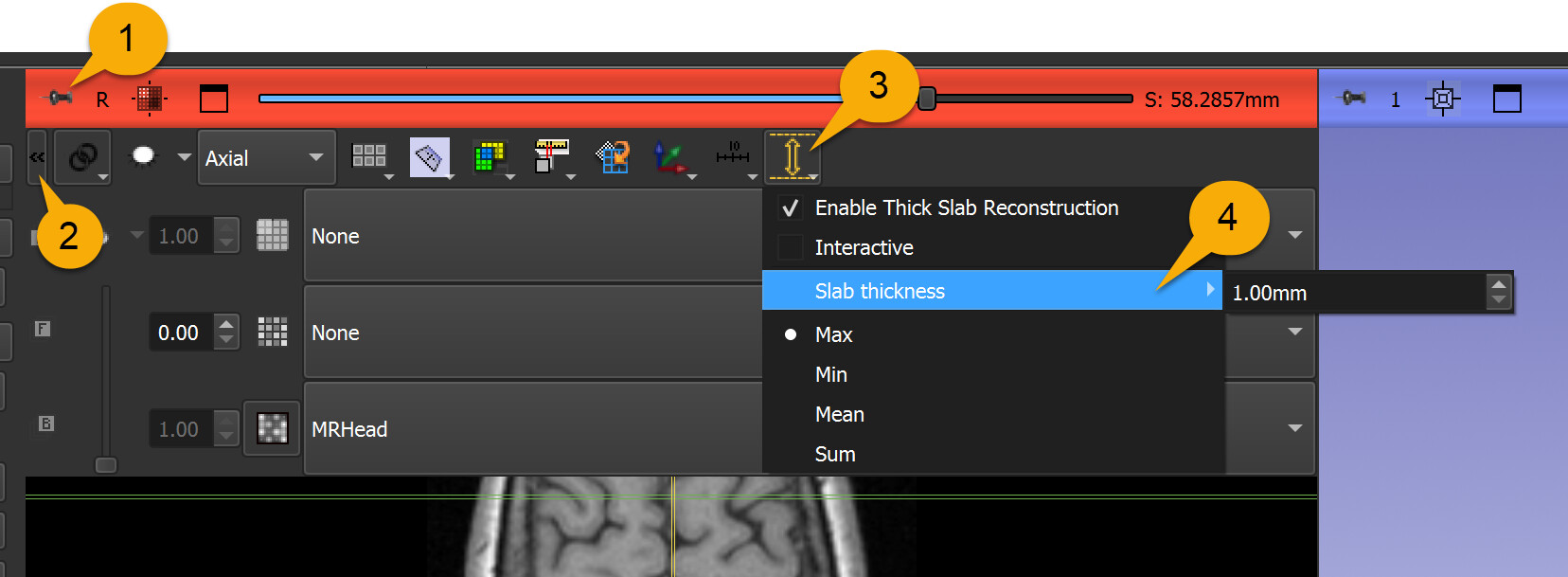
---
### Author:  [@lassoan](https://discourse.slicer.org/u/lassoan)
#### Post date: [September 19, 2025, 4:28pm UTC](https://discourse.slicer.org/t/new-lightbox-contact-image-mode-in-screen-capture-module/10840/8 "2025-09-19T16:28:54Z")
> [@mohammed\_alshakhas](#):
>
> the control is bit not clear . im trying to do from lateral to medial but seem awkward . with column and number of slices .
>
> can we in addition to capture first preview / view the lightbox first ? live preview is gonna be great for this
`Main view`: Choose the slice that has the orientation you need as “main view”. Lateral to medial would be sagittal slicer → `Yellow` slice.
`Capture mode` → `slice sweep`.
`Start sweep offset` and `End sweep offset` → set visually.
`Output type` → `lightbox image`.
`Number of images`: rows x columns. You can set something like 36.
`Advanced / Lightbox image columns` → you can leave the default 6.
