# Pixelated 3D view in Volume Rendering
**URL:** https://discourse.slicer.org/t/pixelated-3d-view-in-volume-rendering/15605
**Category:** Support
**Tags:** volume-rendering
**Created:** [January 20, 2021, 3:22pm UTC](https://discourse.slicer.org/t/pixelated-3d-view-in-volume-rendering/15605 "2021-01-20T15:22:27Z")
**Posts on this page:** 20
**Page:** 1
### Author:  [@mlaw-migalig](https://discourse.slicer.org/u/mlaw-migalig)
#### Post date: [January 20, 2021, 3:22pm UTC](https://discourse.slicer.org/t/pixelated-3d-view-in-volume-rendering/15605/1 "2021-01-20T15:22:27Z")
I loaded data via SlicerMorph SkyscanReconImport.
I go to Volume Rendering and slide the shift bar, everything as as usual, I reveal the bones I am interested in, but then the 3D render becomes pixelated blocks in the 3D view - I have attached a picture for reference.
When moving the 3D view, the image is in good resolution, but when it is stationary the large pixels occur again.
What could be the cause of this?

---
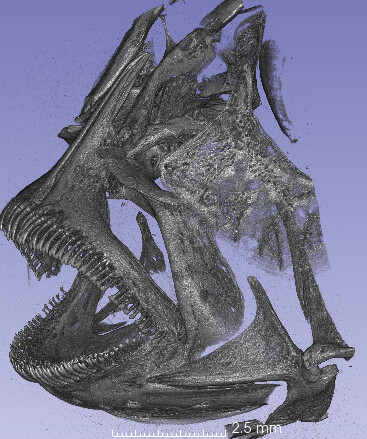
### Author:  [@lassoan](https://discourse.slicer.org/u/lassoan)
#### Post date: [January 20, 2021, 6:43pm UTC](https://discourse.slicer.org/t/pixelated-3d-view-in-volume-rendering/15605/2 "2021-01-20T18:43:36Z")
This looks like a graphics driver bug. What CPU, graphics card, and operating system do you use? What is the size of your volume? What is your Slicer version? Do you see any errors or warnings in the application log (menu: Help / Report a bug)?
---
### Author:  [@muratmaga](https://discourse.slicer.org/u/muratmaga)
#### Post date: [January 20, 2021, 7:02pm UTC](https://discourse.slicer.org/t/pixelated-3d-view-in-volume-rendering/15605/3 "2021-01-20T19:02:37Z")
> [@mlaw-migalig](#):
>
> I loaded data via SlicerMorph SkyscanReconImport.
Can you send a screenshot of the volumes dialog box and a copy of the \*Rec.log file you used to import the volume? I want to rule out the unit issue (micron to mm)…
---
### Author:  [@mlaw-migalig](https://discourse.slicer.org/u/mlaw-migalig)
#### Post date: [January 21, 2021, 2:05pm UTC](https://discourse.slicer.org/t/pixelated-3d-view-in-volume-rendering/15605/4 "2021-01-21T14:05:44Z")
Is this screenshot adequate?

---
### Author:  [@mlaw-migalig](https://discourse.slicer.org/u/mlaw-migalig)
#### Post date: [January 21, 2021, 2:16pm UTC](https://discourse.slicer.org/t/pixelated-3d-view-in-volume-rendering/15605/5 "2021-01-21T14:16:07Z")
CPU: AMD Ryzen 7 5800X
GPU: Nvidia GeForce RTX 3090
Using Windows 64-bit
---
### Author:  [@muratmaga](https://discourse.slicer.org/u/muratmaga)
#### Post date: [January 21, 2021, 3:58pm UTC](https://discourse.slicer.org/t/pixelated-3d-view-in-volume-rendering/15605/6 "2021-01-21T15:58:24Z")
> [@mlaw-migalig](#):
>
> Is this screenshot adequate?
Yes, and based on these I see that SkyscanReconImport did correctly read the voxel sizes and units (5 micron). So it can be a rendering bug as @lassoan mentioned. If you can share the stack as a zip file, I can try the rendering with a RTX Titan, although normally Geforce’s usually work fine.
I also suggest setting the Rendering Quality to Normal from the default adaptive and see if that helps.
---
### Author:  [@mlaw-migalig](https://discourse.slicer.org/u/mlaw-migalig)
#### Post date: [January 21, 2021, 7:15pm UTC](https://discourse.slicer.org/t/pixelated-3d-view-in-volume-rendering/15605/7 "2021-01-21T19:15:12Z")
Even as a zip file, the data is 6.6GB. Do you have a different suggestion for sharing the data?
Thank you for all these comments to troubleshoot, I am still very much a beginner ^^’
---
### Author:  [@muratmaga](https://discourse.slicer.org/u/muratmaga)
#### Post date: [January 21, 2021, 7:23pm UTC](https://discourse.slicer.org/t/pixelated-3d-view-in-volume-rendering/15605/8 "2021-01-21T19:23:47Z")
People typically upload to a cloud sharing site (google drive, onedrive etc) and then share the link, that’s the preferred method.
Alternatively you can upload here, but then it is only going to be shared by me and slicermorph team.
[https://faculty.washington.edu/maga/data\_dropbox/](https://faculty.washington.edu/maga/data_dropbox/)
---
### Author:  [@mlaw-migalig](https://discourse.slicer.org/u/mlaw-migalig)
#### Post date: [January 21, 2021, 9:34pm UTC](https://discourse.slicer.org/t/pixelated-3d-view-in-volume-rendering/15605/9 "2021-01-21T21:34:18Z")
[https://drive.google.com/file/d/19XhOvs4\_6VAwLiZq4HhAN-XO-tOeZsgR/view?usp=sharing](https://drive.google.com/file/d/19XhOvs4_6VAwLiZq4HhAN-XO-tOeZsgR/view?usp=sharing)
---
### Author:  [@muratmaga](https://discourse.slicer.org/u/muratmaga)
#### Post date: [January 22, 2021, 12:01am UTC](https://discourse.slicer.org/t/pixelated-3d-view-in-volume-rendering/15605/10 "2021-01-22T00:01:31Z")
It is not publicly shared, asking for permission.
---
### Author:  [@muratmaga](https://discourse.slicer.org/u/muratmaga)
#### Post date: [January 22, 2021, 4:38pm UTC](https://discourse.slicer.org/t/pixelated-3d-view-in-volume-rendering/15605/11 "2021-01-22T16:38:59Z")
> [@mlaw-migalig](#):
>
> [https://drive.google.com/file/d/19XhOvs4\_6VAwLiZq4HhAN-XO-tOeZsgR/view?usp=sharing](https://drive.google.com/file/d/19XhOvs4_6VAwLiZq4HhAN-XO-tOeZsgR/view?usp=sharing)
I downloaded this from google drive, but the zip file seems corrupt, I can’t unzip it.
---
### Author:  [@mlaw-migalig](https://discourse.slicer.org/u/mlaw-migalig)
#### Post date: [January 25, 2021, 12:02pm UTC](https://discourse.slicer.org/t/pixelated-3d-view-in-volume-rendering/15605/12 "2021-01-25T12:02:54Z")
> **[21322\_oraljaw.zip](https://drive.google.com/file/d/1n6gOLYcO61zc649zHQbXJC0kqYiaaBxL/view?usp=sharing)**
>
> Google Drive file.
I hope this will work. I found a smaller data file that showed the same output.
1. Loading using SlicerMorph - during Volume Rendering, pixelation of the image is seen in the 3D view when stationary.
2. When I load the series of png files using the drag/drop and unselecting ‘Single File’ - during Volume Rendering, the 3D view shows a black box that turns grey when manipulating the ‘Shift’ bar.
Thank you in advance.
---
### Author:  [@muratmaga](https://discourse.slicer.org/u/muratmaga)
#### Post date: [January 25, 2021, 5:17pm UTC](https://discourse.slicer.org/t/pixelated-3d-view-in-volume-rendering/15605/13 "2021-01-25T17:17:11Z")
> [@mlaw-migalig](#):
>
> I hope this will work. I found a smaller data file that showed the same output.
I am checking this.
> [@mlaw-migalig](#):
>
> When I load the series of png files using the drag/drop and unselecting ‘Single File’ - during Volume Rendering, the 3D view shows a black box that turns grey when manipulating the ‘Shift’ bar.
Yes, that’s expected. If you use the default data load menu in Slicer, PNG is treated as an RGB image, and it is not rendered. You need to use the `VectorToScalarVolume` to be able to render this. `ImageStacks` or `SkyscanReconImport` in SlicerMorph does this automatically.
---
### Author:  [@muratmaga](https://discourse.slicer.org/u/muratmaga)
#### Post date: [January 25, 2021, 5:34pm UTC](https://discourse.slicer.org/t/pixelated-3d-view-in-volume-rendering/15605/14 "2021-01-25T17:34:12Z")
> [@mlaw-migalig](#):
>
> Loading using SlicerMorph - during Volume Rendering, pixelation of the image is seen in the 3D view when stationary.
I imported the data both via `ImageStacks` and `SkyscanReconImport` SlicerMorph modules, and cannot replicate the issue (see below). My laptop doesn’t have sufficient GPU RAM to render this in full resolution, so I did have to downsample a bit. Anyways, the issue is not the import or the data.
So going back to the rendering problem, it is possible a driver issue as @lassoan indicated above. Do you have the latest drivers for your Geforce 3090?

---
### Author:  [@mlaw-migalig](https://discourse.slicer.org/u/mlaw-migalig)
#### Post date: [January 27, 2021, 3:48pm UTC](https://discourse.slicer.org/t/pixelated-3d-view-in-volume-rendering/15605/15 "2021-01-27T15:48:57Z")
The 2 lines of warning I get are the following:
[WARNING][Qt] 27.01.2021 16:21:56 [] (unknown:0) - libpng warning: iCCP: profile ‘ICC Profile’: ‘CMYK’: invalid ICC profile color space
[WARNING][Qt] 27.01.2021 16:22:00 [] (unknown:0) - libpng warning: iCCP: known incorrect sRGB profile
The 1 line of error is:
[ERROR][VTK] 27.01.2021 16:23:11 [vtkITKArchetypeDiffusionTensorImageReaderFile (0000016515E34FE0)] (D:\D\S\Slicer-0\Libs\vtkITK\vtkITKArchetypeDiffusionTensorImageReaderFile.cxx:166) - There is more than one file, use the vtkITKArchetypeImageSeriesReader instead.
In terms of driver for GeForce RTX 3090, I have version 461.40.
I uploaded this data via drag/drop and used the VectorToScalarVolume as @muratmaga suggested and there is no pixelation in the Volume Rendering, so I will continue to use this for now.
---
### Author:  [@muratmaga](https://discourse.slicer.org/u/muratmaga)
#### Post date: [January 27, 2021, 6:57pm UTC](https://discourse.slicer.org/t/pixelated-3d-view-in-volume-rendering/15605/16 "2021-01-27T18:57:39Z")
Whatever the reason for the artifact was, it wasn’t due to the `SkyScanReconImport` or `ImageStacks`. As I can’t replicate this with a RTX Titan, full resolution volume renders perfectly fine after importing it via `SkyscanReconImport` .
You can continue to use the default image stack loading mechanism in Slicer, but you will have to do that VectorToScalar conversion everytime you do the import, plus you will have to enter the correct image spacing. These are taken care of during the import time if you `ImageStack` and even more automatically if you use the `SkyscanReconImport` (all you have to do is to point out to the log file and it will obtain the spacing etc). That’s why we developed those two modules.
---
### Author:  [@lassoan](https://discourse.slicer.org/u/lassoan)
#### Post date: [January 28, 2021, 3:48am UTC](https://discourse.slicer.org/t/pixelated-3d-view-in-volume-rendering/15605/17 "2021-01-28T03:48:49Z")
> [@muratmaga](#):
>
> Whatever the reason for the artifact was, it wasn’t due to the `SkyScanReconImport` or `ImageStacks` .
We actually cannot be sure about this. If the image renders consistently well with the default ITK importer and not with the other modules then something might go wrong during the import. For example, there may be subtle differences in file sorting, or which method is used for grayscale conversion (luminance, average, single channel, …), etc. It could worth some more investigation.
---
### Author:  [@muratmaga](https://discourse.slicer.org/u/muratmaga)
#### Post date: [January 28, 2021, 5:29am UTC](https://discourse.slicer.org/t/pixelated-3d-view-in-volume-rendering/15605/18 "2021-01-28T05:29:31Z")
> [@lassoan](#):
>
> We actually cannot be sure about this. If the image renders consistently well with the default ITK importer and not with the other modules then something might go wrong during the import. For example, there may be subtle differences in file sorting, or which method is used for grayscale conversion (luminance, average, single channel, …), etc. It could worth some more investigation.
We tested this quite a bit, and we are not aware of any issues. These are all single channel images to begin with, which default data load mechanism turns it into a multichannel image, in which all channels are identical. So regardless of what conversion you use, you end up in the same place you begin with.
What I wanted to test with that dataset is whether the voxel size read correctly from the log file with SkyscanReconImport. That’s a user customizable field in the Nrecon software and there are a number of prefixes that shows up in the log file over the years (mm, um, micron). And because voxel size seems to impact the 3D rendering quality in Slicer, I thought that might be an issue. It wasn’t.
> [@mlaw-migalig](#):
>
> When moving the 3D view, the image is in good resolution, but when it is stationary the large pixels occur again.
I think this is rendering related.
---
### Author:  [@lassoan](https://discourse.slicer.org/u/lassoan)
#### Post date: [January 28, 2021, 5:35am UTC](https://discourse.slicer.org/t/pixelated-3d-view-in-volume-rendering/15605/19 "2021-01-28T05:35:39Z")
> [@muratmaga](#):
>
> And because voxel size seems to impact the 3D rendering quality in Slicer, I thought that might be an issue. It wasn’t.
I did some tests on two computers and it seems that you are right. If the voxel size is very small, such as in this image, then “Adaptive” quality mode of GPU volume rendering results in pixelated rendering when camera stops (full-quality image is worse than coarse quality). I check if there is an easy fix, but if it is not trivial then we can check again after the VTK9 update (that may fix it).
**Setting quality mode to “Normal” fixes the issue.**
“Normal” quality level is currently the default, but if an older Slicer version created the default settings then the default level was set to “Adaptive”.
---
### Author:  [@muratmaga](https://discourse.slicer.org/u/muratmaga)
#### Post date: [January 28, 2021, 5:40am UTC](https://discourse.slicer.org/t/pixelated-3d-view-in-volume-rendering/15605/20 "2021-01-28T05:40:09Z")
> [@lassoan](#):
>
> “Normal” quality level is currently the default, but if an older Slicer version created the default settings then the default level was set to “Adaptive”.
Thanks Andras. That adaptive setting has been causing quite a bit of issues, particularly for new users. It is particularly troublesome, if they install a new release but because the default settings were carried from older one, they still have to live with “adaptive”. Personally, including an integrated GPUs, I haven’t seen a use case where adaptive makes sense.
Can this be overwritten automatically with a new install?