# Problem about image are not equally spaced
**URL:** https://discourse.slicer.org/t/problem-about-image-are-not-equally-spaced/4482
**Category:** Support
**Tags:** dicom
**Created:** [October 22, 2018, 2:23am UTC](https://discourse.slicer.org/t/problem-about-image-are-not-equally-spaced/4482 "2018-10-22T02:23:23Z")
**Posts on this page:** 7
**Page:** 1
### Author:  [@TingtingYu](https://discourse.slicer.org/u/TingtingYu)
#### Post date: [October 22, 2018, 2:23am UTC](https://discourse.slicer.org/t/problem-about-image-are-not-equally-spaced/4482/1 "2018-10-22T02:23:23Z")
Hi,
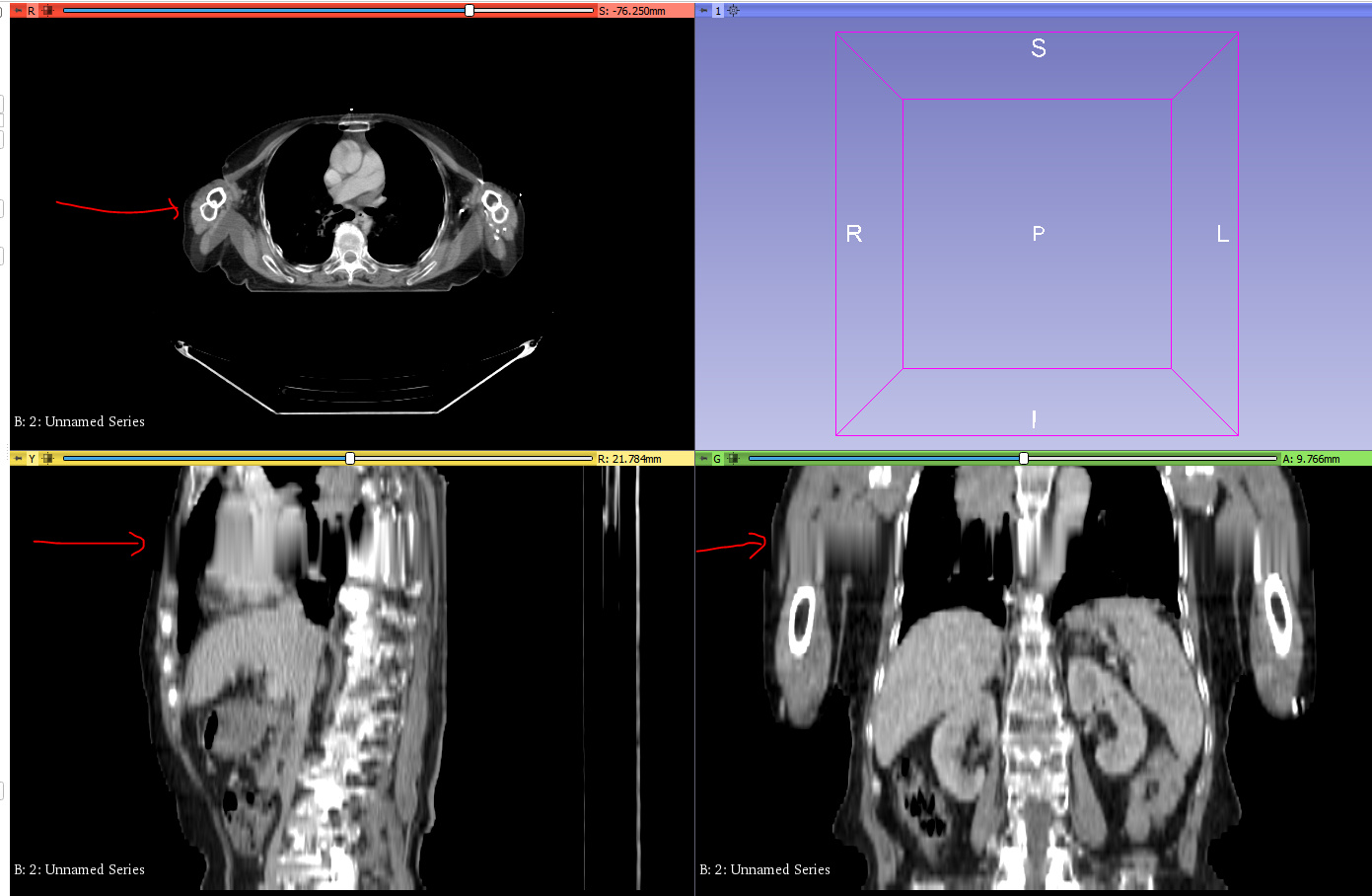
I was trying to import patient images, however, I got the warning after I clicked “examine”. Before I loaded the images, I enabled the “DICOMScalarVolumePlugin” as the warning suggested, but the image still appeared distorted not only in sagittal, coronal direction, but also seems to be disconnected in axial direction. Could you please help me solve this problem?
Many thanks,
Tingting!
[DICOMiMPORT|690x81](https://discourse.slicer.org/uploads/short-url/qtbrvkzJhQ9JZr3SeLU8Dxqz0cM.png)
---
### Author:  [@lassoan](https://discourse.slicer.org/u/lassoan)
#### Post date: [October 22, 2018, 3:41am UTC](https://discourse.slicer.org/t/problem-about-image-are-not-equally-spaced/4482/2 "2018-10-22T03:41:32Z")
Please follow suggestions described in [DICOM faq](https://www.slicer.org/wiki/Documentation/Nightly/FAQ/DICOM#Something_is_displayed.2C_but_it_is_not_what_I_expected) and let us know what you’ve found.
---
### Author:  [@TingtingYu](https://discourse.slicer.org/u/TingtingYu)
#### Post date: [October 23, 2018, 8:22am UTC](https://discourse.slicer.org/t/problem-about-image-are-not-equally-spaced/4482/3 "2018-10-23T08:22:17Z")
Hi Andras,
Thank you. Based on the warnings that I receive when I was using the DICOM module and the DICOM faq you recommended, I modified the application setting, change the acquisition geometry regularization to “apply regularization transform”, I also tried different reader approach. However, I still got the distorted images. Below are the images and the error logs.
Regards,
Tingting



---
### Author:  [@lassoan](https://discourse.slicer.org/u/lassoan)
#### Post date: [October 23, 2018, 11:31am UTC](https://discourse.slicer.org/t/problem-about-image-are-not-equally-spaced/4482/4 "2018-10-23T11:31:18Z")
It looks quite good. It seems you are either missing some slices (or there are extra slices of the same region that interfere with the reconstruction). To diagnose the issue, please send us all the image slice positions occurring in your data set by follow these steps:
- Open DICOM browser
- Click on the patient
- Check `Advanced` checkbox
- Click `Metadata button
- Enter `Image` in the search box
- Click `Copy all files metadata` button to copy image position information on the clipboard
- Paste it to an empty Excel sheet
- Upload the Excel sheet to OneDrive, Dropbox, or any other file sharing service, and paste the link in your response (taking a screenshot of the sheet and attaching it is not enough, as only a small fraction of the data would be visible)

---
### Author:  [@TingtingYu](https://discourse.slicer.org/u/TingtingYu)
#### Post date: [October 24, 2018, 5:39am UTC](https://discourse.slicer.org/t/problem-about-image-are-not-equally-spaced/4482/5 "2018-10-24T05:39:16Z")
Hi Andras,
Thank you for your quick reply. Below is the link to the excel file containing image position information. There are two work sheets. One is about CT image, another is about StructSets.
[https://polyuit-my.sharepoint.com/:x:/g/personal/tt3yu\_polyu\_edu\_hk/EZb\_VmuwjLJGvn4O7GuhNZwBTzYz\_IihN-AsWn4DrEiQUQ?e=lPbMsj](https://polyuit-my.sharepoint.com/:x:/g/personal/tt3yu_polyu_edu_hk/EZb_VmuwjLJGvn4O7GuhNZwBTzYz_IihN-AsWn4DrEiQUQ?e=lPbMsj)
Regards,
Tingting
---
### Author:  [@lassoan](https://discourse.slicer.org/u/lassoan)
#### Post date: [October 24, 2018, 12:34pm UTC](https://discourse.slicer.org/t/problem-about-image-are-not-equally-spaced/4482/6 "2018-10-24T12:34:39Z")
Thank you the table was very useful. It showed that the problem is that you don’t have any slices between coordinates I 66.25 and I 101.25. Slice spacing is 5mm and slices are missing from the end of the list (after 060.DCM), which means that most likely you haven’t received (or did not import into Slicer) files 061.DCM to 067.DCM.
---
### Author:  [@TingtingYu](https://discourse.slicer.org/u/TingtingYu)
#### Post date: [October 25, 2018, 5:46am UTC](https://discourse.slicer.org/t/problem-about-image-are-not-equally-spaced/4482/7 "2018-10-25T05:46:50Z")
Hi Andras,
Thank you. Thank you for helping me figure out the problem. We did miss some files.
Regards,
Tingting