# Segmentation, problem on re-opening files
**URL:** https://discourse.slicer.org/t/segmentation-problem-on-re-opening-files/4369
**Category:** Support
**Created:** [October 11, 2018, 8:36pm UTC](https://discourse.slicer.org/t/segmentation-problem-on-re-opening-files/4369 "2018-10-11T20:36:47Z")
**Posts on this page:** 6
**Page:** 1
### Author:  [@wnzsofia](https://discourse.slicer.org/u/wnzsofia)
#### Post date: [October 11, 2018, 8:36pm UTC](https://discourse.slicer.org/t/segmentation-problem-on-re-opening-files/4369/1 "2018-10-11T20:36:47Z")
Operating system: Windows10
Slicer version: Slicer 4.9.0.
Expected behavior:
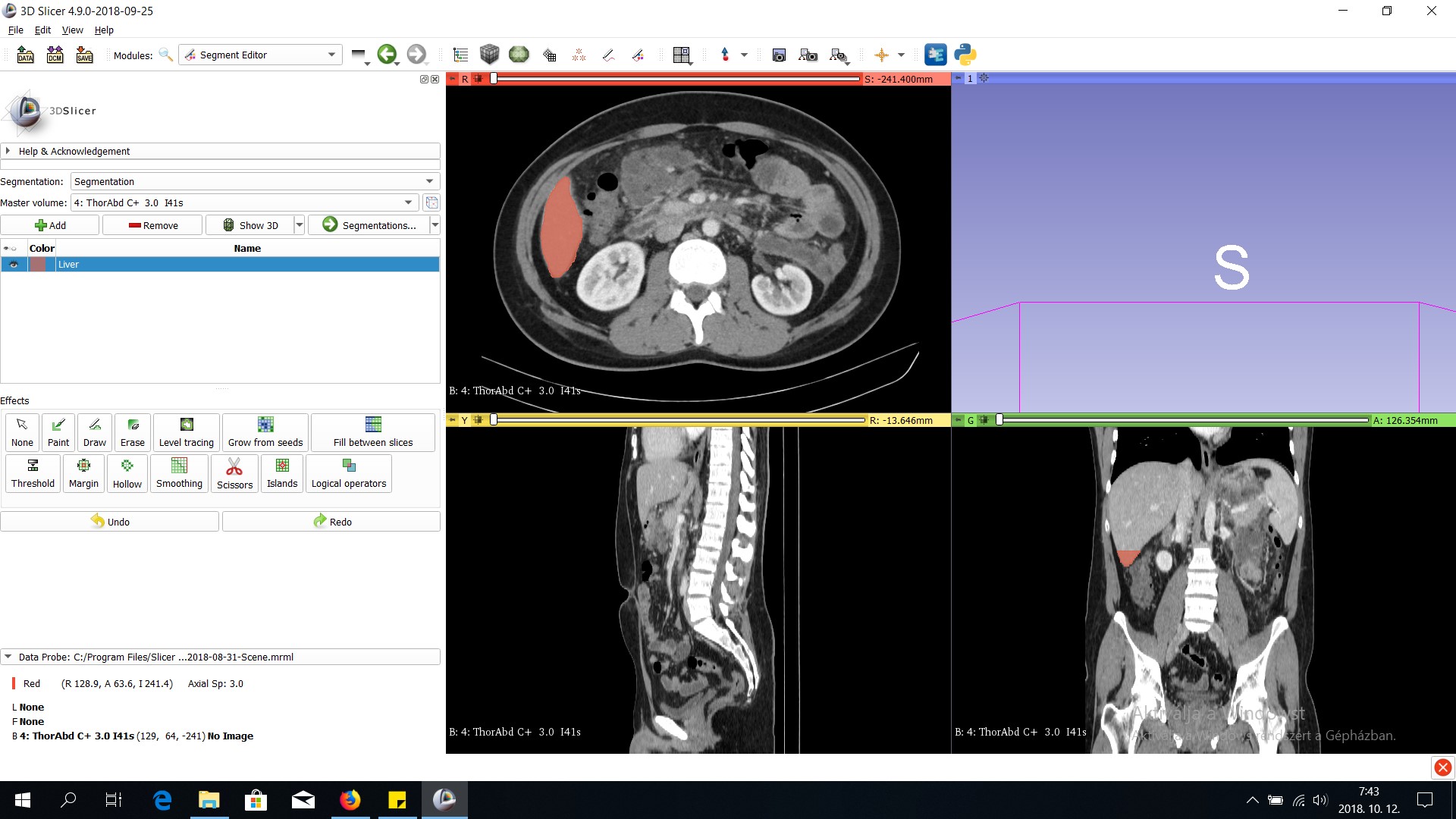
Actual behavior: Hi, I was doing segmentations on the liver and have a problem on re-opening files. Right after re-opening files I can roll with mouse between CT slices but after I begin to use Segment editor I could not roll between slices any more so I can not work on that file again. (Segment editor works on that one slide btw.)
What can be the problem?
Thank you!
---
### Author:  [@lassoan](https://discourse.slicer.org/u/lassoan)
#### Post date: [October 11, 2018, 8:54pm UTC](https://discourse.slicer.org/t/segmentation-problem-on-re-opening-files/4369/2 "2018-10-11T20:54:24Z")
Can you scroll between slices if you move the slider at the top of slice view? Can you post a screenshot?
---
### Author:  [@wnzsofia](https://discourse.slicer.org/u/wnzsofia)
#### Post date: [October 12, 2018, 5:51am UTC](https://discourse.slicer.org/t/segmentation-problem-on-re-opening-files/4369/3 "2018-10-12T05:51:44Z")
No, the top slider does not work either. Here is the print screen.
---
### Author:  [@cpinter](https://discourse.slicer.org/u/cpinter)
#### Post date: [October 12, 2018, 1:32pm UTC](https://discourse.slicer.org/t/segmentation-problem-on-re-opening-files/4369/4 "2018-10-12T13:32:03Z")
The data probe (bottom left) says “no image” , and the sliders are stuck on the left side with no apparent range, so something is wrong with the volume display. Could you send an MRB to us? Click save, then click on the gift-looking icon.
---
### Author:  [@lassoan](https://discourse.slicer.org/u/lassoan)
#### Post date: [October 12, 2018, 2:09pm UTC](https://discourse.slicer.org/t/segmentation-problem-on-re-opening-files/4369/5 "2018-10-12T14:09:02Z")
She showed this to me on Skype and you were right, the volume was invalid (did not contain any image data) due to some scene saving issues. There was a valid volume in the scene and that was shown in the viewers, but when she switched to Segment Editor, the segmentation master volume was set as background volume, which was the invalid volume.
We should fix the slice view pipeline so that if an invalid volume is selected (that has no image data) then a blank slice is displayed (currently the previously selected volume remains displayed).
---
### Author:  [@pieper](https://discourse.slicer.org/u/pieper)
#### Post date: [October 12, 2018, 4:02pm UTC](https://discourse.slicer.org/t/segmentation-problem-on-re-opening-files/4369/6 "2018-10-12T16:02:03Z")
Agreed - the case of an empty image data in a volume node is not handled well currently. I’d always thought is should display a faint grid or something and maybe text that says ‘no image data’.