# Slicer 4.10: Summary, Highlights and Changelog
**URL:** https://discourse.slicer.org/t/slicer-4-10-summary-highlights-and-changelog/4610
**Category:** Release Notes
**Created:** [November 7, 2018, 1:48pm UTC](https://discourse.slicer.org/t/slicer-4-10-summary-highlights-and-changelog/4610 "2018-11-07T13:48:43Z")
**Posts on this page:** 2
**Page:** 1
### Author:  [@jcfr](https://discourse.slicer.org/u/jcfr)
#### Post date: [November 7, 2018, 1:48pm UTC](https://discourse.slicer.org/t/slicer-4-10-summary-highlights-and-changelog/4610/1 "2018-11-07T13:48:43Z")
# Table of Contents
- [Summary](#heading--summary)
- [Highlights](#heading--highlights)
- [Detailed Changelog](https://discourse.slicer.org/t/slicer-4-10-summary-highlights-and-changelog/4610/2)
# Summary
The community of 3D Slicer developers is proud to announce that version 4.10 is [now available for download](http://download.slicer.org/). This version introduces ~500 feature enhancements and bug fixes for better performance and stability. It includes more than 20 new-and-improved core modules and more than 25 new-and-improved extensions.
The development of 3D Slicer—including its numerous modules, extensions, datasets, pull requests, patches, issues reports, suggestions—is made possible by users, developers, contributors and commercial partners around the world. This development is funded by various grants and agencies. For more details, please see the 3D Slicer [Acknowledgments](https://www.slicer.org/wiki/Documentation/4.x/Acknowledgments) page.
[slicer.org](https://www.slicer.org/) is the portal to the application, training materials, and the development community.
The [Slicer Training](https://www.slicer.org/wiki/Documentation/4.10/Training) page provides a series of tutorials and data sets for training in the use of Slicer.
_Please note that Slicer continues to be a research package and is not intended for clinical use. Testing of functionality is an ongoing activity with high priority, however, some features of Slicer are not fully tested._
# Highlights
## Rendering improvements
Switched to completely reworked rendering infrastructure, which enables 10-100x **faster rendering of complex surface models** , faster **GPU-accelerated volume rendering** , available on a wider range of devices, such as **laptops with integrated GPU**. The minimum required OpenGL version is now 3.2.
- GPU volume rendering has now **Surface smoothing** option to remove woodgrain artifacts without increasing rendering time (enable at Volume rendering / Advanced / Techniques / Advanced rendering properties).
- New **optimized volume rendering quality option** : “Normal” optimized image sampling parameters based on volume size and resolution
- New **multi-volume rendering** mode (Volume renderig/Display/Rendering: VTK Multi-Volume): experimental, shading and dynamic clipping not supported yet. Example of skull rendered from CT and stripped brain from MRI:
- **Smooth clipped surfaces** : clipping ROI boundaries are now rendered as smooth planes
- Gradient opacity mapping: gradient opacity mapping can be used to **make soft-tissues** (or other regions with slowly varying image intensity) **semi-transparent**. It now works with both CPU and GPU volume rendering.
- Depth peeling: **transparent surface meshes (models, segmentations) are now correctly rendered** (enable depth peeling by clicking push-pin icon in 3D view, triple-dot button, Use depth peeling checkbox)
- **Improved performance on systems with many CPU cores** by using [Threaded Building Blocks (TBB)](https://www.threadingbuildingblocks.org/) as SMP backend in VTK. It is enabled by default on Windows. Multi-threaded image filter execution is typically improved by 20-30%. For more details, read the [Performances](https://discourse.slicer.org/t/slicer-4-10-summary-highlights-and-changelog/4610#heading--performances) section in the Changelog.
## Segmentation improvements
Many improvements and fixes has been implemented in [Segment Editor](https://slicer.readthedocs.io/en/latest/user_guide/module_segmenteditor.html) and related modules.
- **Convert solid segments to [hollow objects](https://discourse.slicer.org/t/new-segment-editor-effect-for-creating-hollow-objects)**, for example to create 3D-printable vessel wall from segmented blood pool.
- New Draw Tube effect added for **segmentation of tubular shapes** (nerves, flexible catheters, etc.) from control points placed in slice or 3D viewers - available in [SegmentEditorExtraEffects](https://github.com/lassoan/SlicerSegmentEditorExtraEffects) extension.
- **[Save segmentations directly to STL or OBJ files](https://discourse.slicer.org/t/save-segmentation-directly-to-stl-or-obj-files/2428) for 3D printing** or exporting to external modeling software
- **Improve segmentation quality** by setting finer resolution, isotropic voxel size in the segmentation node’s internal labelmap representation. Click the box icon  next to the master volume selector to open the Segmentation geometry window.
- **Improved 3D update speed** by up to 5x: disable surface smoothing (surface smoothing factor is set to 0) and then 3D view is updated immediately after a segmentation is edited
- **Automatically alignment of slice views** : if slice views are not oriented according to axes of internal labelmap then a warning icon  appears. Clicking the icon automatically realigns all slice views.
- **Find small segments** in a large volume easier: click “Jump slices” option to context menu (right-click menu) of segment list to show segment centered in all slice views.
- **Improved paint and erase effect** : (1) Made painting/erasing in 3D view optional, (2) Added “smudge” option to paint effect: auto-select segment at click position, and (3) added option to erase in all segments.
## Improved Python support
- **[Slicer can be used via Jupyter notebooks](https://discourse.slicer.org/t/jupyter-notebooks-are-now-usable-in-3d-slicer)**. Supports auto-complete, inspection (documentation lookup), showing slice and 3D view content in the notebook.
- **Slicer notebooks** can be launched directly **on the cloud in any web browser**. Can be used on any platforms, even on a phone, **no Slicer installation is necessary**. [Try now!](https://mybinder.org/v2/gh/slicer/SlicerNotebooks/master) [](https://mybinder.org/v2/gh/slicer/SlicerNotebooks/master)
- **Any Python script can be loaded into Slicer as a CLI module**. User interface in Slicer is generated automatically from module descriptor XML file. See [Radiomics module](https://github.com/Radiomics/SlicerRadiomics/tree/master/SlicerRadiomicsCLI) as an example.
## Virtual Reality
[3D Slicer scenes can be viewed in any OpenVR-compatible virtual reality headset](https://blog.kitware.com/slicervirtualreality/)([https://blog.kitware.com/slicervirtualreality/](https://blog.kitware.com/slicervirtualreality/)), such as HTC Vive, any Windows MR headset, or Oculus Rift, by a single button click. 3D Slicer supports all rendering modes, including 4D volume rendering. User can walk or “fly” around, look in inside objects. **Individual objects or the entire scene can be moved** , translated, rotated using controllers: can be used for exploring anatomy (may replace 3D printing in some applications), simulated device placement, interactive 3D registration, etc.
[ ](https://www.youtube.com/watch?v=F_UBoE4FaoY)
## Other improvements
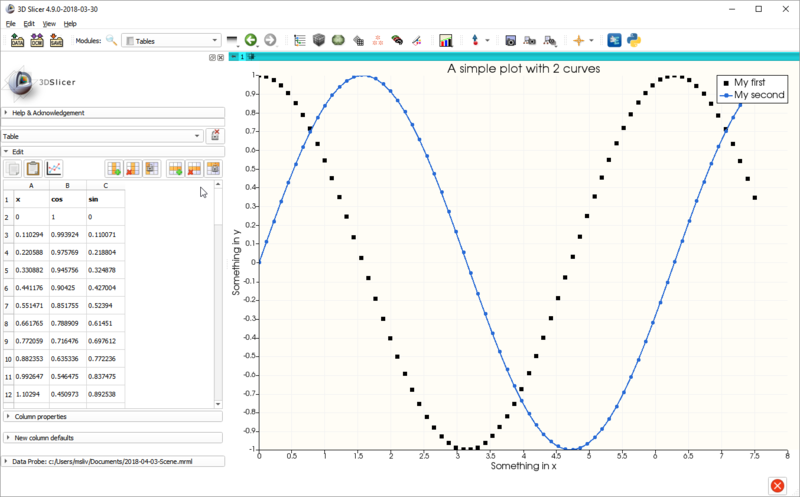
- **Plotting** capabilities have improved with the new [Plots](https://www.slicer.org/wiki/Documentation/Nightly/Developers/Plots) module. Plots can be created directly from tables (stored as .csv files). Line, scatter, bar plot types, various line styles. Custom labels, axes, interactive editing and selection of values.
- **Custom 3D Slicer-based clinical research or commercial applications** can now be developed and maintained more easily: a new [application template was developed](https://github.com/KitwareMedical/SlicerCustomAppTemplate) that gives broad control over the application’s look and feel (custom stylesheet, icons, branding, main window content) and content (custom extensions, modules can be bundled, any Slicer core modules can be disabled). The template is already used for building custom research tools, such as [SlicerSALT](http://salt.slicer.org/) and multiple clinical software applications.
- **Markup fiducials can be copied to clipboard** and pasted into Excel or into other markup fiducial list.
- **Screen capture** : **Master view can be different from captured views** , therefore for example it is now possible to sweep a slice view and capture it in 3D view (master view is a slice node; capture all frames enabled; layout is 1-up 3D). Video can be exported that repeats the animation multiple times, optionally in forward/backward direction, which enables **sharing very short (few-second) videos on YouTube** or other video players where continuous looped playback is not available.
- **26 new extensions** have been added - [see complete list below](#heading--new)
---
### Author:  [@lassoan](https://discourse.slicer.org/u/lassoan)
#### Post date: [November 8, 2018, 6:49am UTC](https://discourse.slicer.org/t/slicer-4-10-summary-highlights-and-changelog/4610/2 "2018-11-08T06:49:44Z")
# Changelog
- [Core](#heading--core)
- [Performances](#heading--performances)
- [Features](#heading--features)
- [Fixes](#heading--fixes)
- [Internationalization/Localization](#heading--internationalizationlocalization)
- [IO](#heading--io)
- [DICOM](#heading--dicom)
- [Multivolume/Sequences Support](#heading--multivolumesequences-support)
- [API Updates](#heading--api-updates)
- [Python Scripting](#heading--python-scripting)
- [Infrastructure](#heading--infrastructure)
- [Dashboard and Factories](#heading--dashboard-and-factories)
- [Build System](#heading--build-system)
- [Custom Slicer application support](#heading--custom-slicer-application-support)
- [Dependencies](#heading--dependencies)
- [Qt](#heading--qt)
- [ITK](#heading--itk)
- [VTK](#heading--vtk)
- [New Modules](#heading--new-modules)
- [Plots](#heading--plots)
- [Improved Modules](#heading--improved-modules)
- [BRAINSTools](#heading--brainstools)
- [Colors](#heading--colors)
- [Data](#heading--data)
- [Data Probe](#heading--data-probe)
- [Extract Skeleton](#heading--extract-skeleton)
- [Endoscopy](#heading--endoscopy)
- [Extension Wizard](#heading--extension-wizard)
- [Cameras](#heading--cameras)
- [Label Map Statistics](#heading--label-map-statistics)
- [Landmark Registration](#heading--landmark-registration)
- [Markups / Fiducials / Annotations](#heading--markups--fiducials--annotations)
- [Models, Surface Toolbox](#heading--models-surface-toolbox)
- [ProbeVolumeWithModel](#heading--probevolumewithmodel)
- [Sample Data](#heading--sample-data)
- [Segmentations / Segment Editor / Segment Statistics](#heading--segmentations--segment-editor--segment-statistics)
- [Simple Filters](#heading--simple-filters)
- [Scene Views](#heading--scene-views)
- [Screen Capture](#heading--screen-capture)
- [Transforms](#heading--transforms)
- [VectorToScalarVolume](#heading--vectortoscalarvolume)
- [Volumes](#heading--volumes)
- [Volume Rendering](#heading--volume-rendering)
- [Removed Modules](#heading--removed-modules)
- [Extensions](#heading--extensions)
- [New](#heading--new)
- [Improved](#heading--improved)
## Core
### Performances
- [Threaded Building Blocks (TBB)](https://www.threadingbuildingblocks.org/) is now available as a SMP backend in VTK.
- Speedup app startup time by lazily instantiating extension dialog: With the introduction of Qt5, this became an issue because instantiating a QWebEngineView also means that QtWebEngineProcess is started. Read details at [r26960](http://viewvc.slicer.org/viewvc.cgi/Slicer4?view=revision&revision=26960).
- Use new, optimized VTK filters for isosurface extraction and plane cutting. vtkDiscreteMarchingCubes replaced with vtkDiscreteFlyingEdges3D, and vtkCutter replaced with vtkPlaneCutter. With TBB backend, computation time for complex surfaces (e.g., obtained by thresholding a noisy grayscale volume) is decreased by a factor of 30-500%.
- Speedup application launch by 50% when handling of command-line argument displays a message and exits the application. This was done by introducing the function quickExit allowing to quickly terminate the process. More details at [r27015](http://viewvc.slicer.org/viewvc.cgi/Slicer4?view=revision&revision=27015).
- Ensure application quickly exit if problem parsing cmd line arguments
- Improve reslicing performance: When slice position was changed, all inputs of slice image blend filters were reset, which caused measurable slowdown in some cases. This fix makes sure that slice inputs are only reset if they have been changed. It improves reslice speed by a few FPS, and much more in some special cases.
- Improve rotate to volume plane algorithm. Slice plane is always rotated to the closest matching plane orientation. If a single-slice volume is selected then volume plane normal is selected as slice plane normal. Also added RotateToAxes method, which allows aligning slice with an arbitrary coordinate system, defined by a homogeneous transformation.
- Hide/show crosshairs actor instead of using the more expensive add/remove.
- Prevent unnecessary 3D view updates. When slice view was moved or crosshair was moved, 3D view was always updated, even if slice and crosshair were not visible in the 3D view. This caused unnecessary slowdown of slice browsing.
### Features
- Add 3d views linking capability.
- Add confirmation dialog for scene close. User can choose to disable confirmation dialog in application settings (“Confirm on scene close” checkbox).
- Enable high-resolution screenshots of slice views.
- Update CTKAppLauncher: Add support for interactive process. See [https://discourse.slicer.org/t/static-build-of-qt5-to-update-the-application-launcher-and-support-interactive-process/3801](https://discourse.slicer.org/t/static-build-of-qt5-to-update-the-application-launcher-and-support-interactive-process/3801)
- Add the ability to restore extensions from a previous Slicer install.
- Ensure Slicer process has a name in macOS Activity monitor.
### Fixes
- Report insufficient OpenGL support instead of crashing.
- Fix Windows remote desktop re-connection on OpenGL version check. If insufficient OpenGL version is found on Windows then a “Retry” option is offered, which closes current remote desktop session and restarts Slicer.
- Fix high DPI display on windows with multiple screens.
- Fix passing module paths containing single quote. Add SlicerCorePythonManager::toPythonStringLiteral method to create Python string literals from string values.
- Create user-specific temporary directory on unix systems. Slicer temporary directory is owned by the user who started Slicer first and is not writeable for other users.
- Reset scene name when closing the scene.
- Fix running of script specified with native path separators.
- Fix crash on scene close caused by annotation ROI node.
- Fix add and subtract slice blending modes.
- Fix slice normal flipping by rotate to volume plane. “Rotate to volume” always set slice (X, Y, normal) axes to form a right-handed coordinate system. However, by default, axial and sagittal views are set up with a left-handed coordinate system, so “Rotate to volume” feature flipped the slice normal (slice moved in opposite direction when moving the slider the same direction) for axial and sagittal views. Fix problem by flipping the slice plane normal if and only if input slice coordinate system was left-handed.
### Internationalization/Localization
- Add translation support for loadable modules as well as MRML Widgets.
- Improve support for Chinese language by fixing qSlicerCoreApplication::loadTranslations() and also encoding special characters for subject hierarchy item attributes. See [https://discourse.slicer.org/t/slicer-mrml-scene-not-loading/2090](https://discourse.slicer.org/t/slicer-mrml-scene-not-loading/2090)
- Add more string translation in qSlicerAppMainWindow and qMRMLCaptureToolBar.
### IO
- Features
- Fixes
### DICOM
Most changes to the DICOM module are under-the-hood improvements to provide additional flexibility to load a wider variety acquisition types with fewer warning messages and redundant confirmation dialogs. Added extensive options to DICOM header (metadata) viewer to allow exporting all or selected fields for troubleshooting and data mining. Also improved DICOM utility methods to make it easier for developers to import and load DICOM data sets.
### Multivolume/Sequences Support
MultiVolume support was improved with new features (support of multivolume import from 4D NIfTI), incremental improvements (improved robustness of cardiac CT import, support of import of multivolume as Sequences, improved progress reporting, migration of the infrastructure to use Plotting module in place of VTK plots) and bug fixes.
### API Updates
- Add API to add border around fullscreen app window. On Windows, when turning on OpenGL and using the full screen mode (mainWindow=slicer.util.mainWindow().showFullScreen()), menus and tooltips were no longer visible. By enabling setHasBorderInFullScreen, a one-pixel border is added around the window, which fixes the problem. See [http://doc.qt.io/qt-5/windows-issues.html#fullscreen-opengl-based-windows](http://doc.qt.io/qt-5/windows-issues.html#fullscreen-opengl-based-windows)
- User information can be saved to application settings using slicer.app.applicationLogic().GetUserInformation(). User information can be edited in application settings (User panel).
- Set default attribute value for Scene::Clear(bool). This change allows clearing the scene by simply calling scene.Clear().
- Add Pick3D function for 3D displayable managers. 3D displayable managers can implement their Pick3D function which takes a RAS point, and finds the display node that was picked. It can be queried using GetPickedNodeID. Implemented for models, segmentations, and volume rendering
- Allow excluding views from main layout management. See [KitwareMedical/SlicerOpenVR#18](https://github.com/KitwareMedical/SlicerOpenVR/issues/18)
- Add pause render functions to qMRMLLayoutManager and qSlicerApplication: When modifying or setting up nodes that may trigger a render event, pauseRender can be called to temporarily stop the view from rendering intermediate steps. Once all modifications have been completed, calling resumeRender will restore the previously stored pause states.
- Add method in ThreeDViewControllerWidgetPrivate to retrieve ViewLogic from ViewNode.
- Add color support to 3D view controllers. The layout view property ‘viewcolor’ was only available for slice views. By sinking the LayoutColor member variable from vtkMRMLSliceNode to vtkMRMLAbstractViewNode, and adding accessor functions to qMRMLThreeDWidget and controller similar to those in the slice widgets, this property can now be set to 3D views as well.
- Add fit option to slicer.util.setSliceViewerLayers().
- Refactor and improve underlying infrastructure to support browsing capabilities provided by Qt4 (QWebView) and Qt5 (QWebEngineView).
- Add C++ macros for reading, writing, copying, and printing MRML node properties. For more details, read [Why use macros instead of functions ?](http://viewvc.slicer.org/viewvc.cgi/Slicer4?view=revision&revision=26900).
- Add Set/GetOrientationMatrixColumn methods to vtkAddonMathUtilities.
- Add “IsNodeClassRegistered” function to vtkMRMLScene.
- Add MeanDiffusivity calculation to vtkDiffusionTensorMathematics class.
### Python Scripting
- Change Slicer’s Python executable to PythonSlicer. This allows using Slicer’s Python executable as an interpreter in PyCharm (to make available auto-complete and method documentation in the editor).
- Support import of Slicer python packages using PythonSlicer.
- Support loading module script starting with ‘!#’ as Python CLI.
- Add python utilities that download, unzip, import, and load DICOM data.
- Add accessor functions to layout manager and factory.
- Numpy Integration
- Wrapping
- Performance
- Fixes
## Infrastructure
### Dashboard and Factories
- Switch continuous integration to CircleCI 2.0 leveraging the “slicer/slicer-base” docker image based of “slicer/buildenv-qt5-centos7”. See [https://github.com/Slicer/SlicerBuildEnvironment](https://github.com/Slicer/SlicerBuildEnvironment) and [https://github.com/thewtex/SlicerDocker](https://github.com/thewtex/SlicerDocker).
- Improve dashboard driver script used to test both Slicer application and Slicer extensions as well as custom Slicer-based applications. Dashboard script templates is also easier to customize and read (50% less lines).
- Add support for uploading extension packages to a Girder based server.
- “Slicer Nightly” build has been renamed to “Slicer Preview”. See [https://discourse.slicer.org/t/different-dashboard-for-master-and-stable-builds/2091](https://discourse.slicer.org/t/different-dashboard-for-master-and-stable-builds/2091).
- License information is now tracked for all external projects and remote modules: A license-.txt file is generated for each external projects. This should help compose the list of open source packages used in a Slicer based applications.
- Add [runCodespell](https://github.com/codespell-project/codespell#readme) maintenance script to identify and help fix typo in Slicer source code.
- Reduce noise reported on the quality dashboard updating CTestCustom warning exception list.
- Add support for uploading extension package to a Girder based server. See [https://github.com/girder/slicer\_extension\_manager#readme](https://github.com/girder/slicer_extension_manager#readme).
### Build System
- Support building Slicer against either Qt4 or Qt5.
- Subversion is no longer required to configure Slicer.
- SuperBuild extension templates have been improved.
- IDE support
- Update infrastructure used to regenerate the Slicer.crt Certificate authority bundle. The bundle is used to confirm the “digital identity” of peers when establishing secure connection over https. See [Slicer/Base/QTCore/Resources/Certs/README](https://github.com/Slicer/Slicer/blob/master/Base/QTCore/Resources/Certs/README).
- Streamline future update of major version of ITK and VTK by renaming external project file.
- Fix build issues with GCC7.
- Fix building with a virtualenv system python.
- Update SlicerInitializeOSXVariables CMake module with latest macOS version.
- Improve build system to fail early if requirements are not met.
- Improve consistency of external projects (External\_\*.cmake) in Slicer and CTK.
- Update dynamic analysis infrastructure. Read [r26993](http://viewvc.slicer.org/viewvc.cgi/Slicer4?view=revision&revision=26993) commit message for more details.
- Improve support for ninja build tool adding support for CMAKE\_JOB\_\* options. See [https://discourse.slicer.org/t/ninja-build-using-too-many-cores/2304](https://discourse.slicer.org/t/ninja-build-using-too-many-cores/2304)
- Fix configuration of valgrind script on macOS
- Update SuperBuild extension template to work around ExternalProject issue and submit a CMake fix. See [https://gitlab.kitware.com/cmake/cmake/merge\_requests/1838](https://gitlab.kitware.com/cmake/cmake/merge_requests/1838) and [viewvc.slicer.org/viewvc.cgi/Slicer4?view=revision&revision=27038](http://viewvc.slicer.org/viewvc.cgi/Slicer4?view=revision&revision=27038)
- Contribute improvements to [ExternalProjectDependency](https://cmake-artichoke.readthedocs.io) CMake module:
- Update UseSlicer to conveniently include ExternalProject CMake module and ensure that the CMAKE\_OSX\_ variables are passed to all external projects when used in SuperBuild extension.
### Custom Slicer application support
- Modernize the Slicer Custom Application template [https://github.com/KitwareMedical/SlicerCustomAppTemplate](https://github.com/KitwareMedical/SlicerCustomAppTemplate) and introduce use of cookiecutter template for generating a custom application.
- Introduce application properties to differentiate Slicer and main app version. Custom Slicer application can have their own metadata (version number, description, …) in addition of the Slicer ones. See [r27316](http://viewvc.slicer.org/viewvc.cgi/Slicer4?view=revision&revision=27316) for more details.
- Slicer util messageBox now shows current actual application name.
- Dependencies
- Slicer Refactoring:
- Packaging:
- Slicer CMake modules
### Dependencies
#### Qt
- Update from Qt 4.8 to Qt 5.11
#### ITK
- Update ITK to 4.13.1, for more information on the new features available see the [ITK 4.13 release notes](https://discourse.itk.org/t/itk-4-13-has-been-released/549).
- DICOM image reading, which is provided by ITK, can now optionally use ITK’s DCMTK backend in addition to the GDCM backend.
- Anticipating the transition to ITK 5, the code has been updated to build with the option ITK\_LEGACY\_REMOVE set to ON.
#### VTK
- Update from VTK 7.1 to VTK 8.2:
## New Modules
### Plots
- Features
- Python API
## Improved Modules
### BRAINSTools
- Update DWIConvert module to fix conversion of FSL (\*.nii.gz) to NRRD file
### Colors
- Feature:
### Data
- Features
- API
- Fixes
### Data
Probe
- Improve user experience keeping DataProbe height consistent.
- Fix logic used to hide slice view corner annotations.
### Extract Skeleton
- Fix centerline points computation.
### Endoscopy
- Fix camera update: No camera Modified event is invoked until all camera parameters are updated. Camera view up vector and clipping range is automatically recomputed.
- Increase maximum replay speed by allowing skipping 50 points (was 10 before).
### Extension Wizard
- Add created module paths to search paths by default.
- Include name of target in pull request title
- Fix contribution of extensions targeting a specific version of the ExtensionsIndex.
### Cameras
- Fix vtkMRMLCameraNode::ResetClippingRange(): Far clipping plane was approximated from camera distance form focal point, which was often incorrect.
- Fix start/end modify for vtkMRMLCameraNode: ModifiedEvent was invoked directly by calling InvokeEvent(), which was not intercepted in DisabledModified state. Fixed by using Modified() method instead.
### Label Map Statistics
- Add Median computation support.
### Landmark Registration
- Known issue: This module has not changed much, but is currently not working pending the resolution of [bug #4634](https://issues.slicer.org/view.php?id=4634).
### Markups / Fiducials / Annotations
- Features
- Fixes
### Models, Surface Toolbox
- Features
- Fixes
### ProbeVolumeWithModel
- Add support for volumetric meshes.
### Sample Data
- Support adding custom data category.
- Add Development category that only shows up in Developer mode
- Add one dataset in the Development category: TinyPatient, containing a 10x10x10 CT and a binary labelmap segmentation with two segments.
- Stop trying to download data after five attempts (it could get into infinite loop)
- Add MRBrain sample data set.
- Try to download sample data again if loading fails.
### Segmentations / Segment Editor / Segment Statistics
- Features
- Python
- Performance
- Fixes
### Simple Filters
- Update SimpleITK version to v1.1.0
- Avoid installing SimpleITK archive lib and reduce Slicer package size
### Scene Views
- Fix writing of scene view description to scene file keeping HTML tags.
- Prevent crash when saving MRML scene with SceneView module is disabled.
- Refactor scene views module to use Qt Widgets instead of a web widget.
### Screen Capture
- Allow frames-per-second specification as alternative to video length: this makes it easier to create videos from sequences that are played at original acquisition speed (e.g., X-ray fluoroscopy frames taken at particular FPS).
- Allow using not visible master view: It is now possible to have a slice sweep and capture 3D view (master view is a slice node; capture all frames enabled; layout is 1-up 3D).
- It is now possible to export a video that is playing the animation forward and backwards.
- Animation can be repeated multiple times. This allows making very short (few-second) videos easier to view in players where continuous looped playback is not available (e.g., YouTube and some media players).
### Transforms
- Extend volume if non-linear transform is hardened: Voxel grid of the volume was not changed when non-linear transform was hardened on it, which could cause clipping of the volume. Now volume is automatically extended to contain the transformed volume.
- Prevent re-registration of custom ITK transform types: Profiling indicated that it takes noticeable time to re-register when a large number of transform nodes are instantiated.
- Fix transform hierarchy errors after scene load.
### VectorToScalarVolume
- Expand the module with two new options: (2) Extract a single component from any vector image, not only RGB and (3) Compute the average of all the components of the vector image. Existing option (1) allows computing the luminance from a RGB image.
### Volumes
- Fix crash if a volume with empty image data is exported by volumes logic. See [https://discourse.slicer.org/t/convert-label-map-volume-into-a-scalarvolumenode/3550](https://discourse.slicer.org/t/convert-label-map-volume-into-a-scalarvolumenode/3550) and [r27291](http://viewvc.slicer.org/viewvc.cgi/Slicer4?view=revision&revision=27291) commit message.
- Volumes module histogram:
- Update CTK to prevent crash in ctkVTKVolumePropertyWidget
### Volume Rendering
- Features
- API
- Fixes
## Removed Modules
- Remove EMSegment modules and disable support for Tcl and associated python-tcl bridges.
- Remove OpenIGTLink from Slicer core. Instead, OpenIGTLink modules are distributed in an extension. This allows more frequent updates with fixes and new features.
## Extensions
The Slicer [extensions manager](https://www.slicer.org/wiki/Documentation/Nightly/SlicerApplication/ExtensionsManager) enables Slicer users to install more than 100 extensions written and contributed by their peers from around the world.
### New
- [**DiffusionQC**](https://github.com/pnlbwh/SlicerDiffusionQC#readme): This extension provides a quality-estimation algorithm for diffusion-weighted MRI gradient images, paired with an interactive, graphical review and approval tool. It identifies bad gradients by comparing distance of each gradient to a median line. The median line is obtained from [KL divergences](https://en.wikipedia.org/wiki/Kullback%E2%80%93Leibler_divergence) between consecutive slices. After above processing, it allows user to manually review each gradient: keep or discard them.
- [**LesionSpotlight**](https://www.slicer.org/wiki/Documentation/Nightly/Extensions/LesionSpotlight#Introduction_and_Acknowledgements): This extension implements a modern image segmentation and enhancement approaches allowing to highlight abnormal white matter voxels in magnetic resonance images. It provides the following modules: **LS Segmenter** : specific for hyperintense Multiple Sclerosis lesion segmentation on T2-FLAIR images. It implements a hyperintense T2-FLAIR lesion segmentation based on a hybrid segmentation algorithm, published by Senra Filho, A.C. See [http://dx.doi.org/10.1007/s11517-017-1747-2](http://dx.doi.org/10.1007/s11517-017-1747-2), **LS Contrast Enhancement** : specific to increase the contrast of abnormal voxels of the same T2-FLAIR images and **AFT Segmenter** : A simple implementation of another recent MS lesion segmentation algorithm based on the method described in Cabezas M. et al. See [http://dx.doi.org/10.1016/j.cmpb.2014.04.006](http://dx.doi.org/10.1016/j.cmpb.2014.04.006)
- [**OsteotomyPlanner**](https://github.com/KitwareMedical/OsteotomyPlanner/wiki): This extension is used for arranging, cutting and bending closed surface mesh models that represent bone structures. It is an an open source implementation of an open-source tool for osteotomy simulation. It can be used for the planning of surgical procedures and analysis of the resulting structures. The input models for this module would typically be generated by segmenting a CT/MRI/etc dataset. This pre-processing should also include registering the model to a fixed space, in order to allow for direct comparison with reference models.
- [**PathReconstruction**](https://github.com/SlicerIGT/SlicerPathReconstruction#readme): This extension is used for creating 3D surface models of catheters from a spatially tracked wire (e.g. transform updated through **SlicerOpenIGTLink** ). The user specifies which transform corresponds to the wire then records points along the length of the catheters. The main output is a pair of model nodes for each catheter - one model node for storing raw points, and one for storing a surface representation of the catheter.
- [**PedicleScrewSimulator**](https://github.com/lassoan/PedicleScrewSimulator/#readme): This extension is used for pedicle screw insertion training.
- [**RegQAExtension**](https://github.com/gsi-biomotion/SlicerRegistrationQA/wiki/Introduction-and-Tutorial): This extension enables quality assurance (QA) for image registration. It can perform different test, both qualitative and quantitative to estimate registration quality. It can also create output files, which can serve as documentation for specific registration QA.
- [**SNRMeasurement**](https://github.com/SNRLab/SNRMeasurement#readme): This extension provides a command line module (CLI) allowing to calculate signal-to-nose ratio of MR images using “difference image” method.
- [**Sandbox**](https://github.com/PerkLab/SlicerSandbox): This extension is a collection of utilities that are not polished implementations but can be useful to users. It provides the LineProfile module allowing to compute the intensity profile in an image along a line.
- [**SegmentMesher**](https://github.com/lassoan/SlicerSegmentMesher#readme): This extension is used for creating volumetric meshes from segmentation using Cleaver2 or TetGen. [Cleaver2](https://sciinstitute.github.io/cleaver.pages) mesher is freely usable, without any restrictions. [TetGen](http://www.tetgen.org) mesher is only free for private, research, and educational use (see [license](https://people.sc.fsu.edu/~jburkardt/examples/tetgen/license.txt) for details).
- [**ShapeRegressionExtension**](https://github.com/KitwareMedical/ShapeRegressionExtension#readme): This extension enables the computation and visualization of time-regressed shapes in a collection of 3D shape inputs associated to a linear variable. It provides two modules: **RegressionComputation** and **RegressionVisualization**.
- [**SkeletalRepresentation**](https://github.com/KitwareMedical/SlicerSkeletalRepresentation#readme): This extension provides modules to establish, refine and visualize skeletal representation model of an object. The skeletal representation is then used as a model for shape analysis.
- [**SlicerCaseIterator**](https://github.com/JoostJM/SlicerCaseIterator#readme): This extension provides a simple scripted module allowing to iterate through a set of cases defined in a csv-file. It’s purpose is to streamline the segmentation of image datasets by handling loading and saving.
- [**SlicerCochlea**](https://medicalimageanalysistutorials.github.io/SlicerCochlea): The cochlea is a very important part of the inner ear. It is responsible for the transfer of audio signals to the brain. There are two modules in this extension: **Cochlea Registration** module allowing to register and fuse cochlea images from different modalities and **Cochlea Segmentation** module allowing to segment out the cochlea structure, scala tympani and other scalae (media and vestibuli) and to measure the length and the size of the scala tympani. Both modules require a few seconds to complete the tasks. They use a customized set of parameters from the [elastix toolbox](https://github.com/SuperElastix/elastix) itself based on [Insight Toolkit (ITK)](https://itk.org/).
- [**SlicerFab**](https://github.com/SlicerFab/SlicerFab#readme): This extension is used for fabrication of physical objects. It supports a bitmap-based multimaterial 3D printing workflow for the rapid and highly accurate generation of physical models directly from volumetric data stacks. Learn more, reading [From Improved Diagnostics to Presurgical Planning: High-Resolution Functionally Graded Multimaterial 3D Printing of Biomedical Tomographic Data Sets](https://www.researchgate.net/publication/325436455_From_Improved_Diagnostics_to_Presurgical_Planning_High-Resolution_Functionally_Graded_Multimaterial_3D_Printing_of_Biomedical_Tomographic_Data_Sets).
- [**SlicerJupyter**](https://github.com/Slicer/SlicerJupyter#readme): This extension provides a Jupyter kernel, which allows running Jupyter notebooks in 3D Slicer. There are two options to run the notebooks: **Option 1** : Run using Binder, no installation or setup is needed, just click on [this link](https://mybinder.org/v2/gh/slicer/SlicerNotebooks/master) and start using Slicer via Jupyter notebook in your web browser. **Option 2** : Run Slicer and Jupyter on your own computer after following [these instructions](https://github.com/Slicer/SlicerJupyter#option-2-run-slicer-and-jupyter-on-your-own-computer).
- [**SlicerLayoutButtons**](https://github.com/QIICR/SlicerLayoutButtons#readme): This extension facilitates the selection/display of labels or foreground/background images for a specific slice view. The module panel consists of “colored” buttons that are arranged with the exact same layout as the current slice view layout used in 3D Slicer. Anytime the slice view layout changes, the module widget will adapt its layout and buttons so that those buttons “mirror” the exact same layout. Furthermore information are provided for each button about the currently selected label and background/foreground image for each corresponding slice view.
- **SlicerOpenIGTLink** : This extension adds [OpenIGTLink](http://openigtlink.org/) communication interface to 3D Slicer to exchange real-time imaging, tracking, and other data.
- [**SlicerPETPhantomAnalysis**](https://www.slicer.org/wiki/Documentation/Nightly/Modules/PETCPhantomAnalysis): This extension is used for the Analysis of Uniform Cylinder Phantoms in PET scans. Quantitative verification of calibration and spatial homogeneity of PET scanners is an essential prerequisite for quantitative analysis of clinical PET scans. For this purpose uniform cylindrical phantoms are commonly utilized. The provided module enables automated analysis of produced PET scans.
- [**SlicerProstateAblation**](https://github.com/SlicerProstate/SlicerProstateAblation#overview): This extension was designed to support the workflow of the in-bore MRI-guided therapies. It was developed and tested to support transperineal prostate cryo-ablation procedures in the [Advanced Multimodality Image Guided Operating (AMIGO)](http://www.brighamandwomens.org/research/amigo/default.aspx) at the Brigham and Women’s Hospital, Boston. Its applicability to other types of procedures has not been evaluated. See also [https://ncigt.org/prostate-biopsy](https://ncigt.org/prostate-biopsy).
- [**SlicerVASST**](https://github.com/VASST/SlicerVASST#readme): This extension contains a number of modules developed by the VASST laboratory at the Robarts Research Institute. It provides access to RobartsVTK, a library for visualization and image processing. It provides the following modules: **EpiGuide** , a guidelet used to perform image guided navigation for epidural needle insertions. It requires a Plus connections to an image and tracking server, as well as a single element transducer server, **NeoGuidance** , a loadable module enabling surgical guidance for NeoChord surgical procedures.
- [**SlicerVideoCameras**](https://github.com/VASST/SlicerVideoCameras#readme): This extension is used for interacting and calibrating videoCameras using 3D Slicer streamed from a PlusServer. It provides the following modules: **Intrinsic calibration** : Assuming a [pinhole model](http://opencv-python-tutroals.readthedocs.io/en/latest/py_tutorials/py_calib3d/py_calibration/py_calibration.html), this module discovers the camera parameters using a [6x9 checkerboard](https://github.com/VASST/SlicerVideoCameras/blob/master/Documentation/checkerboardPattern.png) or [4x11 circle pattern](https://github.com/VASST/SlicerVideoCameras/blob/master/Documentation/circles_pattern.png) image. **Tracker registration** : This module enables the registration of an external tracker marker attached to the camera and the camera coordinate system.
- [**SlicerVirtualReality**](https://github.com/KitwareMedical/SlicerVirtualReality#readme): This extension enables user to interact with the 3D scene using virtual reality. The extension works with all OpenVR-compatible headsets, such as [HTC Vive](https://github.com/KitwareMedical/SlicerVirtualReality/#setup-htc-vive), all [Windows Mixed Reality headsets](https://github.com/KitwareMedical/SlicerVirtualReality/#setup-windows-mixed-reality) (by Acer, Lenovo, HP, etc.), and with [Oculus Rift](https://github.com/KitwareMedical/SlicerVirtualReality/#setup-oculus-rift). See this [YouTube video](https://www.youtube.com/watch?v=F_UBoE4FaoY) as well as this [Kitware blog post](https://blog.kitware.com/slicervirtualreality/) for some more background and application examples.
- [**SlicerWMA**](https://github.com/SlicerDMRI/SlicerWMA#readme): This extension provides the [WhiteMatterAnalysis](https://github.com/SlicerDMRI/whitematteranalysis) clustering and tractography analysis python package and its dependencies installed within Slicer’s Python environment.
- [**T2mapping**](https://github.com/gattia/Slicer-T2mapping#readme): This extension can be used to create a T2 Map from a 4D multi-echo MRI.
- [**TOMAAT**](https://github.com/faustomilletari/TOMAAT-Slicer#readme): This extension allows to run deep learning based analysis of medical volumes through inference service deployed on the cloud via _TOMAAT_. Learn more at [https://tomaat.readthedocs.io](https://tomaat.readthedocs.io)
- [**VASSTAlgorithms**](https://github.com/VASST/VASSTAlgorithms#readme): This extension contains a number of algorithms for algebra, geometry, registration, and other library functions. It is a dependency of **SlicerVASST** and **SlicerVideoCameras** extensions.
### Improved
- [**DSC\_Analysis**](https://github.com/QIICR/DSC_Analysis#readme)
- [**MarkupsToModel**](https://github.com/SlicerIGT/SlicerMarkupsToModel): Added multiple new algorithms for generating approximating curves from markup point list.
- [**PkModeling**](https://github.com/QIICR/PkModeling#readme)
- [**QuantitativeReporting**](https://qiicr.gitbooks.io/quantitativereporting-guide/content/)
- [**SlicerDMRI**](http://dmri.slicer.org/)
- [**SlicerElastix**](https://github.com/lassoan/SlicerElastix#readme)
- [**SlicerIGT**](https://github.com/SlicerIGT/SlicerIGT#readme): Fiducial registration wizard module can match two fiducial lists even if points are missing or out of order.
- [**SlicerRT**](https://www.slicer.org/wiki/Documentation/Nightly/Extensions/SlicerRT)