# Totalsegmentator failing with error 120
**URL:** https://discourse.slicer.org/t/totalsegmentator-failing-with-error-120/34434
**Category:** Support
**Created:** [February 20, 2024, 6:52pm UTC](https://discourse.slicer.org/t/totalsegmentator-failing-with-error-120/34434 "2024-02-20T18:52:39Z")
**Posts on this page:** 14
**Page:** 1
### Author:  [@Logan\_Moore](https://discourse.slicer.org/u/Logan_Moore)
#### Post date: [February 20, 2024, 6:52pm UTC](https://discourse.slicer.org/t/totalsegmentator-failing-with-error-120/34434/1 "2024-02-20T18:52:39Z")
Hi all,
I am having issues with the Totalsegmentator module. I have tried the steps that I have seen here:[TotalSegmentator fails with error 120 - #4 by lassoan](https://discourse.slicer.org/t/totalsegmentator-fails-with-error-120/27130/4) and here:[TotalSegmentator error at first run: Command ...Python\Scripts\TotalSegmentator... returned non-zero exit status 120](https://discourse.slicer.org/t/totalsegmentator-error-at-first-run-command-python-scripts-totalsegmentator-returned-non-zero-exit-status-120/26755) to resolve the issue with no solution yet.
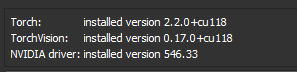
I am running on Windows 11 with Slicer 5.6.1 and an RTX 3080. Additionally, I have downloaded and installed both versions of CUDA listed on the Pytorch website, thinking that there was an issue with one of them. As for data I am using the sample CTLiver data.
Here is a screenshot of my Pytorch Utils
And here is my error output:
```auto
Traceback (most recent call last):
File "C:\Users\Logan\AppData\Local\slicer.org\Slicer 5.6.1\bin\Python\slicer\util.py", line 3255, in tryWithErrorDisplay
yield
File "C:/Users/Logan/AppData/Local/slicer.org/Slicer 5.6.1/slicer.org/Extensions-32438/TotalSegmentator/lib/Slicer-5.6/qt-scripted-modules/TotalSegmentator.py", line 292, in onApplyButton
self.logic.process(self.ui.inputVolumeSelector.currentNode(), self.ui.outputSegmentationSelector.currentNode(),
File "C:/Users/Logan/AppData/Local/slicer.org/Slicer 5.6.1/slicer.org/Extensions-32438/TotalSegmentator/lib/Slicer-5.6/qt-scripted-modules/TotalSegmentator.py", line 967, in process
self.logProcessOutput(proc)
File "C:/Users/Logan/AppData/Local/slicer.org/Slicer 5.6.1/slicer.org/Extensions-32438/TotalSegmentator/lib/Slicer-5.6/qt-scripted-modules/TotalSegmentator.py", line 787, in logProcessOutput
raise CalledProcessError(retcode, proc.args, output=proc.stdout, stderr=proc.stderr)
subprocess.CalledProcessError: Command '['C:/Users/Logan/AppData/Local/slicer.org/Slicer 5.6.1/bin/../bin\\PythonSlicer.EXE', 'C:\\Users\\Logan\\AppData\\Local\\slicer.org\\Slicer 5.6.1\\lib\\Python\\Scripts\\TotalSegmentator.exe', '-i', 'C:/Users/Logan/AppData/Local/Temp/Slicer/ __SlicerTemp__ 2024-02-20_12+51+51.753/total-segmentator-input.nii', '-o', 'C:/Users/Logan/AppData/Local/Temp/Slicer/ __SlicerTemp__ 2024-02-20_12+51+51.753/segmentation', '--ml', '--task', 'total']' returned non-zero exit status 120.
```
---
### Author:  [@lassoan](https://discourse.slicer.org/u/lassoan)
#### Post date: [February 20, 2024, 7:17pm UTC](https://discourse.slicer.org/t/totalsegmentator-failing-with-error-120/34434/2 "2024-02-20T19:17:07Z")
Does this happen on a laptop? If yes, have you set up SlicerApp-real.exe to use the NVIDIA GPU?
How much free disk space do you have?
I would recommend to reinstall Slicer from scratch into an empty folder. Also remove the downloaded TotalSegmentator model from your user profile folder. When installing TotalSegmentator and its dependencies make sure to have at least 20GB of free disk space.
---
### Author:  [@Logan\_Moore](https://discourse.slicer.org/u/Logan_Moore)
#### Post date: [February 20, 2024, 7:25pm UTC](https://discourse.slicer.org/t/totalsegmentator-failing-with-error-120/34434/3 "2024-02-20T19:25:13Z")
Hi @lassoan this is happening on my desktop workstation. I still have over 800 gigabytes of free space on my main C drive.
Do I still need the SlicerApp-real.exe for my desktop?
I will begin removing slicer and the old dependencies and check back in shortly.
---
### Author:  [@lassoan](https://discourse.slicer.org/u/lassoan)
#### Post date: [February 20, 2024, 7:37pm UTC](https://discourse.slicer.org/t/totalsegmentator-failing-with-error-120/34434/4 "2024-02-20T19:37:54Z")
On desktop systems the NVIDIA GPU is used for all applications (if you have some low-performance Intel integrated graphics system then it is usually disabled). So, there is no need to specify SlicerApp-real to be used for the high-performance GPU.
With 800GB free disk space, installation is not corrupted by running out of disk space.
Reinstalling Slicer into a new empty folder and deleting all downloaded TotalSegmentator files (in `%USERPROFILE%\.totalsegmentator`) may still make sense, as you may have installed various Python package versions and/or you may have some failed installations due to temporary network issues.
---
### Author:  [@Logan\_Moore](https://discourse.slicer.org/u/Logan_Moore)
#### Post date: [February 20, 2024, 8:08pm UTC](https://discourse.slicer.org/t/totalsegmentator-failing-with-error-120/34434/5 "2024-02-20T20:08:09Z")
Ok, I did a completely clean install of Slicer and removed every single dependency that I could find related to the program in my C drive and in Appdata (including .totalsegmentator). Additionally, I updated my graphics driver, but I am still getting the 120 error. I’ve pasted the log again below. I have also included the full log where it is installing everything on a first run in case something is not happening that should be. Should I delete slicer, pytorch, and python for a truly clean install and try again?
> **Logs**
>
> ```auto
> Traceback (most recent call last):
> File "C:\Slicer\Slicer 5.6.1\bin\Python\slicer\util.py", line 3255, in tryWithErrorDisplay
> yield
> File "C:/Slicer/Slicer 5.6.1/slicer.org/Extensions-32438/TotalSegmentator/lib/Slicer-5.6/qt-scripted-modules/TotalSegmentator.py", line 292, in onApplyButton
> self.logic.process(self.ui.inputVolumeSelector.currentNode(), self.ui.outputSegmentationSelector.currentNode(),
> File "C:/Slicer/Slicer 5.6.1/slicer.org/Extensions-32438/TotalSegmentator/lib/Slicer-5.6/qt-scripted-modules/TotalSegmentator.py", line 967, in process
> self.logProcessOutput(proc)
> File "C:/Slicer/Slicer 5.6.1/slicer.org/Extensions-32438/TotalSegmentator/lib/Slicer-5.6/qt-scripted-modules/TotalSegmentator.py", line 787, in logProcessOutput
> raise CalledProcessError(retcode, proc.args, output=proc.stdout, stderr=proc.stderr)
> subprocess.CalledProcessError: Command '['C:/Slicer/Slicer 5.6.1/bin/../bin\\PythonSlicer.EXE', 'C:\\Slicer\\Slicer 5.6.1\\lib\\Python\\Scripts\\TotalSegmentator.exe', '-i', 'C:/Users/Logan/AppData/Local/Temp/Slicer/ __SlicerTemp__ 2024-02-20_14+01+32.822/total-segmentator-input.nii', '-o', 'C:/Users/Logan/AppData/Local/Temp/Slicer/ __SlicerTemp__ 2024-02-20_14+01+32.822/segmentation', '--ml', '--task', 'total']' returned non-zero exit status 120.
>
> TotalSegmentator Python package is required. Installing it from https://github.com/wasserth/TotalSegmentator/archive/bbc1e7b3df64339e67acbebe2cf3c739098aabf4.zip... (it may take several minutes)
> - Installing numpy...
> - Installing psutil...
> - Installing nibabel>=2.3.0...
> - Installing tqdm>=4.45.0...
> - Installing p-tqdm...
> - Installing xvfbwrapper...
> - Installing fury...
> - Installing rt-utils...
> - Installing dicom2nifti...
> nnunetv2 Python package is required. Installing nnunetv2==2.1
> ...
> - Installing acvl-utils>=0.2...
> - Installing dynamic-network-architectures>=0.2...
> - Installing tqdm...
> - Installing dicom2nifti...
> - Installing scikit-image>=0.14...
> - Installing medpy...
> - Installing scipy...
> - Installing batchgenerators>=0.25...
> - Installing numpy...
> - Installing scikit-learn...
> - Installing scikit-image>=0.19.3...
> - Installing pandas...
> - Installing graphviz...
> - Installing tifffile...
> - Installing nibabel...
> - Installing matplotlib...
> - Installing seaborn...
> - Installing imagecodecs...
> - Installing yacs...
> TotalSegmentator installation is completed successfully.
> Processing started
> Writing input file to C:/Users/Logan/AppData/Local/Temp/Slicer/ __SlicerTemp__ 2024-02-20_14+01+32.822/total-segmentator-input.nii
> Creating segmentations with TotalSegmentator AI...
> Total Segmentator arguments: ['-i', 'C:/Users/Logan/AppData/Local/Temp/Slicer/ __SlicerTemp__ 2024-02-20_14+01+32.822/total-segmentator-input.nii', '-o', 'C:/Users/Logan/AppData/Local/Temp/Slicer/ __SlicerTemp__ 2024-02-20_14+01+32.822/segmentation', '--ml', '--task', 'total']
>
> If you use this tool please cite: https://pubs.rsna.org/doi/10.1148/ryai.230024
>
> TotalSegmentator sends anonymous usage statistics. If you want to disable it check the documentation.
> Downloading model for Task 291 ...
>
> Downloading: 0%| | 0.00/234M [00:00 Downloading: 2%|1 | 4.06M/234M [00:00<00:06, 36.7MB/s]
> Downloading: 8%|7 | 18.1M/234M [00:00<00:02, 88.6MB/s]
> Downloading: 12%|#1 | 27.0M/234M [00:00<00:02, 86.8MB/s]
> Downloading: 15%|#5 | 35.8M/234M [00:00<00:02, 76.1MB/s]
> Downloading: 19%|#8 | 43.5M/234M [00:00<00:02, 73.0MB/s]
> Downloading: 22%|##1 | 51.0M/234M [00:00<00:02, 71.0MB/s]
> Downloading: 25%|##4 | 58.2M/234M [00:00<00:02, 69.9MB/s]
> Downloading: 28%|##7 | 65.3M/234M [00:00<00:02, 69.0MB/s]
> Downloading: 31%|### | 72.2M/234M [00:01<00:02, 68.8MB/s]
> Downloading: 34%|###3 | 79.3M/234M [00:01<00:02, 69.0MB/s]
> Downloading: 37%|###6 | 86.2M/234M [00:01<00:02, 68.7MB/s]
> Downloading: 40%|###9 | 93.5M/234M [00:01<00:02, 69.0MB/s]
> Downloading: 43%|####2 | 100M/234M [00:01<00:01, 69.1MB/s]
> Downloading: 46%|####6 | 108M/234M [00:01<00:01, 69.7MB/s]
> Downloading: 49%|####9 | 115M/234M [00:01<00:01, 70.4MB/s]
> Downloading: 52%|#####2 | 122M/234M [00:01<00:01, 71.5MB/s]
> Downloading: 56%|#####5 | 130M/234M [00:01<00:01, 71.7MB/s]
> Downloading: 59%|#####8 | 137M/234M [00:01<00:01, 64.1MB/s]
> Downloading: 62%|######1 | 144M/234M [00:02<00:01, 65.9MB/s]
> Downloading: 65%|######4 | 152M/234M [00:02<00:01, 68.1MB/s]
> Downloading: 68%|######8 | 159M/234M [00:02<00:01, 69.8MB/s]
> Downloading: 71%|#######1 | 167M/234M [00:02<00:00, 71.4MB/s]
> Downloading: 75%|#######4 | 174M/234M [00:02<00:00, 72.2MB/s]
> Downloading: 78%|#######7 | 182M/234M [00:02<00:00, 72.8MB/s]
> Downloading: 81%|########1 | 189M/234M [00:02<00:00, 73.7MB/s]
> Downloading: 84%|########4 | 197M/234M [00:02<00:00, 74.7MB/s]
> Downloading: 88%|########7 | 205M/234M [00:02<00:00, 76.1MB/s]
> Downloading: 91%|#########1| 213M/234M [00:02<00:00, 76.3MB/s]
> Downloading: 94%|#########4| 221M/234M [00:03<00:00, 77.0MB/s]
> Downloading: 98%|#########7| 229M/234M [00:03<00:00, 77.1MB/s]
> Downloading: 100%|##########| 234M/234M [00:03<00:00, 72.1MB/s]
> Download finished. Extracting...
> Downloading model for Task 292 ...
>
> Downloading: 0%| | 0.00/234M [00:00 Downloading: 2%|1 | 4.19M/234M [00:00<00:06, 37.9MB/s]
> Downloading: 7%|7 | 17.2M/234M [00:00<00:02, 89.5MB/s]
> Downloading: 12%|#2 | 28.3M/234M [00:00<00:02, 99.0MB/s]
> Downloading: 16%|#6 | 38.4M/234M [00:00<00:02, 87.7MB/s]
> Downloading: 20%|## | 47.4M/234M [00:00<00:02, 82.4MB/s]
> Downloading: 24%|##3 | 56.0M/234M [00:00<00:02, 79.6MB/s]
> Downloading: 27%|##7 | 64.1M/234M [00:00<00:02, 77.8MB/s]
> Downloading: 31%|### | 72.0M/234M [00:00<00:02, 76.6MB/s]
> Downloading: 34%|###4 | 79.7M/234M [00:01<00:02, 75.8MB/s]
> Downloading: 37%|###7 | 87.4M/234M [00:01<00:01, 75.4MB/s]
> Downloading: 41%|#### | 95.0M/234M [00:01<00:01, 75.4MB/s]
> Downloading: 44%|####3 | 103M/234M [00:01<00:01, 75.3MB/s]
> Downloading: 47%|####7 | 111M/234M [00:01<00:01, 76.6MB/s]
> Downloading: 51%|##### | 118M/234M [00:01<00:01, 77.1MB/s]
> Downloading: 54%|#####3 | 126M/234M [00:01<00:01, 77.3MB/s]
> Downloading: 57%|#####7 | 134M/234M [00:01<00:01, 78.4MB/s]
> Downloading: 61%|###### | 143M/234M [00:01<00:01, 78.8MB/s]
> Downloading: 64%|######4 | 151M/234M [00:01<00:01, 79.3MB/s]
> Downloading: 68%|######7 | 159M/234M [00:02<00:00, 79.2MB/s]
> Downloading: 71%|#######1 | 167M/234M [00:02<00:00, 79.6MB/s]
> Downloading: 75%|#######4 | 175M/234M [00:02<00:00, 79.6MB/s]
> Downloading: 78%|#######8 | 183M/234M [00:02<00:00, 79.7MB/s]
> Downloading: 82%|########1 | 191M/234M [00:02<00:00, 80.5MB/s]
> Downloading: 85%|########5 | 199M/234M [00:02<00:00, 80.0MB/s]
> Downloading: 89%|########8 | 208M/234M [00:02<00:00, 81.4MB/s]
> Downloading: 93%|#########2| 217M/234M [00:02<00:00, 82.3MB/s]
> Downloading: 96%|#########6| 225M/234M [00:02<00:00, 82.5MB/s]
> Downloading: 100%|#########9| 233M/234M [00:02<00:00, 83.3MB/s]
> Downloading: 100%|##########| 234M/234M [00:02<00:00, 79.8MB/s]
> Download finished. Extracting...
> Downloading model for Task 293 ...
>
> Downloading: 0%| | 0.00/234M [00:00 Downloading: 2%|2 | 5.51M/234M [00:00<00:04, 55.0MB/s]
> Downloading: 7%|7 | 17.4M/234M [00:00<00:02, 92.4MB/s]
> Downloading: 13%|#2 | 29.6M/234M [00:00<00:01, 105MB/s]
> Downloading: 17%|#7 | 40.4M/234M [00:00<00:01, 106MB/s]
> Downloading: 22%|##1 | 51.0M/234M [00:00<00:01, 106MB/s]
> Downloading: 26%|##6 | 61.9M/234M [00:00<00:01, 106MB/s]
> Downloading: 31%|###1 | 72.7M/234M [00:00<00:01, 107MB/s]
> Downloading: 36%|###5 | 83.9M/234M [00:00<00:01, 108MB/s]
> Downloading: 40%|#### | 94.8M/234M [00:00<00:01, 108MB/s]
> Downloading: 45%|####5 | 106M/234M [00:01<00:01, 109MB/s]
> Downloading: 50%|##### | 117M/234M [00:01<00:01, 110MB/s]
> Downloading: 55%|#####4 | 128M/234M [00:01<00:00, 110MB/s]
> Downloading: 60%|#####9 | 140M/234M [00:01<00:00, 111MB/s]
> Downloading: 65%|######4 | 151M/234M [00:01<00:00, 111MB/s]
> Downloading: 69%|######9 | 163M/234M [00:01<00:00, 112MB/s]
> Downloading: 74%|#######4 | 174M/234M [00:01<00:00, 113MB/s]
> Downloading: 80%|#######9 | 186M/234M [00:01<00:00, 115MB/s]
> Downloading: 85%|########4 | 198M/234M [00:01<00:00, 115MB/s]
> Downloading: 89%|########9 | 210M/234M [00:01<00:00, 115MB/s]
> Downloading: 95%|#########4| 222M/234M [00:02<00:00, 116MB/s]
> Downloading: 100%|#########9| 233M/234M [00:02<00:00, 117MB/s]
> Downloading: 100%|##########| 234M/234M [00:02<00:00, 110MB/s]
> Download finished. Extracting...
> Downloading model for Task 294 ...
>
> Downloading: 0%| | 0.00/234M [00:00 Downloading: 2%|2 | 5.51M/234M [00:00<00:04, 54.8MB/s]
> Downloading: 5%|4 | 11.0M/234M [00:00<00:04, 47.0MB/s]
> Downloading: 7%|6 | 15.9M/234M [00:00<00:04, 45.5MB/s]
> Downloading: 12%|#1 | 27.7M/234M [00:00<00:02, 71.8MB/s]
> Downloading: 16%|#6 | 37.9M/234M [00:00<00:02, 81.8MB/s]
> Downloading: 20%|#9 | 46.3M/234M [00:00<00:02, 79.3MB/s]
> Downloading: 23%|##3 | 54.4M/234M [00:00<00:02, 77.8MB/s]
> Downloading: 27%|##6 | 62.4M/234M [00:00<00:02, 77.5MB/s]
> Downloading: 30%|### | 70.4M/234M [00:00<00:02, 78.2MB/s]
> Downloading: 34%|###3 | 78.4M/234M [00:01<00:02, 77.1MB/s]
> Downloading: 37%|###6 | 86.2M/234M [00:01<00:01, 76.9MB/s]
> Downloading: 40%|#### | 94.4M/234M [00:01<00:01, 78.1MB/s]
> Downloading: 44%|####3 | 102M/234M [00:01<00:01, 78.4MB/s]
> Downloading: 47%|####7 | 110M/234M [00:01<00:01, 79.1MB/s]
> Downloading: 51%|##### | 119M/234M [00:01<00:01, 79.7MB/s]
> Downloading: 54%|#####4 | 127M/234M [00:01<00:01, 79.1MB/s]
> Downloading: 58%|#####7 | 135M/234M [00:01<00:01, 80.1MB/s]
> Downloading: 61%|######1 | 143M/234M [00:01<00:01, 81.4MB/s]
> Downloading: 65%|######4 | 152M/234M [00:01<00:01, 81.5MB/s]
> Downloading: 69%|######8 | 160M/234M [00:02<00:00, 82.8MB/s]
> Downloading: 72%|#######2 | 169M/234M [00:02<00:00, 83.0MB/s]
> Downloading: 76%|#######5 | 177M/234M [00:02<00:00, 83.2MB/s]
> Downloading: 79%|#######9 | 186M/234M [00:02<00:00, 83.4MB/s]
> Downloading: 83%|########3 | 195M/234M [00:02<00:00, 84.3MB/s]
> Downloading: 87%|########6 | 203M/234M [00:02<00:00, 84.1MB/s]
> Downloading: 91%|######### | 212M/234M [00:02<00:00, 84.7MB/s]
> Downloading: 94%|#########4| 221M/234M [00:02<00:00, 85.2MB/s]
> Downloading: 98%|#########8| 229M/234M [00:02<00:00, 85.2MB/s]
> Downloading: 100%|##########| 234M/234M [00:02<00:00, 79.3MB/s]
> Download finished. Extracting...
> Downloading model for Task 295 ...
>
> Downloading: 0%| | 0.00/234M [00:00 Downloading: 1%|1 | 2.88M/234M [00:00<00:08, 28.0MB/s]
> Downloading: 4%|4 | 9.44M/234M [00:00<00:04, 49.0MB/s]
> Downloading: 6%|6 | 14.7M/234M [00:00<00:04, 50.5MB/s]
> Downloading: 8%|8 | 19.8M/234M [00:00<00:04, 48.1MB/s]
> Downloading: 12%|#1 | 27.9M/234M [00:00<00:03, 59.4MB/s]
> Downloading: 15%|#4 | 33.9M/234M [00:00<00:03, 58.3MB/s]
> Downloading: 18%|#8 | 42.3M/234M [00:00<00:02, 66.2MB/s]
> Downloading: 21%|## | 49.0M/234M [00:00<00:02, 62.5MB/s]
> Downloading: 25%|##5 | 58.7M/234M [00:00<00:02, 72.7MB/s]
> Downloading: 30%|### | 70.6M/234M [00:01<00:01, 86.4MB/s]
> Downloading: 35%|###4 | 80.7M/234M [00:01<00:01, 90.7MB/s]
> Downloading: 39%|###8 | 90.8M/234M [00:01<00:01, 93.5MB/s]
> Downloading: 43%|####3 | 101M/234M [00:01<00:01, 95.8MB/s]
> Downloading: 48%|####7 | 111M/234M [00:01<00:01, 97.4MB/s]
> Downloading: 52%|#####1 | 122M/234M [00:01<00:01, 98.7MB/s]
> Downloading: 56%|#####6 | 132M/234M [00:01<00:01, 99.9MB/s]
> Downloading: 61%|###### | 142M/234M [00:01<00:00, 100MB/s]
> Downloading: 65%|######5 | 153M/234M [00:01<00:00, 101MB/s]
> Downloading: 70%|######9 | 163M/234M [00:01<00:00, 102MB/s]
> Downloading: 74%|#######4 | 174M/234M [00:02<00:00, 102MB/s]
> Downloading: 79%|#######8 | 184M/234M [00:02<00:00, 102MB/s]
> Downloading: 83%|########3 | 195M/234M [00:02<00:00, 103MB/s]
> Downloading: 88%|########7 | 205M/234M [00:02<00:00, 103MB/s]
> Downloading: 92%|#########2| 216M/234M [00:02<00:00, 102MB/s]
> Downloading: 97%|#########6| 226M/234M [00:02<00:00, 103MB/s]
> Downloading: 100%|##########| 234M/234M [00:02<00:00, 88.5MB/s]
> Traceback (most recent call last):
> File "C:\Slicer\Slicer 5.6.1\lib\Python\Lib\runpy.py", line 197, in _run_module_as_main
> return _run_code(code, main_globals, None,
> File "C:\Slicer\Slicer 5.6.1\lib\Python\Lib\runpy.py", line 87, in _run_code
> exec(code, run_globals)
> File "C:\Slicer\Slicer 5.6.1\lib\Python\Scripts\TotalSegmentator.exe\ __main__.py", line 7, in
> File "C:\Slicer\Slicer 5.6.1\lib\Python\Lib\site-packages\totalsegmentator\bin\TotalSegmentator.py", line 127, in main
> totalsegmentator(args.input, args.output, args.ml, args.nr_thr_resamp, args.nr_thr_saving,
> File "C:\Slicer\Slicer 5.6.1\lib\Python\Lib\site-packages\totalsegmentator\python_api.py", line 293, in totalsegmentator
> seg_img, ct_img = nnUNet_predict_image(input, output, task_id, model=model, folds=folds,
> File "C:\Slicer\Slicer 5.6.1\lib\Python\Lib\site-packages\totalsegmentator\nnunet.py", line 375, in nnUNet_predict_image
> nnUNetv2_predict(tmp_dir, tmp_dir, tid, model, folds, trainer, tta,
> File "C:\Slicer\Slicer 5.6.1\lib\Python\Lib\site-packages\totalsegmentator\nnunet.py", line 178, in nnUNetv2_predict
> predict_from_raw_data(dir_in,
> File "C:\Slicer\Slicer 5.6.1\lib\Python\Lib\site-packages\nnunetv2\inference\predict_from_raw_data.py", line 159, in predict_from_raw_data
> load_what_we_need(model_training_output_dir, use_folds, checkpoint_name)
> File "C:\Slicer\Slicer 5.6.1\lib\Python\Lib\site-packages\nnunetv2\inference\predict_from_raw_data.py", line 96, in load_what_we_need
> trainer_class = recursive_find_python_class(join(nnunetv2. __path__ [0], "training", "nnUNetTrainer"),
> File "C:\Slicer\Slicer 5.6.1\lib\Python\Lib\site-packages\nnunetv2\utilities\find_class_by_name.py", line 12, in recursive_find_python_class
> m = importlib.import_module(current_module + "." + modname)
> File "C:\Slicer\Slicer 5.6.1\lib\Python\Lib\importlib\ __init__.py", line 127, in import_module
> return _bootstrap._gcd_import(name[level:], package, level)
> File "", line 1030, in _gcd_import
> File "", line 1007, in _find_and_load
> File "", line 986, in _find_and_load_unlocked
> File "", line 680, in _load_unlocked
> File "", line 850, in exec_module
> File "", line 228, in _call_with_frames_removed
> File "C:\Slicer\Slicer 5.6.1\lib\Python\Lib\site-packages\nnunetv2\training\nnUNetTrainer\nnUNetTrainer.py", line 51, in
> from nnunetv2.utilities.get_network_from_plans import get_network_from_plans
> File "C:\Slicer\Slicer 5.6.1\lib\Python\Lib\site-packages\nnunetv2\utilities\get_network_from_plans.py", line 1, in
> from dynamic_network_architectures.architectures.unet import PlainConvUNet, ResidualEncoderUNet
> ImportError: cannot import name 'ResidualEncoderUNet' from 'dynamic_network_architectures.architectures.unet' (C:\Slicer\Slicer 5.6.1\lib\Python\Lib\site-packages\dynamic_network_architectures\architectures\unet.py)
> Exception ignored in:
> AttributeError: 'DummyFile' object has no attribute 'flush'
> Download finished. Extracting...
> Resampling...
> Resampled in 6.01s
> Predicting part 1 of 5 ...
>
> ```
---
### Author:  [@lassoan](https://discourse.slicer.org/u/lassoan)
#### Post date: [February 20, 2024, 8:14pm UTC](https://discourse.slicer.org/t/totalsegmentator-failing-with-error-120/34434/6 "2024-02-20T20:14:20Z")
> [@Logan\_Moore](#):
>
> from dynamic\_network\_architectures.architectures.unet import PlainConvUNet, ResidualEncoderUNet
> ImportError: cannot import name ‘ResidualEncoderUNet’ from
This error indicates that your nnunet installation is corrupted. Wipe out the entire `C:\Slicer\Slicer 5.6.1` folder and install Slicer and TotalSegmentator extension from scratch.
---
### Author:  [@Logan\_Moore](https://discourse.slicer.org/u/Logan_Moore)
#### Post date: [February 20, 2024, 9:06pm UTC](https://discourse.slicer.org/t/totalsegmentator-failing-with-error-120/34434/7 "2024-02-20T21:06:31Z")
Sadly, I got the same result. I posted the outputs below. As you suggested, I wiped out the entire `C:\Slicer\Slicer 5.6.1` folder and installed Slicer and TotalSegmentator extension from scratch. Prior to this, I even removed Python (it had multiple versions for some reason) and grabbed the most recent version. I made a timeline for troubleshooting. Unsure how to further chase the nnunet error from here. If it would be helpful, I can stream myself doing this and then post the VOD here for enhanced clarification.
Clean slicer, removed all extension folders.

grabbed Totalsegmentator

grabbed Pytorch. I noted that when I grabbed Totalsegmentator it said it downloaded Pytorch but there was nothing there after a restart.

imported CTLiver data

Running Totalsegmentator for the first time (it asked me to restart here so I did)

> **Logs**
>
> ```auto
> Traceback (most recent call last):
> File "C:\Users\Logan\AppData\Local\slicer.org\Slicer 5.6.1\bin\Python\slicer\util.py", line 3255, in tryWithErrorDisplay
> yield
> File "C:/Users/Logan/AppData/Local/slicer.org/Slicer 5.6.1/slicer.org/Extensions-32438/TotalSegmentator/lib/Slicer-5.6/qt-scripted-modules/TotalSegmentator.py", line 292, in onApplyButton
> self.logic.process(self.ui.inputVolumeSelector.currentNode(), self.ui.outputSegmentationSelector.currentNode(),
> File "C:/Users/Logan/AppData/Local/slicer.org/Slicer 5.6.1/slicer.org/Extensions-32438/TotalSegmentator/lib/Slicer-5.6/qt-scripted-modules/TotalSegmentator.py", line 967, in process
> self.logProcessOutput(proc)
> File "C:/Users/Logan/AppData/Local/slicer.org/Slicer 5.6.1/slicer.org/Extensions-32438/TotalSegmentator/lib/Slicer-5.6/qt-scripted-modules/TotalSegmentator.py", line 787, in logProcessOutput
> raise CalledProcessError(retcode, proc.args, output=proc.stdout, stderr=proc.stderr)
> subprocess.CalledProcessError: Command '['C:/Users/Logan/AppData/Local/slicer.org/Slicer 5.6.1/bin/../bin\\PythonSlicer.EXE', 'C:\\Users\\Logan\\AppData\\Local\\slicer.org\\Slicer 5.6.1\\lib\\Python\\Scripts\\TotalSegmentator.exe', '-i', 'C:/Users/Logan/AppData/Local/Temp/Slicer/ __SlicerTemp__ 2024-02-20_14+56+35.190/total-segmentator-input.nii', '-o', 'C:/Users/Logan/AppData/Local/Temp/Slicer/ __SlicerTemp__ 2024-02-20_14+56+35.190/segmentation', '--ml', '--task', 'total']' returned non-zero exit status 120.
>
> TotalSegmentator Python package is required. Installing it from https://github.com/wasserth/TotalSegmentator/archive/bbc1e7b3df64339e67acbebe2cf3c739098aabf4.zip... (it may take several minutes)
> - Installing numpy...
> - Installing psutil...
> - Installing nibabel>=2.3.0...
> - Installing tqdm>=4.45.0...
> - Installing p-tqdm...
> - Installing xvfbwrapper...
> - Installing fury...
> - Installing rt-utils...
> - Installing dicom2nifti...
> nnunetv2 Python package is required. Installing nnunetv2==2.1
> ...
> - Installing acvl-utils>=0.2...
> - Installing dynamic-network-architectures>=0.2...
> - Installing tqdm...
> - Installing dicom2nifti...
> - Installing scikit-image>=0.14...
> - Installing medpy...
> - Installing scipy...
> - Installing batchgenerators>=0.25...
> - Installing numpy...
> - Installing scikit-learn...
> - Installing scikit-image>=0.19.3...
> - Installing pandas...
> - Installing graphviz...
> - Installing tifffile...
> - Installing nibabel...
> - Installing matplotlib...
> - Installing seaborn...
> - Installing imagecodecs...
> - Installing yacs...
> TotalSegmentator installation is completed successfully.
> Processing started
> Writing input file to C:/Users/Logan/AppData/Local/Temp/Slicer/ __SlicerTemp__ 2024-02-20_14+56+35.190/total-segmentator-input.nii
> Creating segmentations with TotalSegmentator AI...
> Total Segmentator arguments: ['-i', 'C:/Users/Logan/AppData/Local/Temp/Slicer/ __SlicerTemp__ 2024-02-20_14+56+35.190/total-segmentator-input.nii', '-o', 'C:/Users/Logan/AppData/Local/Temp/Slicer/ __SlicerTemp__ 2024-02-20_14+56+35.190/segmentation', '--ml', '--task', 'total']
>
> If you use this tool please cite: https://pubs.rsna.org/doi/10.1148/ryai.230024
>
> TotalSegmentator sends anonymous usage statistics. If you want to disable it check the documentation.
> Downloading model for Task 291 ...
>
> Downloading: 0%| | 0.00/234M [00:00 Downloading: 2%|2 | 5.11M/234M [00:00<00:04, 51.1MB/s]
> Downloading: 7%|7 | 17.4M/234M [00:00<00:02, 87.8MB/s]
> Downloading: 12%|#1 | 27.8M/234M [00:00<00:02, 94.7MB/s]
> Downloading: 16%|#5 | 37.2M/234M [00:00<00:02, 86.0MB/s]
> Downloading: 20%|#9 | 46.0M/234M [00:00<00:02, 82.0MB/s]
> Downloading: 23%|##3 | 54.3M/234M [00:00<00:02, 80.7MB/s]
> Downloading: 27%|##6 | 62.4M/234M [00:00<00:02, 80.0MB/s]
> Downloading: 30%|### | 70.5M/234M [00:00<00:02, 79.9MB/s]
> Downloading: 34%|###3 | 78.6M/234M [00:00<00:01, 79.9MB/s]
> Downloading: 37%|###7 | 86.8M/234M [00:01<00:01, 80.3MB/s]
> Downloading: 41%|#### | 94.9M/234M [00:01<00:01, 79.8MB/s]
> Downloading: 44%|####4 | 103M/234M [00:01<00:01, 79.7MB/s]
> Downloading: 48%|####7 | 111M/234M [00:01<00:01, 80.6MB/s]
> Downloading: 51%|#####1 | 120M/234M [00:01<00:01, 81.6MB/s]
> Downloading: 55%|#####4 | 128M/234M [00:01<00:01, 82.8MB/s]
> Downloading: 59%|#####8 | 137M/234M [00:01<00:01, 84.3MB/s]
> Downloading: 62%|######2 | 146M/234M [00:01<00:01, 84.9MB/s]
> Downloading: 66%|######6 | 155M/234M [00:01<00:00, 85.5MB/s]
> Downloading: 70%|######9 | 163M/234M [00:01<00:00, 85.9MB/s]
> Downloading: 74%|#######3 | 172M/234M [00:02<00:00, 86.9MB/s]
> Downloading: 77%|#######7 | 181M/234M [00:02<00:00, 86.7MB/s]
> Downloading: 81%|########1 | 190M/234M [00:02<00:00, 88.3MB/s]
> Downloading: 86%|########5 | 200M/234M [00:02<00:00, 89.8MB/s]
> Downloading: 90%|########9 | 209M/234M [00:02<00:00, 90.9MB/s]
> Downloading: 94%|#########3| 219M/234M [00:02<00:00, 91.4MB/s]
> Downloading: 98%|#########7| 228M/234M [00:02<00:00, 91.6MB/s]
> Downloading: 100%|##########| 234M/234M [00:02<00:00, 85.1MB/s]
> Download finished. Extracting...
> Downloading model for Task 292 ...
>
> Downloading: 0%| | 0.00/234M [00:00 Downloading: 2%|2 | 5.64M/234M [00:00<00:04, 47.7MB/s]
> Downloading: 4%|4 | 10.5M/234M [00:00<00:05, 43.4MB/s]
> Downloading: 6%|6 | 15.2M/234M [00:00<00:05, 43.5MB/s]
> Downloading: 11%|#1 | 26.9M/234M [00:00<00:02, 69.9MB/s]
> Downloading: 16%|#5 | 37.1M/234M [00:00<00:02, 80.9MB/s]
> Downloading: 19%|#9 | 45.5M/234M [00:00<00:02, 80.1MB/s]
> Downloading: 23%|##2 | 53.7M/234M [00:00<00:02, 79.3MB/s]
> Downloading: 26%|##6 | 61.9M/234M [00:00<00:02, 79.0MB/s]
> Downloading: 30%|##9 | 69.9M/234M [00:00<00:02, 78.8MB/s]
> Downloading: 33%|###3 | 78.0M/234M [00:01<00:01, 78.9MB/s]
> Downloading: 37%|###6 | 86.0M/234M [00:01<00:01, 79.2MB/s]
> Downloading: 40%|#### | 94.2M/234M [00:01<00:01, 80.1MB/s]
> Downloading: 44%|####3 | 102M/234M [00:01<00:01, 80.3MB/s]
> Downloading: 47%|####7 | 111M/234M [00:01<00:01, 81.7MB/s]
> Downloading: 51%|#####1 | 119M/234M [00:01<00:01, 82.6MB/s]
> Downloading: 55%|#####4 | 128M/234M [00:01<00:01, 82.8MB/s]
> Downloading: 58%|#####8 | 136M/234M [00:01<00:01, 83.2MB/s]
> Downloading: 62%|######1 | 145M/234M [00:01<00:01, 83.4MB/s]
> Downloading: 66%|######5 | 153M/234M [00:01<00:00, 84.1MB/s]
> Downloading: 69%|######9 | 162M/234M [00:02<00:00, 83.7MB/s]
> Downloading: 73%|#######2 | 171M/234M [00:02<00:00, 84.5MB/s]
> Downloading: 77%|#######6 | 179M/234M [00:02<00:00, 84.5MB/s]
> Downloading: 80%|######## | 188M/234M [00:02<00:00, 85.0MB/s]
> Downloading: 84%|########4 | 197M/234M [00:02<00:00, 86.2MB/s]
> Downloading: 88%|########7 | 206M/234M [00:02<00:00, 86.6MB/s]
> Downloading: 92%|#########1| 215M/234M [00:02<00:00, 87.3MB/s]
> Downloading: 96%|#########5| 224M/234M [00:02<00:00, 88.0MB/s]
> Downloading: 100%|#########9| 233M/234M [00:02<00:00, 88.6MB/s]
> Downloading: 100%|##########| 234M/234M [00:02<00:00, 80.7MB/s]
> Download finished. Extracting...
> Downloading model for Task 293 ...
>
> Downloading: 0%| | 0.00/234M [00:00 Downloading: 2%|1 | 4.33M/234M [00:00<00:06, 37.6MB/s]
> Downloading: 8%|7 | 18.6M/234M [00:00<00:02, 95.8MB/s]
> Downloading: 13%|#2 | 30.4M/234M [00:00<00:01, 105MB/s]
> Downloading: 18%|#8 | 42.3M/234M [00:00<00:01, 110MB/s]
> Downloading: 23%|##3 | 54.1M/234M [00:00<00:01, 113MB/s]
> Downloading: 28%|##7 | 65.5M/234M [00:00<00:01, 111MB/s]
> Downloading: 33%|###2 | 76.8M/234M [00:00<00:01, 105MB/s]
> Downloading: 37%|###7 | 87.6M/234M [00:00<00:01, 101MB/s]
> Downloading: 42%|####1 | 97.8M/234M [00:00<00:01, 99.1MB/s]
> Downloading: 46%|####6 | 108M/234M [00:01<00:01, 98.3MB/s]
> Downloading: 50%|##### | 118M/234M [00:01<00:01, 97.2MB/s]
> Downloading: 55%|#####4 | 128M/234M [00:01<00:01, 97.4MB/s]
> Downloading: 59%|#####8 | 137M/234M [00:01<00:01, 96.5MB/s]
> Downloading: 63%|######2 | 147M/234M [00:01<00:00, 96.9MB/s]
> Downloading: 67%|######7 | 157M/234M [00:01<00:00, 97.3MB/s]
> Downloading: 71%|#######1 | 167M/234M [00:01<00:00, 98.3MB/s]
> Downloading: 76%|#######5 | 178M/234M [00:01<00:00, 99.2MB/s]
> Downloading: 80%|######## | 188M/234M [00:01<00:00, 99.6MB/s]
> Downloading: 85%|########4 | 198M/234M [00:01<00:00, 99.9MB/s]
> Downloading: 89%|########8 | 208M/234M [00:02<00:00, 100MB/s]
> Downloading: 93%|#########3| 219M/234M [00:02<00:00, 101MB/s]
> Downloading: 98%|#########7| 229M/234M [00:02<00:00, 101MB/s]
> Downloading: 100%|##########| 234M/234M [00:02<00:00, 100MB/s]
> Download finished. Extracting...
> Downloading model for Task 294 ...
>
> Downloading: 0%| | 0.00/234M [00:00 Downloading: 2%|1 | 3.80M/234M [00:00<00:06, 37.7MB/s]
> Downloading: 5%|5 | 12.5M/234M [00:00<00:03, 66.2MB/s]
> Downloading: 11%|#1 | 26.6M/234M [00:00<00:02, 100MB/s]
> Downloading: 16%|#6 | 38.4M/234M [00:00<00:01, 107MB/s]
> Downloading: 21%|##1 | 49.4M/234M [00:00<00:01, 108MB/s]
> Downloading: 26%|##5 | 60.3M/234M [00:00<00:01, 102MB/s]
> Downloading: 30%|### | 70.6M/234M [00:00<00:01, 99.1MB/s]
> Downloading: 35%|###4 | 80.6M/234M [00:00<00:01, 97.1MB/s]
> Downloading: 39%|###8 | 90.4M/234M [00:00<00:01, 96.1MB/s]
> Downloading: 43%|####2 | 100M/234M [00:01<00:01, 95.6MB/s]
> Downloading: 47%|####7 | 110M/234M [00:01<00:01, 95.6MB/s]
> Downloading: 51%|#####1 | 120M/234M [00:01<00:01, 95.8MB/s]
> Downloading: 55%|#####5 | 129M/234M [00:01<00:01, 96.5MB/s]
> Downloading: 60%|#####9 | 139M/234M [00:01<00:00, 96.4MB/s]
> Downloading: 64%|######3 | 149M/234M [00:01<00:00, 96.6MB/s]
> Downloading: 68%|######7 | 159M/234M [00:01<00:00, 96.7MB/s]
> Downloading: 72%|#######2 | 168M/234M [00:01<00:00, 96.0MB/s]
> Downloading: 76%|#######6 | 178M/234M [00:01<00:00, 96.4MB/s]
> Downloading: 81%|######## | 188M/234M [00:01<00:00, 97.0MB/s]
> Downloading: 85%|########4 | 198M/234M [00:02<00:00, 97.4MB/s]
> Downloading: 89%|########9 | 208M/234M [00:02<00:00, 98.6MB/s]
> Downloading: 93%|#########3| 218M/234M [00:02<00:00, 99.4MB/s]
> Downloading: 98%|#########7| 229M/234M [00:02<00:00, 100MB/s]
> Downloading: 100%|##########| 234M/234M [00:02<00:00, 97.0MB/s]
> Download finished. Extracting...
> Downloading model for Task 295 ...
>
> Downloading: 0%| | 0.00/234M [00:00 Downloading: 2%|1 | 4.59M/234M [00:00<00:05, 40.2MB/s]
> Downloading: 7%|7 | 16.9M/234M [00:00<00:02, 86.1MB/s]
> Downloading: 12%|#1 | 28.0M/234M [00:00<00:02, 96.6MB/s]
> Downloading: 16%|#6 | 37.9M/234M [00:00<00:02, 88.6MB/s]
> Downloading: 20%|## | 46.9M/234M [00:00<00:02, 86.1MB/s]
> Downloading: 24%|##3 | 55.7M/234M [00:00<00:02, 84.3MB/s]
> Downloading: 27%|##7 | 64.2M/234M [00:00<00:02, 83.5MB/s]
> Downloading: 31%|###1 | 72.7M/234M [00:00<00:01, 83.3MB/s]
> Downloading: 35%|###4 | 81.3M/234M [00:00<00:01, 83.2MB/s]
> Downloading: 38%|###8 | 89.8M/234M [00:01<00:01, 83.4MB/s]
> Downloading: 42%|####2 | 98.3M/234M [00:01<00:01, 83.6MB/s]
> Downloading: 46%|####5 | 107M/234M [00:01<00:01, 83.5MB/s]
> Downloading: 49%|####9 | 116M/234M [00:01<00:01, 84.9MB/s]
> Downloading: 53%|#####3 | 124M/234M [00:01<00:01, 84.5MB/s]
> Downloading: 57%|#####6 | 133M/234M [00:01<00:01, 85.0MB/s]
> Downloading: 60%|###### | 141M/234M [00:01<00:01, 85.0MB/s]
> Downloading: 64%|######4 | 150M/234M [00:01<00:00, 85.5MB/s]
> Downloading: 68%|######7 | 159M/234M [00:01<00:00, 86.6MB/s]
> Downloading: 72%|#######1 | 168M/234M [00:01<00:00, 86.9MB/s]
> Downloading: 76%|#######5 | 177M/234M [00:02<00:00, 87.3MB/s]
> Downloading: 79%|#######9 | 186M/234M [00:02<00:00, 87.2MB/s]
> Downloading: 83%|########3 | 195M/234M [00:02<00:00, 87.8MB/s]
> Downloading: 87%|########6 | 204M/234M [00:02<00:00, 88.4MB/s]
> Downloading: 91%|######### | 213M/234M [00:02<00:00, 88.9MB/s]
> Downloading: 95%|#########4| 222M/234M [00:02<00:00, 89.3MB/s]
> Downloading: 99%|#########8| 231M/234M [00:02<00:00, 89.8MB/s]
> Downloading: 100%|##########| 234M/234M [00:02<00:00, 86.0MB/s]
> Traceback (most recent call last):
> File "C:\Users\Logan\AppData\Local\slicer.org\Slicer 5.6.1\lib\Python\Lib\runpy.py", line 197, in _run_module_as_main
> return _run_code(code, main_globals, None,
> File "C:\Users\Logan\AppData\Local\slicer.org\Slicer 5.6.1\lib\Python\Lib\runpy.py", line 87, in _run_code
> exec(code, run_globals)
> File "C:\Users\Logan\AppData\Local\slicer.org\Slicer 5.6.1\lib\Python\Scripts\TotalSegmentator.exe\ __main__.py", line 7, in
> File "C:\Users\Logan\AppData\Local\slicer.org\Slicer 5.6.1\lib\Python\Lib\site-packages\totalsegmentator\bin\TotalSegmentator.py", line 127, in main
> totalsegmentator(args.input, args.output, args.ml, args.nr_thr_resamp, args.nr_thr_saving,
> File "C:\Users\Logan\AppData\Local\slicer.org\Slicer 5.6.1\lib\Python\Lib\site-packages\totalsegmentator\python_api.py", line 293, in totalsegmentator
> seg_img, ct_img = nnUNet_predict_image(input, output, task_id, model=model, folds=folds,
> File "C:\Users\Logan\AppData\Local\slicer.org\Slicer 5.6.1\lib\Python\Lib\site-packages\totalsegmentator\nnunet.py", line 375, in nnUNet_predict_image
> nnUNetv2_predict(tmp_dir, tmp_dir, tid, model, folds, trainer, tta,
> File "C:\Users\Logan\AppData\Local\slicer.org\Slicer 5.6.1\lib\Python\Lib\site-packages\totalsegmentator\nnunet.py", line 178, in nnUNetv2_predict
> predict_from_raw_data(dir_in,
> File "C:\Users\Logan\AppData\Local\slicer.org\Slicer 5.6.1\lib\Python\Lib\site-packages\nnunetv2\inference\predict_from_raw_data.py", line 159, in predict_from_raw_data
> load_what_we_need(model_training_output_dir, use_folds, checkpoint_name)
> File "C:\Users\Logan\AppData\Local\slicer.org\Slicer 5.6.1\lib\Python\Lib\site-packages\nnunetv2\inference\predict_from_raw_data.py", line 96, in load_what_we_need
> trainer_class = recursive_find_python_class(join(nnunetv2. __path__ [0], "training", "nnUNetTrainer"),
> File "C:\Users\Logan\AppData\Local\slicer.org\Slicer 5.6.1\lib\Python\Lib\site-packages\nnunetv2\utilities\find_class_by_name.py", line 12, in recursive_find_python_class
> m = importlib.import_module(current_module + "." + modname)
> File "C:\Users\Logan\AppData\Local\slicer.org\Slicer 5.6.1\lib\Python\Lib\importlib\ __init__.py", line 127, in import_module
> return _bootstrap._gcd_import(name[level:], package, level)
> File "", line 1030, in _gcd_import
> File "", line 1007, in _find_and_load
> File "", line 986, in _find_and_load_unlocked
> File "", line 680, in _load_unlocked
> File "", line 850, in exec_module
> File "", line 228, in _call_with_frames_removed
> File "C:\Users\Logan\AppData\Local\slicer.org\Slicer 5.6.1\lib\Python\Lib\site-packages\nnunetv2\training\nnUNetTrainer\nnUNetTrainer.py", line 51, in
> from nnunetv2.utilities.get_network_from_plans import get_network_from_plans
> File "C:\Users\Logan\AppData\Local\slicer.org\Slicer 5.6.1\lib\Python\Lib\site-packages\nnunetv2\utilities\get_network_from_plans.py", line 1, in
> from dynamic_network_architectures.architectures.unet import PlainConvUNet, ResidualEncoderUNet
> ImportError: cannot import name 'ResidualEncoderUNet' from 'dynamic_network_architectures.architectures.unet' (C:\Users\Logan\AppData\Local\slicer.org\Slicer 5.6.1\lib\Python\Lib\site-packages\dynamic_network_architectures\architectures\unet.py)
> Exception ignored in:
> AttributeError: 'DummyFile' object has no attribute 'flush'
> Download finished. Extracting...
> Resampling...
> Resampled in 5.88s
> Predicting part 1 of 5 ...
>
> ```
---
### Author:  [@Logan\_Moore](https://discourse.slicer.org/u/Logan_Moore)
#### Post date: [February 20, 2024, 9:17pm UTC](https://discourse.slicer.org/t/totalsegmentator-failing-with-error-120/34434/8 "2024-02-20T21:17:14Z")
One thing that just came to mind would be that this isn’t a cpu issue, is it? I am running an AMD 7950X. The days where certain applications only run on certain chips are fairly gone but I suppose it is one thing to check.
---
### Author:  [@lassoan](https://discourse.slicer.org/u/lassoan)
#### Post date: [February 20, 2024, 9:27pm UTC](https://discourse.slicer.org/t/totalsegmentator-failing-with-error-120/34434/9 "2024-02-20T21:27:35Z")
Most likely the issue is that the `dynamic-network-architectures` is somehow corrupted. Maybe you have some old corrupted copy in the pip cache.
First of all, check its version:
```python
from importlib.metadata import version
print(version("dynamic_network_architectures"))
```
Then check if you can import `dynamic_network_architectures` and its path is within the Slicer build tree:
```python
import dynamic_network_architectures
import inspect
print(inspect.getabsfile(dynamic_network_architectures))
```
Then check if you can load `ResidualEncoderUNet` and it is in the correct location:
```python
from dynamic_network_architectures.architectures.unet import ResidualEncoderUNet
print(inspect.getabsfile(ResidualEncoderUNet))
```
If this fails check if the content of your `dynamic_network_architectures` file folder matches the content of the folder on my computer (from a working TotalSegmentator installation): [site-packages.zip](https://1drv.ms/u/s!Arm_AFxB9yqH0J9sUHKrsZt6sODpBA?e=B7Lt1n)
---
### Author:  [@jamesobutler](https://discourse.slicer.org/u/jamesobutler)
#### Post date: [February 20, 2024, 9:31pm UTC](https://discourse.slicer.org/t/totalsegmentator-failing-with-error-120/34434/10 "2024-02-20T21:31:51Z")
I ran into the same issue as @Logan_Moore when I tried on my machine.
@lassoan It appears that your `dynamic_network_architectures` is version 0.2, while mine is version 0.4.
Checking for `ResidualEncoderUNet` I get:
```auto
Traceback (most recent call last):
File "", line 1, in
ImportError: cannot import name 'ResidualEncoderUNet' from 'dynamic_network_architectures.architectures.unet' (C:\Users\butlej30383\AppData\Local\slicer.org\Slicer 5.7.0-2024-02-17\lib\Python\Lib\site-packages\dynamic_network_architectures\architectures\unet.py)
```
---
### Author:  [@lassoan](https://discourse.slicer.org/u/lassoan)
#### Post date: [February 20, 2024, 9:53pm UTC](https://discourse.slicer.org/t/totalsegmentator-failing-with-error-120/34434/11 "2024-02-20T21:53:20Z")
Aha! So, it is not a too old package, but a too recent package.
Unfortunately, developer of `dynamic_network_architectures` broke backward compatibility with a recent update. `ResidualEncoderUNet` package must be imported as `from dynamic_network_architectures.architectures.residual_unet import ResidualEncoderUNet` now, but since this change was snuck into a minor version update (0.2 to 0.4) developer of TotalSegmentator did not suspect anything bad would happen.
As a workaround, you can downgrade `dynamic_network_architectures` package by running this command in the Python console (that I’ll also add to the TotalSegmentator Slicer module):
```python
pip_install('dynamic_network_architectures==0.2.0')
```
I’ve filed a bug report to TotalSegmentator to make sure the incompatibility is fixed properly:
>
>
> Recent update of \`dynamic\_network\_architectures\` package contains a backward-inc…ompatible change. \`ResidualEncoderUNet\` class is in a different module now:
>
> In \`dynamic\_network\_architectures\` version 0.2:
>
> from dynamic\_network\_architectures.architectures.unet import ResidualEncoderUNet
>
> In \`dynamic\_network\_architectures\` version 0.4:
>
> from dynamic\_network\_architectures.architectures.residual\_unet import ResidualEncoderUNet
>
> This change breaks nnunet, which breaks totalsegmentator.
>
> Could you update totalsegmentator requirements specification to avoid this incompatible \`dynamic\_network\_architectures\` version until the issue is properly sorted out? For a proper solution, maintainers of nnunet and dynamic\_network\_architectures need to talk.
>
>
> Full stack trace:
>
> \`\`\`
> Traceback (most recent call last):
> File "C:\\Users\\Logan\\AppData\\Local\\slicer.org\\Slicer 5.6.1\\lib\\Python\\Lib\\runpy.py", line 197, in \_run\_module\_as\_main
> return \_run\_code(code, main\_globals, None,
> File "C:\\Users\\Logan\\AppData\\Local\\slicer.org\\Slicer 5.6.1\\lib\\Python\\Lib\\runpy.py", line 87, in \_run\_code
> exec(code, run\_globals)
> File "C:\\Users\\Logan\\AppData\\Local\\slicer.org\\Slicer 5.6.1\\lib\\Python\\Scripts\\TotalSegmentator.exe\\\_\_main\_\_.py", line 7, in \
> File "C:\\Users\\Logan\\AppData\\Local\\slicer.org\\Slicer 5.6.1\\lib\\Python\\Lib\\site-packages\\totalsegmentator\\bin\\TotalSegmentator.py", line 127, in main
> totalsegmentator(args.input, args.output, args.ml, args.nr\_thr\_resamp, args.nr\_thr\_saving,
> File "C:\\Users\\Logan\\AppData\\Local\\slicer.org\\Slicer 5.6.1\\lib\\Python\\Lib\\site-packages\\totalsegmentator\\python\_api.py", line 293, in totalsegmentator
> seg\_img, ct\_img = nnUNet\_predict\_image(input, output, task\_id, model=model, folds=folds,
> File "C:\\Users\\Logan\\AppData\\Local\\slicer.org\\Slicer 5.6.1\\lib\\Python\\Lib\\site-packages\\totalsegmentator\\nnunet.py", line 375, in nnUNet\_predict\_image
> nnUNetv2\_predict(tmp\_dir, tmp\_dir, tid, model, folds, trainer, tta,
> File "C:\\Users\\Logan\\AppData\\Local\\slicer.org\\Slicer 5.6.1\\lib\\Python\\Lib\\site-packages\\totalsegmentator\\nnunet.py", line 178, in nnUNetv2\_predict
> predict\_from\_raw\_data(dir\_in,
> File "C:\\Users\\Logan\\AppData\\Local\\slicer.org\\Slicer 5.6.1\\lib\\Python\\Lib\\site-packages\\nnunetv2\\inference\\predict\_from\_raw\_data.py", line 159, in predict\_from\_raw\_data
> load\_what\_we\_need(model\_training\_output\_dir, use\_folds, checkpoint\_name)
> File "C:\\Users\\Logan\\AppData\\Local\\slicer.org\\Slicer 5.6.1\\lib\\Python\\Lib\\site-packages\\nnunetv2\\inference\\predict\_from\_raw\_data.py", line 96, in load\_what\_we\_need
> trainer\_class = recursive\_find\_python\_class(join(nnunetv2.\_\_path\_\_\[0\], "training", "nnUNetTrainer"),
> File "C:\\Users\\Logan\\AppData\\Local\\slicer.org\\Slicer 5.6.1\\lib\\Python\\Lib\\site-packages\\nnunetv2\\utilities\\find\_class\_by\_name.py", line 12, in recursive\_find\_python\_class
> m = importlib.import\_module(current\_module + "." + modname)
> File "C:\\Users\\Logan\\AppData\\Local\\slicer.org\\Slicer 5.6.1\\lib\\Python\\Lib\\importlib\\\_\_init\_\_.py", line 127, in import\_module
> return \_bootstrap.\_gcd\_import(name\[level:\], package, level)
> File "\", line 1030, in \_gcd\_import
> File "\", line 1007, in \_find\_and\_load
> File "\", line 986, in \_find\_and\_load\_unlocked
> File "\", line 680, in \_load\_unlocked
> File "\", line 850, in exec\_module
> File "\", line 228, in \_call\_with\_frames\_removed
> File "C:\\Users\\Logan\\AppData\\Local\\slicer.org\\Slicer 5.6.1\\lib\\Python\\Lib\\site-packages\\nnunetv2\\training\\nnUNetTrainer\\nnUNetTrainer.py", line 51, in \
> from nnunetv2.utilities.get\_network\_from\_plans import get\_network\_from\_plans
> File "C:\\Users\\Logan\\AppData\\Local\\slicer.org\\Slicer 5.6.1\\lib\\Python\\Lib\\site-packages\\nnunetv2\\utilities\\get\_network\_from\_plans.py", line 1, in \
> from dynamic\_network\_architectures.architectures.unet import PlainConvUNet, ResidualEncoderUNet
> ImportError: cannot import name 'ResidualEncoderUNet' from 'dynamic\_network\_architectures.architectures.unet'
> \`\`\`
---
### Author:  [@Logan\_Moore](https://discourse.slicer.org/u/Logan_Moore)
#### Post date: [February 20, 2024, 10:00pm UTC](https://discourse.slicer.org/t/totalsegmentator-failing-with-error-120/34434/12 "2024-02-20T22:00:36Z")
And we have success! Thank you, @lassoan and @jamesobutler, for your work and patience with this. I am glad the issue could be identified and flagged for a future fix

---
### Author:  [@lassoan](https://discourse.slicer.org/u/lassoan)
#### Post date: [February 20, 2024, 11:21pm UTC](https://discourse.slicer.org/t/totalsegmentator-failing-with-error-120/34434/13 "2024-02-20T23:21:39Z")
Awesome, it is good that with some shared effort we figured this all out.
---
### Author:  [@lassoan](https://discourse.slicer.org/u/lassoan)
#### Post date: [February 22, 2024, 5:06am UTC](https://discourse.slicer.org/t/totalsegmentator-failing-with-error-120/34434/14 "2024-02-22T05:06:07Z")
FYI, maintainer of dynamic-network-architectures [yanked the incompatible releases and published a new release that is backward compatible](https://github.com/MIC-DKFZ/dynamic-network-architectures/issues/4#issuecomment-1957911229), so this issue should not come up again.