# VMTK centerline merge does not work
**URL:** https://discourse.slicer.org/t/vmtk-centerline-merge-does-not-work/36634
**Category:** VMTK
**Tags:** python
**Created:** [June 7, 2024, 4:20am UTC](https://discourse.slicer.org/t/vmtk-centerline-merge-does-not-work/36634 "2024-06-07T04:20:11Z")
**Posts on this page:** 3
**Page:** 1
### Author:  [@tomo-akiyama](https://discourse.slicer.org/u/tomo-akiyama)
#### Post date: [June 7, 2024, 4:20am UTC](https://discourse.slicer.org/t/vmtk-centerline-merge-does-not-work/36634/1 "2024-06-07T04:20:11Z")
Hello, everyone
I am encountering an issue while merging centerlines using VMTK, and I would appreciate some assistance.
I used the “Extract Centerlines” module in 3D Slicer to extract centerlines from a cerebral vascular mesh and saved it as a VTP file. Next, I loaded the centerlines VTP file in VS Code with Python 3.10 and performed branch splitting using vmtk\_branch\_splitting. Then, I smoothed the centerlines using vmtk\_centerline\_smoothing.

Finally, I merged the centerlines from the same vessel using vmtk\_centerlinemerge. After merging the centerlines (magenta centerlines) and displaying them using PyVista alongside the pre-merged (smoothed, green centerlines), it is clear that the merged centerlines (magenta) deviate significantly from the original path of the centerlines (green).

The step length during merging was adjusted, but the result did not change. Could you help me identify the cause and suggest improvements?
Here is the code I used:
```auto
from vmtk import vmtkscripts
import vtk
def load_vtp(file_name):
reader = vtk.vtkXMLPolyDataReader()
reader.SetFileName(file_name)
reader.Update()
polydata = reader.GetOutput()
return polydata
def vmtk_branch_splitting(centerlines):
branch_splitting = vmtkscripts.vmtkBranchExtractor()
branch_splitting.Centerlines = centerlines
branch_splitting.Execute()
splitted_centerlines = branch_splitting.Centerlines
return splitted_centerlines
def vmtk_centerline_smoothing(centerlines, num_iteration=100, smooth_factor=1.2):
smoother = vmtkscripts.vmtkCenterlineSmoothing()
smoother.Centerlines = centerlines
smoother.NumberOfSmoothingIterations = num_iteration
smoother.SmoothingFactor = smooth_factor
smoother.Execute()
smoothed_centerlines = smoother.Centerlines
return smoothed_centerlines
def vmtk_centerlinemerge(centerlines, step_length=0.1):
centerlinemerge = vmtkscripts.vmtkCenterlineMerge()
centerlinemerge.Centerlines = centerlines
centerlinemerge.Length = step_length
centerlinemerge.Execute()
merged_centerlines = centerlinemerge.Centerlines
return merged_centerlines
centerlines = load_vtp("Centerline model.vtp")
radius_array = centerlines.GetPointData().GetArray("Radius")
radius_array.SetName("MaximumInscribedSphereRadius")
splitted_centerlines = vmtk_branch_splitting(centerlines)
smoothed_centerlines = vmtk_centerline_smoothing(splitted_centerlines)
merged_splitted_centerlines = vmtk_centerlinemerge(smoothed_centerlines)
```
Thank you
---
### Author:  [@tomo-akiyama](https://discourse.slicer.org/u/tomo-akiyama)
#### Post date: [June 10, 2024, 7:55am UTC](https://discourse.slicer.org/t/vmtk-centerline-merge-does-not-work/36634/2 "2024-06-10T07:55:53Z")
After testing by extracting centerlines from only a part of the cerebral vessels, smoothing, and then merging, it worked without any issues.


Next, I thought it might be a problem with the number of inlets, so I used two inlets and specified endpoints partially instead of all of them, and this also worked well.

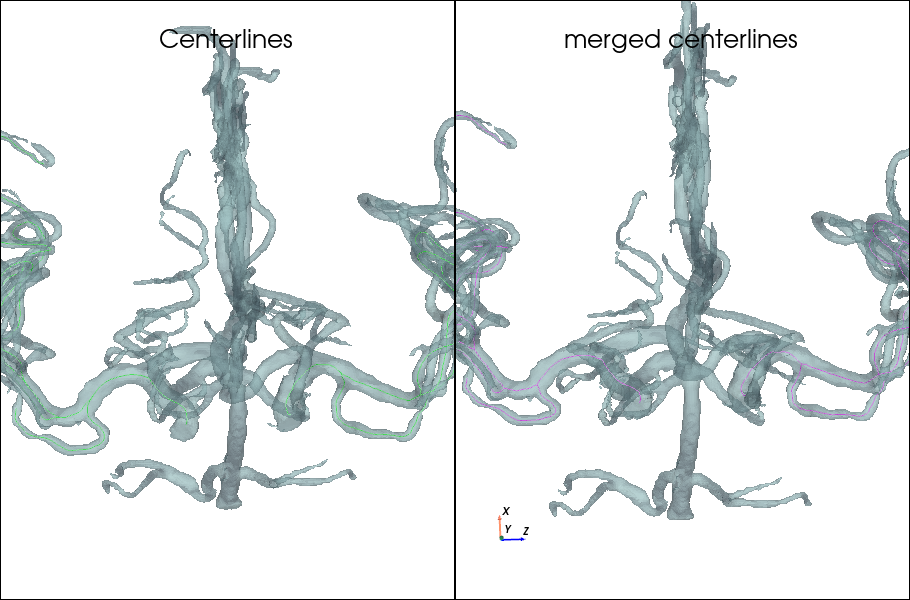
It seems that increasing the number of endpoints causes an error at some point.


Does anyone have a solution for this?
---
### Author:  [@Tracy](https://discourse.slicer.org/u/Tracy)
#### Post date: [February 27, 2025, 8:35pm UTC](https://discourse.slicer.org/t/vmtk-centerline-merge-does-not-work/36634/3 "2025-02-27T20:35:34Z")
Hi tomo-san,
I would like to use vmtkscripts as well, but face the error
* * *
ModuleNotFoundError Traceback (most recent call last)
Cell In[1], line 2
1 import slicer
----\> 2 from vmtk import vmtkscripts
3 import vtk
ModuleNotFoundError: No module named ‘vmtk’
Can you tell me how to install vmtk within the slicer?
Thank you so much.
Best,
Tracy