I’m happy to share that we have completed development of a set of modules to generate CFD-simulation-ready mesh from image segmentation.
The work has been largely based on the VMTK toolkit, exposing its existing features and extending it with new ones. It was a joint effort between the SlicerHeart group at Children’s Hospital of Philadelphia (PI: Matthew A. Jolley) and SimVascular group at Stanford (PI: Alison Marsden), with Andras Lasso and Aaron Brown as main contributors.
Demo video of the main features:
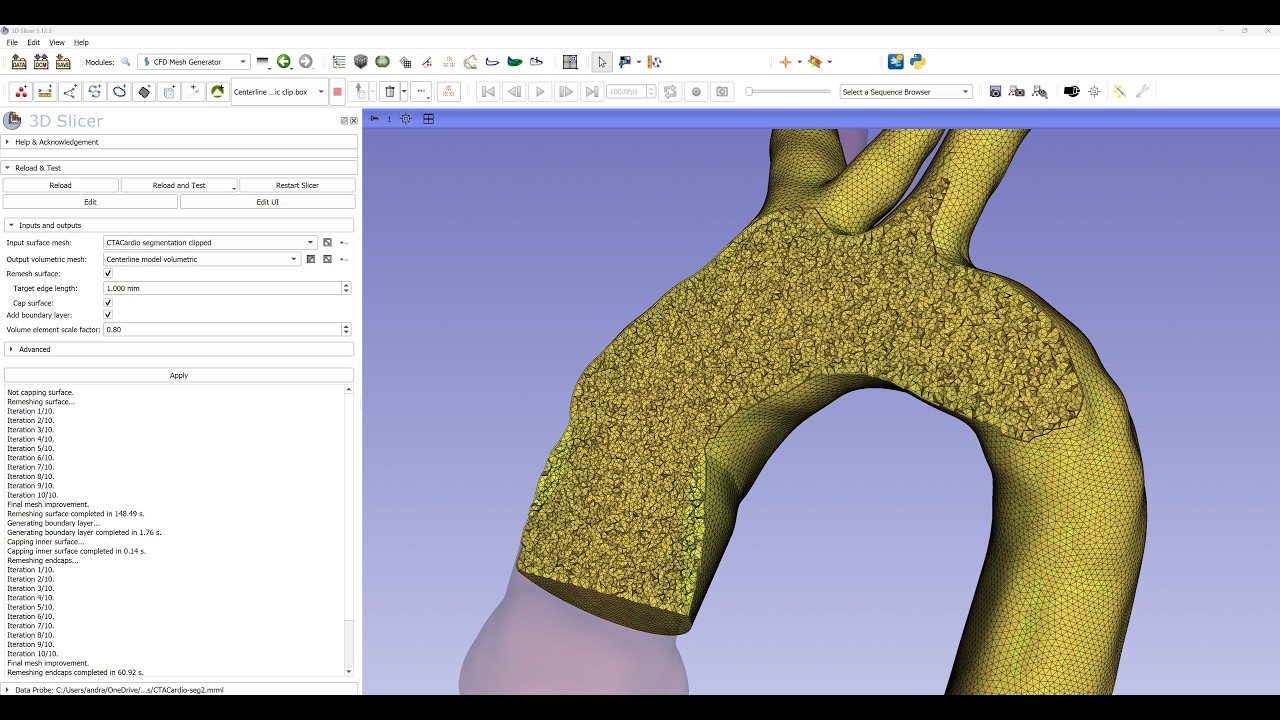
(Click here to see the video on YouTube)
The workflow consists of three modules - one of them is completely new and one completely reworked. Each module can run fully automatically, but also offers many customization options:
- Extract centerline: needed for convenient definition of vessel branches and clipping plane orientations - documentation
- Clip vessel: clip the segmentation to the relevant region - documentation
- cut off branches: automatic endpoint detection and clipping position/orientation recommendation, can be adjusted for each point
- flow extensions: optional, absolute or relative to radius, can be set globally and adjusted individually for each branch
- capping: straight or smooth, optionally uniform distribution (automatic resolution to match wall or manually specified)
- labeling: boundaries and cap faces are labeled using point and cell data, they are propagated to the final volumetric mesh
- CFD mesh generator: generate tetrahedral mesh from surface mesh - documentation
- uniform remeshing: optional, can be enabled separately for the wall and caps
- capping: optional, if input did not contain caps it can add them
- boundary layer refinement: optional, adds layers of prism elements at the wall, can be turned off separately for the caps
- automatic labeling of boundary surfaces: based on labels in the input surface mesh
- regional isotropic refinement supported by all but not yet exposed on the user interface
- it provides 3 meshing engines: all the module features are available for all three meshers, all the inputs and outputs are converted automatically to match the data format used by each mesher
- TetGen: fast but its free license is extremely restrictive (AGPL), therefore most uses require paid commercial license
- NetGen: slightly slower but completely free (LGPL weak copyleft license allows free commercial use without sharing own source code)
- fTetWild: slow, but free and does not require good quality input mesh (MPL2.0 weak copyleft license allows free commercial use without sharing own source code)
- SimVascular Mesh Prep is a new module in the SimVascular extension that converts a volume mesh from CFD Mesh Generator into a
mesh-completefolder that can be read by the svMultiPhysics solver. That folder holds the volume mesh plus one surface file per inlet, outlet and wall, which the solver’s boundary conditions attach to. The module works together with Clip Vessel in the VMTK extension to automatically pass clip point names on to corresponding cap surfaces. The names are carried through CFD Mesh Generator, so a clipped model arrives with every cap already named after its clip point, and renaming a clip point renames the cap. You can also name any face, or rename one, by hovering over it and clicking it in the 3D view. For each face the module shows its area, equivalent diameter and flatness. Export mesh-complete writes the mesh-complete folder that is ready for an svMultiPhysics simulation run from the terminal. Setting up and running simulations from Slicer’s GUI is under active development as part of the ongoing SimVascular-to-Slicer port. - documentation
Notes:
- All these modules are available via the VMTK and SimVascular extensions for the latest Slicer Stable Release (currently Slicer-5.12.4) and very latest Slicer Preview Release.
- The modules can be used in sequence or independently. For example, if you already have the clipped surface mesh then you can go straight to the CFD mesh generator module.
- Slicer uses mm-g-s unit system. For exchanging simulation input or output meshes that use a different system (such as CGS), you can use the “Import/Export simulation model” module in SlicerHeart extension - documentation
- The modules work with all automatic and manual segmentation modules in 3D Slicer and various mesh processing modules, such as stent deployment simulator in SimVascular Slicer extension.
Extracted centerline:

Clip, cap, and extend vessel branches:

Generated volumetric mesh with thin boundary layer elements:

Mesh preparation for SimVascular svMultiPhysics:

Any feedback and suggestions are welcome.