I am seeking advice on how to practically reconstruct a skull in order to calculate cranial capacity.
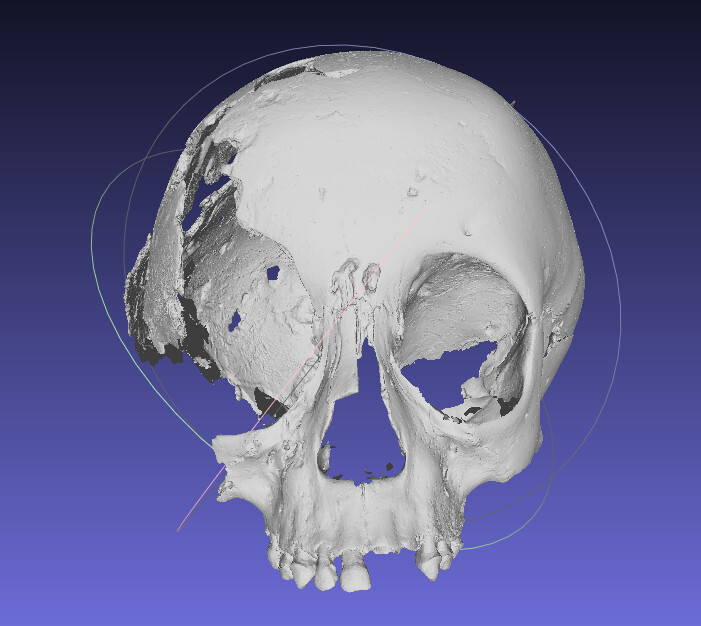
The skull is a fragment (missing skull base and some parietal), estimated to be a 4 year old indiviual.
I have segmented complete skulls of 4 year olds from NMDID CT scans and aligned them with landmark-based alignment in Scalismo/VSC Studio.
What would be the next steps? Do I need to resample to a reference mesh to get point-to-point correspondence? Do I need to create a mean shape and warp it to fit the shape of the skull fragment? I believe the SSM approach is reliable for skull reconstruction/estimation?
How much of this can be done in slicer. I am strugging with the coding side of VSC studio, but this is what I have so far:
//> using scala "3.3.7"
//> using repository "https://scalismo.org/repo/"
//> using dep "ch.unibas.cs.gravis::scalismo:0.92.0"
//> using dep "ch.unibas.cs.gravis::scalismo-ui:0.92.0"

import scalismo.geometry._
import scalismo.common._
import scalismo.mesh._
import scalismo.transformations._
import scalismo.io.MeshIO
import scalismo.ui.api._
import scalismo.registration._
import java.io.File

object SkullRigidAlignmentApp {

  def main(args: Array[String]): Unit = {

    // Initialize Scalismo and the UI
    scalismo.initialize()
    val ui = ScalismoUI()

    // Load skull meshes
    val skullFiles = Seq(
      new File("G:\\Kikopey_project\\skull-ssm\\data\\case-119553_skull.ply"),
      new File("G:\\Kikopey_project\\skull-ssm\\data\\case-137263_skull.ply"),
      new File("G:\\Kikopey_project\\skull-ssm\\data\\case-119851_skull.ply")
    )

    val skullMeshes: Seq[TriangleMesh[_3D]] =
      skullFiles.map(file => MeshIO.readMesh(file).get)

    // Display original skulls
    val skullGroup = ui.createGroup("OriginalSkulls")
    skullMeshes.zipWithIndex.foreach { case (mesh, idx) =>
      ui.show(skullGroup, mesh, s"Skull${idx + 1}")
    }

    // Pick the first skull as reference
    val referenceMesh = skullMeshes.head

    // Define landmarks (replace with actual PointIds from your meshes)
    val landmarkIds = Seq(PointId(1000), PointId(5000), PointId(10000))
    val referenceLandmarks = landmarkIds.map(pid =>
      Landmark(s"ref-${pid.id}", referenceMesh.pointSet.point(pid))
    )

    // Align other skulls rigidly to the reference
    val alignedSkullsGroup = ui.createGroup("AlignedSkulls")
    skullMeshes.zipWithIndex.tail.foreach { case (mesh, idx) =>

      val targetLandmarks = landmarkIds.map(pid =>
        Landmark(s"tgt-${pid.id}", mesh.pointSet.point(pid))
      )

      // Compute best rigid transform using landmarks
      val bestTransform: RigidTransformation[_3D] =
        LandmarkRegistration.rigid3DLandmarkRegistration(referenceLandmarks, targetLandmarks, center = Point(0, 0, 0))

      // Apply transformation
      val alignedMesh = mesh.transform(bestTransform)

      // Show aligned mesh in UI
      val view = ui.show(alignedSkullsGroup, alignedMesh, s"AlignedSkull${idx + 2}")
      view.color = java.awt.Color.RED
    }

    println("Rigid alignment done. Check the UI for original and aligned skulls.")
  }
}
I am not sure if statismo would be much of use here. You can take a few age matched individuals from NIDID segment the endocranial space from the. Deformably register those to your specimen, and the use that mapping to transfer the segmented endocranial space to your fragmented skull. Doing this a few different individuals will give you a range of estimates then you can decide to average or report or as a range.
How would you perform the endocranial deformations and register the deformable/mean shape to the fossil fragment? I am less versed with Python, if that is what you recommend. Can this be done within Slicer?
Thiss individual likely had craniosynostosis (via fusion of sagittal and parietal sutures) with a congenital syndrome. I think a range for CC would be best.
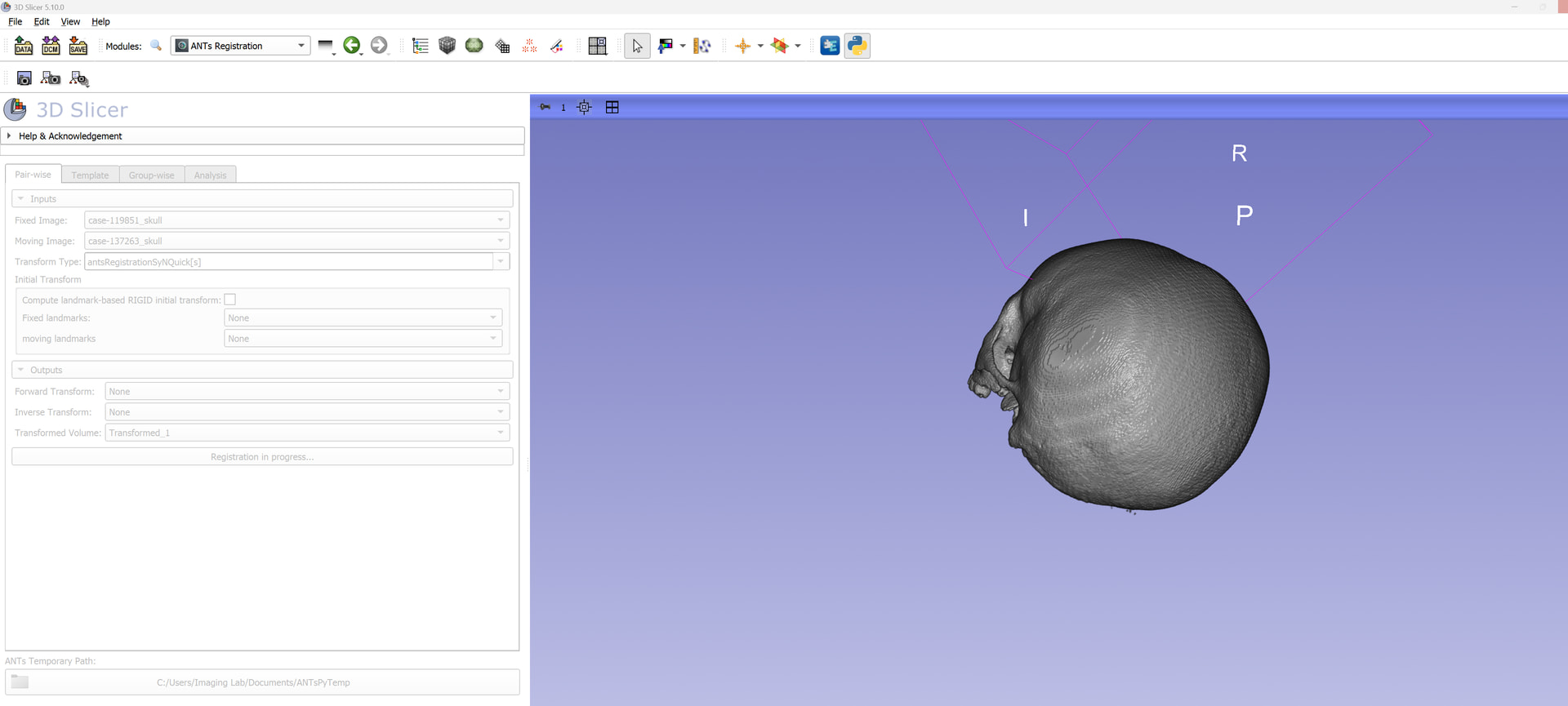
You can use ANTs registration to do that in Slicer. It is available through SlicerANTs and SlicerANTsPy extension (the former is only registration, the latter has more functionality but the parameters you can control for registration is not as comprehensive as the other).
In either case you want to use the SyNRegistrationQuick[s] for quick results and then just use SyN for final set of results (will take some time).
Yes, ANTs is a volumetric registration module. I assumed you segmented your skulls in Slicer. If you don’t have the original volumes, obviously this won’t work.
SyN option in the Brains Registration doesn’t work (it requires Brains to be built against ANTs, which is not done in Slicer build). You need to use the ANTsRegistration module.
If you are using ANTs extension, then you would choose QuickSyN, for quick results. Looks like ANTsPY extension has an issue blocking to be run in Slicer.
No, but ANTsPy can (it is in the groupwise registration tab).
Also, the issue turned out to be simple. ANTs and ANTsPy apparently can’t co-exist (at the moment). If you want to use ANTspy, uninstall the ANTs extension and things should work. Again you want to start with antsRegistrationSyNQuick[s] until you know things are working.
Thank you.
I am using ANTsPy. Pair-wise QuickRigid registration was much faster than antsRegistrationSyNQuick[s] which is yet to finish (>1 hour). Is this normal? I am assuming SyN is doing both Affine and Rigid registration, and full SyN parameters will take even longer.
Just to clarify - Would you recommend deforming the endocranial cavity volumes, or the skull volumes themselves?
Quick or Affine are not deformable registrations. Quick simply rotates and translates the object, affine does the same with scaling and shearing allowed. You need deformable registration to warp one object to the other, and that’s computationally expensive and long.
So, if you want to run things fast, down sample your fixed volume by 2 using crop volume (ants will automatically resample the moving one to match that). It will go faster. Or find a computer with lots of cores.
Initital Template: case-109181_skull.nrrd
Transform Type: antsRegistrationSyNQuick[s], iterations: 1 (I know >3 iterations would be ideal).
Select Input Images: The Group-Wise registered .nii.gz’s
Run Template Building and create new volume.
Would you add/change this workflow?
How do I go from the labelmap volume to segmentation to compute segment statistics/endocranial capacity/volume etc?
If you are going to use my suggested approach, which is find 3-4 age/sex matched normal skulls, and segment the endocranial space from them, and then deformably register them to your fractured one, then you don’t need to use the template workflow. Only the groupswise.
Settings would be
Fixed is the fractured skull
moving would be your intact skulls (3-4 of them)
Transform would be initially AntsRegistrationSyNQuick[s], and the output would all of them (transformed volume, forward and inverse transforms).
SyN is about 10 times slower than the SyNQuick (uses cross-correlation instead mutual informaiton) and definitely results better alignment, but your goal is to get results quick to see how things work out. So I would stick with SyNQuick until you know things works and you want the best outcome.
Great, I will try this.
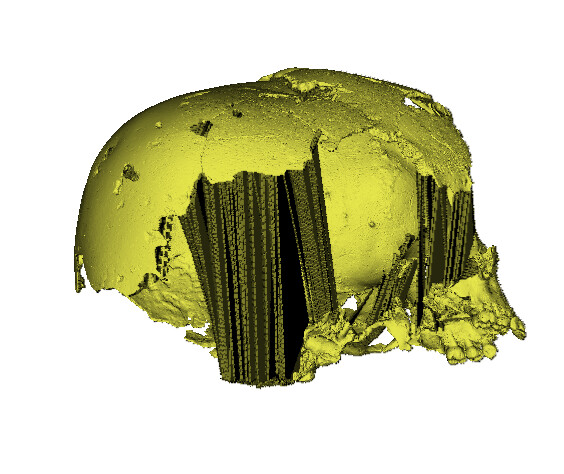
A potential issue, however, is that the fragmented skull is just an .obj surface mesh. Converting this to a segmentation → Export models and labelmaps → Export to new labelmap, creates anomalies and artefacts in the volume (bottom: surface mesh, top: labelmap volume in 3D rendering). This might be ok, but I will have to test it out.
How did you generate the obj? You don’t have the original scan? That’s what you will need for this to work. Even if you were to able to generate a decent labelmap by cleaning up, registration will not work, as it expects and intensity image.
ANTs is an intensity registration framework, so it does need intensity images. You can convert all your volumes labelmaps and do a labelmap registrations….
There might be deformable mesh registration frameworks that can do what I suggested on 3D models.