Hello all.
I’m trying to do MRI segmentation on a very thin and round structure (knee cartilage). I was wondering if there is any to create a surface on a set of polynomial curves like this:

Looking forward to hearing from you.
Mohammadreza
Hello all.
I’m trying to do MRI segmentation on a very thin and round structure (knee cartilage). I was wondering if there is any to create a surface on a set of polynomial curves like this:
Looking forward to hearing from you.
Mohammadreza
If you use a closed curve instead of an open curve, the Baffle planner module in the SlicerHeart extension can create a model out of it (not a segmentation).
Do you really need the curve representation? You might only need that if you are exporting to a CAD tool, and that’s a hard problem to do right.
You may be better off making a segmentation (binary labelmap) and reconstructing a surface from that. You should definitely supersample the segmentation so that the thinnest structures are several voxels thick. Then you can look at the wrapsolidify extension to get a smooth contour. Search for similar work people do with thin temporal bones.
Thanks a lot, this is a very thin structure on non-isotropic MRI. I had tried Wrap Solidify, but it was not successful. That’s why I ended up with this idea.
What is your overall goal and plan? How will you use the surface? I ask because lofting splines is a non-trivial operation whereas working with segmentations is well studies and you can make it work without developing new tools.
My application is kind of Finite Element Analysis (not exactly; cartilages contact force analyses during physical activities using musculoskeletal modeling: opensim-jam/opensim-jam-release/examples/walking/graphics/walking_contact.gif at master · clnsmith/opensim-jam · GitHub).
So I need the cartilage surfaces accurate, and smoothed. But what I have already doesn’t allow me to use the common workflows in any medical imaging segmentation software.
Thanks for your help.
Okay, cool, yes, that helps. I would definitely supersample the segmentation heavily. Like use the crop volume to get just the cartilage are and the supersample as much as your computer can manage (or get a bigger computer) and then you may be able to paint with threshold and use smoothing to get a faithful surface. (As an aside, joining curves manually draw slice-by-slice will always lead to bumpy surfaces so some kind of smoothing is needed here).
Thanks again. There were two main issues in this approach: first, thresholding doesn’t work well for these kinds of MRI as this is not the best type for cartilage segmentation; second, the cartilages in children are so thin and narrow, the Brush or Draw tools were a nightmare. Overall, this approach is so boring for 60 patients  . I’ve been thinking about doing sth like this: https://superhivemarket.com/products/curves-to-mesh
Yes, that’s a classic CAD approach. There’s some support for doing things like that in Slicer extensions (surface markups) but I haven’t used them myself. Maybe someone else can chime in. If you are willing / able to do some coding I’m sure it’s doable with vtk or some python packages.
I recall seeing NURBS surfaces in SurfaceMarkup extension.
Before I can chime in I’d like to understand. What you want to segment is this structure?
On how many slices does it appear in the MRI?
I really have a hard time imagining how NURBS would be useful to represent this thin structure.
Also, the problem with the NURBS in SurfaceMarkups is that
Thanks all;
What you want to segment is this structure?
Yes, exactly, but the surface would be enough for me, so I don’t have to have a volume. This is a non-isotropic MRI, I already have it in 31 slices.
I had some progress with curves and `vtkRuledSurfaceFilter`. This is not good yet, but the approach looks promising. Any idea?
Thanks for your help.
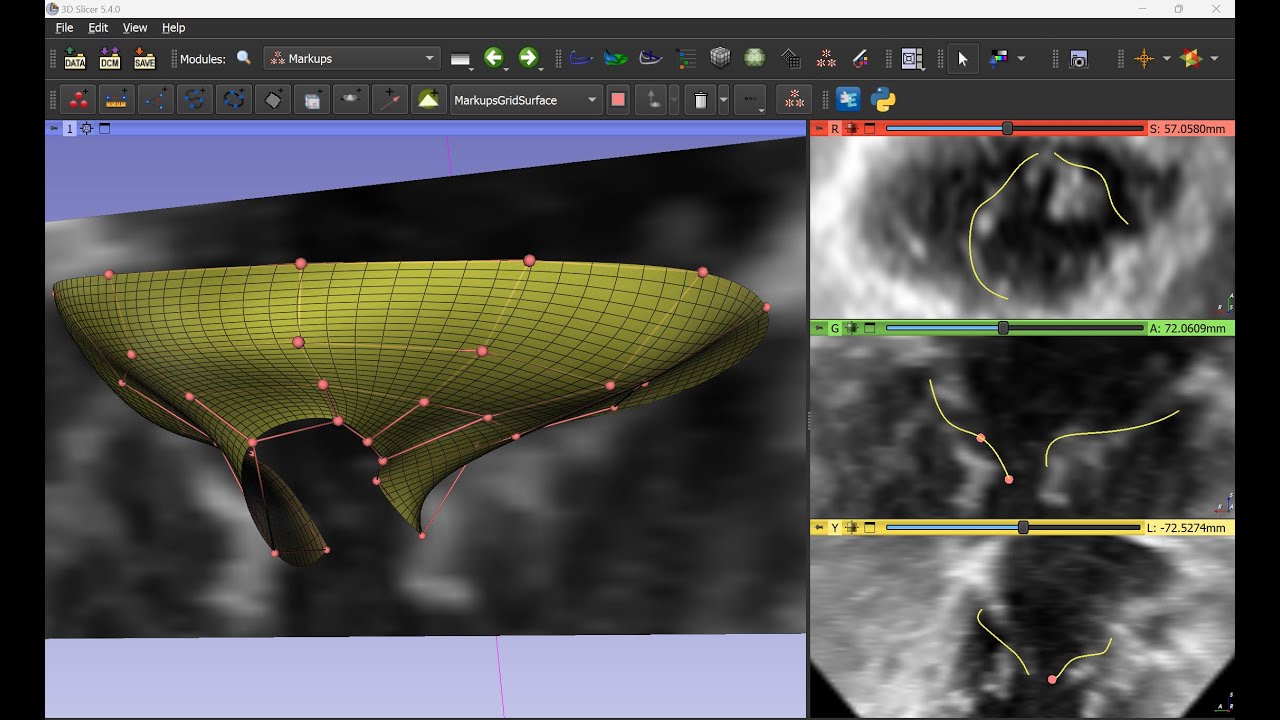
If you only want surface, then the SurfaceMarkup could be a way to go after all. What I could imagine is:
Something like this:
gridPoints = vtk.vtkPoints()
gridPoints.SetNumberOfPoints(numCurves * numPointsInCurve)
for u in range(numCurves):
  curveNode = pass  # Need to implement
  for v in range(numPointsInCurve):
    point = np.zeros(3)
    curveNode.GetNthControlPointPosition(v, point)
    gridPoints.SetPoint(u * numPointsInCurve + v, point[0], point[1], point[2])

nurbsSurfaceNode = slicer.mrmlScene.AddNewNodeByClass('vtkMRMLMarkupsGridSurfaceNode')
nurbsSurfaceNode.SetGridResolution(numCurves, numPointsInCurve)
nurbsSurfaceNode.SetControlPointPositionsWorld(gridPoints)
nurbsSurfaceNode.CreateDefaultDisplayNodes()
Thanks a lot, I will try that. If I understood correctly, it fits a plane to the control points; Cool! Does it also handle the boundaries?
It seems twisted. Be very careful about the order and spacing of the control points of each curve so that they align in a more or less grid-like way.
I thought this was an interesting use-case so I’ve been playing along at home.
Here is a way to turn curves into a Surface Mesh (vtkPolyData), with controllable subdivisions.
This isn’t as nice as a NURBS surface because it doesn’t subdivide between curves, but may be useful if distance between curves is much less than distance between control points.
This code will sort the curve order based on where the control points lie on the inferior / superior axis. This way you can draw curves out of order and they get sorted during meshing.
This illustrates the importance of having the same number of control points per-curve, and doing your best to keep them relatively spaced the same proportions between curves. This way the alignment of control points perpendicular to the curve are well aligned. My example here could be improved for better flow lines (in yellow).
Its also critical to draw your curves the same direction each time (left-to-right or right-to-left)
example code:
import vtk
import slicer

def create_sorted_lofted_surface():
    # 1. Get all curve nodes
    allCurveNodes = slicer.util.getNodesByClass("vtkMRMLMarkupsCurveNode")
    if len(allCurveNodes) < 2:
        print("Need at least 2 curves to create a surface.")
        return

    # 2. Sort curves by their average 'S' (Superior/Inferior) coordinate
    # We calculate the mean S-value of all control points in the curve
    def get_average_s(node):
        s_values = []
        for i in range(node.GetNumberOfControlPoints()):
            p = [0, 0, 0]
            node.GetNthControlPointPositionWorld(i, p)
            s_values.append(p[2]) # RAS: R=0, A=1, S=2
        return sum(s_values) / len(s_values) if s_values else 0

    # Apply the sort
    curveNodes = sorted(allCurveNodes, key=get_average_s)

    numCurves = len(curveNodes)
    numPointsPerCurve = 50
    points = vtk.vtkPoints()

    # 3. Extract and Resample Points
    for node in curveNodes:
        curvePoly = node.GetCurveWorld()
        if not curvePoly or curvePoly.GetNumberOfPoints() < 2:
            continue

        resampler = vtk.vtkSplineFilter()
        resampler.SetInputData(curvePoly)
        resampler.SetSubdivideToSpecified()
        resampler.SetNumberOfSubdivisions(numPointsPerCurve - 1)
        resampler.Update()

        resampledPoly = resampler.GetOutput()

        for i in range(numPointsPerCurve):
            points.InsertNextPoint(resampledPoly.GetPoint(i))

    # 4. Create Mesh Topology (Triangles)
    cellArray = vtk.vtkCellArray()
    for i in range(numCurves - 1):
        for j in range(numPointsPerCurve - 1):
            p1 = i * numPointsPerCurve + j
            p2 = p1 + 1
            p3 = (i + 1) * numPointsPerCurve + j
            p4 = p3 + 1

            tri1 = vtk.vtkTriangle()
            tri1.GetPointIds().SetId(0, p1)
            tri1.GetPointIds().SetId(1, p2)
            tri1.GetPointIds().SetId(2, p3)

            tri2 = vtk.vtkTriangle()
            tri2.GetPointIds().SetId(0, p2)
            tri2.GetPointIds().SetId(1, p4)
            tri2.GetPointIds().SetId(2, p3)

            cellArray.InsertNextCell(tri1)
            cellArray.InsertNextCell(tri2)

    # 5. Finalize Model
    outputPolyData = vtk.vtkPolyData()
    outputPolyData.SetPoints(points)
    outputPolyData.SetPolys(cellArray)

    normals = vtk.vtkPolyDataNormals()
    normals.SetInputData(outputPolyData)
    normals.ConsistencyOn()
    normals.SplittingOff()
    normals.Update()

    modelName = "Lofted_S_Sorted_Surface"
    modelNode = slicer.util.getFirstNodeByName(modelName)
    if not modelNode:
        modelNode = slicer.mrmlScene.AddNewNodeByClass("vtkMRMLModelNode", modelName)

    modelNode.SetAndObservePolyData(normals.GetOutput())
    modelNode.CreateDefaultDisplayNodes()
    modelNode.GetDisplayNode().SetBackfaceCulling(False)
    modelNode.GetDisplayNode().SetColor(0.8, 0.2, 0.2) # Reddish

    print(f"Lofted {numCurves} curves sorted by Superior coordinate.")

create_sorted_lofted_surface()
Thanks a lot for the code. I had to sort the curves from right/left, and it worked.
s_values.append(p[0]) # RAS: R=0, A=1, S=2
Now, I need to take care of the points density on the curves, and the boundaries.
Thanks again.
Just a quick comment. You can also resample along individual curves easily, so that could be a way to address having different numbers of control points on different curves: You just resample along the curve to have a specified matching number of control points (keeping the endpoints the same). This would also handle having the points matching fractions of the way along the curve.


