Operating system: Windows 11
Slicer version: 5.9.0-2025-10-23
Expected behavior: Scroll through a stack of DICOM images in the plane acquired.
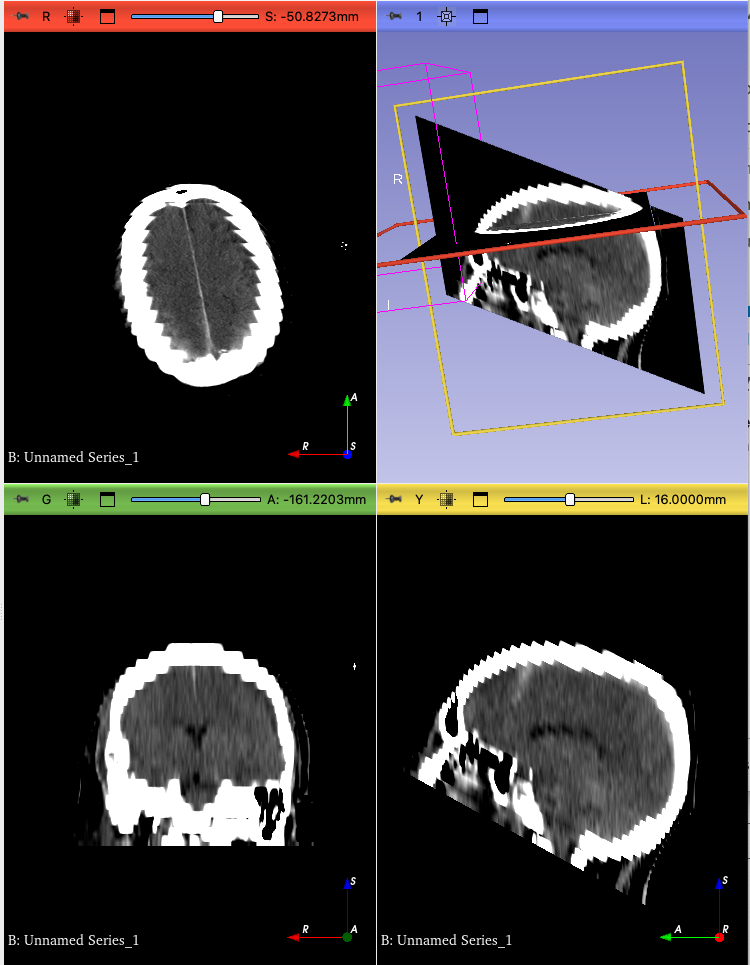
Actual behavior: Plane is listed as ‘Reformat’, scroll tool doesn’t work, and if I drag the slider on the red image, it shows only half the volume, with volume averaging between slices.
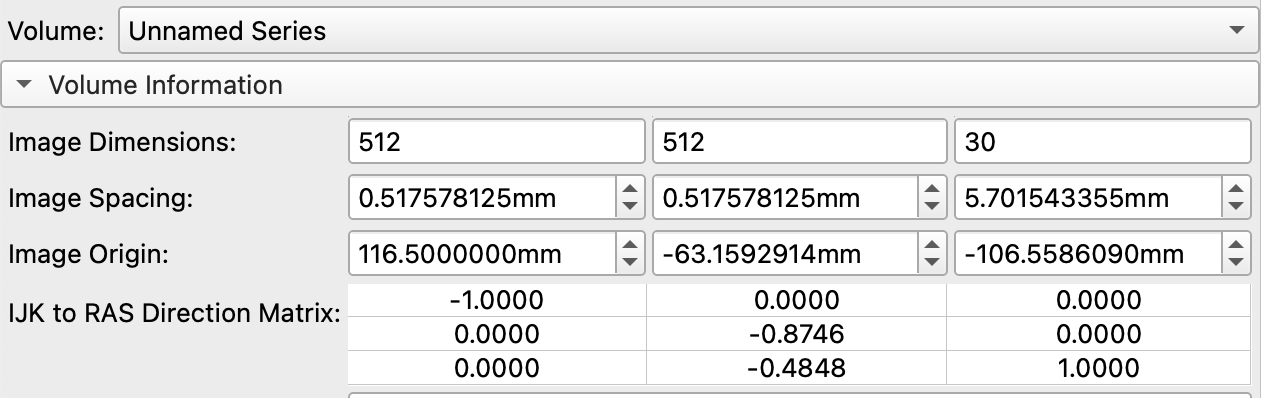
I suspect there is some irregularity with the DICOM metadata that Slicer is not handling well, such as the patient position being negative and not evenly spaced. The data are highly anonymized, taken from the RSNA Intracranial Hemorrhage Detection Challenge (2019) dataset. Other DICOM viewers deal with it fine.
It seems that the acquisition normalization does not compensate for cases when the IJK to RAS matrix is linear but non-orthogonal. As a result, a slice view may be set up with non-orthogonal axes, resulting in distorted appearance:
@pieper could you have a look at the acquisition normalization code if this behavior is expected? It would be better if the IJKToRAS matrix in the volume would be always orthogonal because at many places this may be assumed. The acquisition transform could contain the skewing operation.
I agree, we should modify vtkMRMLSliceNode::RotateToAxes to always enforce the slice view axes to be orthogonal. However, we should still reduce the probability of having sheared images (images with non-orthogonal axes) in the scene, because orthogonal axes may be assumed in many other places (e.g., fit to volume feature seem to be misbehaving, too; and of course many extensions may not work well on sheared images either).
While non-orthogonal axes can come from various sources, a DICOM import is a very common one. It would be valuable if a DICOM import would never produce sheared images. Having an orthogonal image under a warping transform would work better, because this case is explicitly handled at many places. Since we already have acquisition geometry regularization during DICOM import to take care of some warping transforms, we could modify it to also include the shearing component of linear transforms.
Yes, the acquisition transform would be able to compensate if we enforced orthogonality of the directions. I know we’ve talked about this before and researched it and my recollection was that ITK enforces orthogonal directions in some cases - maybe just for nifti?
As a reminder, the way the acquisition transform works is that it uses the vtkITK reader code, which internally uses DCMTK or GDCM, to get the vtkImageData and the IJKToRAS transform. Then it looks at the corners of each slice and creates the oriented grid transform to put them where the ImagePositionPatient and ImageOrientationPatient says they should go.
For this data, because the IJKToRAS directions include the shear, the corners are basically in the right places and the acquisition transform is nearly identity.
I’m thinking what we should do at the ScalarVolumePlugin level is to load the original volume, the transform, and a resampled version of the volume into the scene. The resampled one can have orthogonal directions. Most times that resampled version is what people will want. According to that recent study Avisio probably is doing this behind the scenes automatically.
ITK in general does not generally enforce orthogonal image axis when reading/writing, but its NIFTI reader/writer imposes orthogonality constraints. So, if we want orthogonal axes when reading DICOM then Slicer needs do it.
Currently, the user can choose between skipping regularization, apply a transform, or harden a transform (and the choice is stored persistently in application settings / DICOM). Setting the default to “harden” would be the behavior that most users would expect. I don’t think we need to load two versions of the same volume, as it could be confusing; but if you think it could be useful then it could be fourth option.
Part of the problem is that we aren’t allowing the plugins to expose any GUI so that users can pick how they want to interpret the data on a per-loadable basis, they only get to pick which plugin to use. Having the option in the application settings is suboptimal because it’s not available or discoverable when the data is being loaded.
In ambiguous cases it could make sense for the examine step to return data that the could inform a GUI layer of specific options and then a GUI could be created to select options to send back to the load step. That way it would also be possible script the examine/load preferences when batch processing data. It would be pretty easy to add a button next to the checkbox to raise a plugin-specific dialog if it’s available. This could be simpler for things like sequences too so that instead of showing a bunch of loadables you would have one sequence loadable with a dialog to pick the dimension index.