3D Slicer can now independently render each component of multi-component volumes (such as 3D color Doppler ultrasound or multispectral microscopy images) in 3D views. A new json-based file format is introduced to store the volume rendering settings.
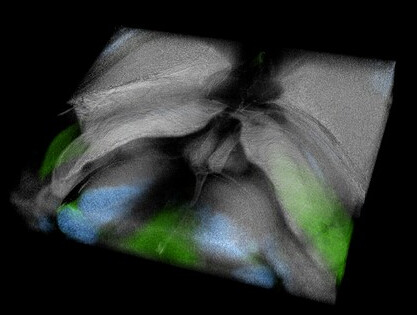
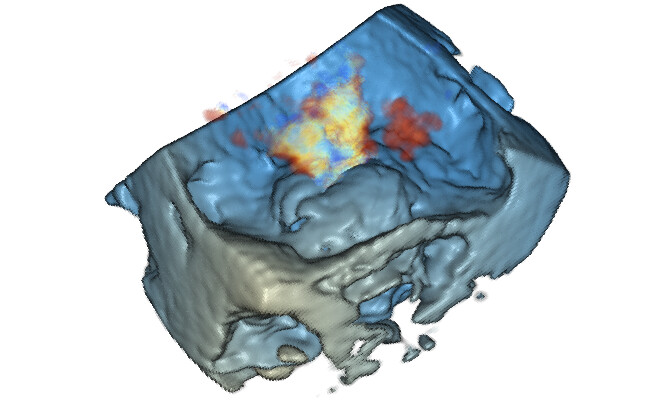
Development was funded in part by a Children’s Hospital of Philadelphia (CHOP) Cardiac Center Innovation Grant, a CHOP Cardiac Center Research Grant, a CHOP Frontier Grant, NIH R01 HL153166 and T32GM008562.
For users:
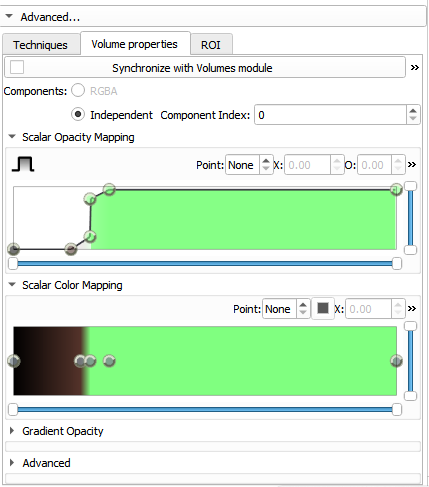
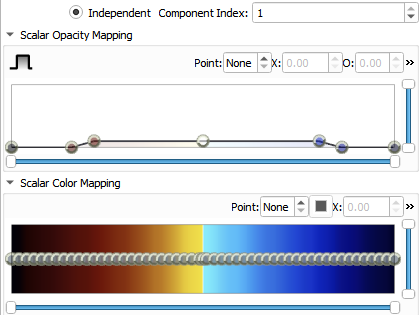
The Volume Rendering module now supports editing of multi-component volume rendering transfer functions.
To access this interface:
- Open the “Advanced” tab in the volume rendering module
- Select “Independent” components
- Changing the “Component Index” allows the transfer function for each component to be modified with the transfer function plot.
For developers:
- Multi-Component Transfer Functions: The
vtkMRMLVolumePropertyNodenow fully supports editing and managing transfer functions for volumes with multiple scalar components - New JSON Storage Format: The new
vtkMRMLVolumePropertyJSONStorageNodeclass enables reading and writing full volume property configurations to JSON files, including:- Transfer functions for each component
- Lighting parameters
- Clipped voxel intensity settings
Independent component rendering can be enabled from python using vtkMRMLVolumeRenderingDisplayNode and vtkMRMLVolumePropertyNode:
volumeNode = slicer.util.getNode('VolumeNode')
displayNode = slicer.modules.volumerendering.logic().CreateDefaultVolumeRenderingNodes(volumeNode)
volumePropertyNode = displayNode.GetVolumePropertyNode()
numberOfComponents = volumeNode.GetImageData().GetNumberOfScalarComponents()
volumePropertyNode.SetNumberOfIndependentComponents(numberOfComponents)
volumeProperty = volumePropertyNode.GetVolumeProperty()

# Enable independent components mode (vs RGB color mode)
# For volumes with 3-4 components, you can choose between:
# - IndependentComponents = False (RGB/RGBA color mode)
# - IndependentComponents = True (independent transfer functions per component)
volumeProperty.SetIndependentComponents(True)

# Configure transfer functions for each component
for component in range(numberOfComponents):
    # Get the color transfer function for this component
    colorTransfer = volumeProperty.GetRGBTransferFunction(component)
    colorTransfer.RemoveAllPoints()
    colorTransfer.AddRGBPoint(0, 0.0, 0.0, 0.0)
    colorTransfer.AddRGBPoint(255, 1.0, 1.0, 1.0)

# Get the opacity transfer function for this component
opacityTransfer = volumeProperty.GetScalarOpacity(component)
opacityTransfer.RemoveAllPoints()
opacityTransfer.AddPoint(0, 0.0)
opacityTransfer.AddPoint(128, 0.5)
opacityTransfer.AddPoint(255, 1.0)

# Configure component-specific shading
volumeProperty.SetShade(component, 1)
volumeProperty.SetAmbient(component, 0.2)
volumeProperty.SetDiffuse(component, 0.7)
volumeProperty.SetSpecular(component, 0.3)
volumeProperty.SetSpecularPower(component, 10.0)
displayNode.SetVisibility(True)
Format of .vp.json (volume property JSON)
Since Slicer version 5.9, volume rendering properties are stored in JSON format by default, with the file extension .vp.json. This format is self-describing and easier to interpret than the legacy text file format. Details are specified by this JSON schema: https://raw.githubusercontent.com/slicer/slicer/main/Modules/Loadable/VolumeRendering/Resources/Schema/volume-property-schema-v1.0.0.json
Example .vp.json file:
{
    "@schema": https://raw.githubusercontent.com/slicer/slicer/main/Modules/Loadable/VolumeRendering/Resources/Schema/volume-property-schema-v1.0.0.json#,
    "volumeProperties": [
        {
            "effectiveRange": [0.0, 220.0],
            "components": [
                {
                    "shade": true,
                    "lighting": {
                        "diffuse": 1.0,
                        "ambient": 0.2,
                        "specular": 0.0,
                        "specularPower": 1.0
                    },
                    "rgbTransferFunction": {
                        "type": "colorTransferFunction",
                        "points": [
                            { "x": 0.0, "color": [0.0, 0.0, 0.0] },
                            { "x": 20.0, "color": [0.168627, 0.0, 0.0] },
                            { "x": 40.0, "color": [0.403922, 0.145098, 0.0784314] },
                            { "x": 40.0, "color": [0.403922, 0.145098, 0.0784314] },
                            { "x": 120.0, "color": [0.780392, 0.607843, 0.380392] },
                            { "x": 220.0, "color": [0.847059, 0.835294, 0.788235] },
                            { "x": 1024.0, "color": [1.0, 1.0, 1.0] }
                        ]
                    },
                    "scalarOpacityUnitDistance": 1.0,
                    "scalarOpacity": {
                        "type": "piecewiseLinearFunction",
                        "points": [
                            { "x": 0.0, "y": 0.0 },
                            { "x": 120.0, "y": 0.3 },
                            { "x": 220.0, "y": 0.375 },
                            { "x": 1024.0, "y": 0.5 }
                        ]
                    },
                    "gradientOpacity": {
                        "type": "piecewiseLinearFunction",
                        "points": [
                            { "x": 0.0, "y": 1.0 },
                            { "x": 255.0, "y": 1.0 }
                        ]
                    }
                }
            ]
        }
    ]
}
